A dopamine menu (sometimes spelled dopamenu) is a pre-made list of healthy, feel-good activities, written while you’re calm and organized like a restaurant menu, so that when boredom or a craving hits you choose from the menu instead of reaching for your phone by default. It sorts activities into courses — starters, mains, sides, desserts, and specials — by how long they take and how stimulating they are. The point isn’t willpower or restriction. It’s making the good choice the easy choice by deciding in advance, before the urge arrives, so your restless brain has somewhere to go that isn’t an infinite feed.

What is a dopamine menu, and why call it a “menu”?
The term jumped from ADHD corners of TikTok to mainstream self-help between 2024 and 2026, but the idea is old: give yourself better options than the phone. The “menu” framing is what makes it stick — a restaurant menu is organized, it’s right there, and it decides for you. You just point. A dopamine menu does that for your free time.
Dopamine isn’t the villain here. It’s the brain’s motivation chemical — the thing that makes you want to do things. Social apps are engineered to hijack that system with unpredictable rewards, which is why the feed feels so magnetic (more on that in dopamine and social media). A dopamine menu doesn’t eliminate dopamine; it redirects the seeking toward activities that leave you feeling better afterward instead of hollow.
Why does a dopamine menu work when willpower doesn’t?
Because the failure point isn’t the phone — it’s the decision. Bored, tired, or anxious at 9 p.m., you don’t rationally choose to scroll for ninety minutes. You do the nearest, easiest thing — and the phone wins because it requires zero decisions.
A dopamine menu attacks that exact weak spot with two well-studied principles:
- Replacement beats restriction. “Don’t scroll” leaves a vacuum, and your brain fills a vacuum with the most available option. “Do one of these ten things instead” gives the craving somewhere to go. You’re not fighting the urge; you’re rerouting it.
- Decide in the calm, not in the craving. You write the menu in a “cold” state — clear-headed, not craving anything — and then just follow it in the “hot” state when your judgment is worst. That’s the same cold-state logic behind commitment devices: let your rational self set the rules that your impulsive self will follow later.
This is also why a menu outperforms a vague resolution. “I’ll read more” is a wish. A starter that says “read one chapter of the book on the nightstand” is a decision that’s already made — all your future self has to do is obey.
The five courses of a dopamine menu
The magic is in the structure. Sorting by time and intensity means there’s always something that fits the exact size of your gap, whether you have three minutes or a free afternoon.
| Course | What it is | Time | Examples |
|---|---|---|---|
| Starters | Quick pick-me-ups for a small break | 2-5 min | Stretch, step outside, text a friend, splash cold water, water a plant |
| Mains | Absorbing activities that genuinely satisfy | 30+ min | Go for a walk, cook, play an instrument, workout, a real hobby project |
| Sides | Pairable add-ons that make a main better | Any | Music, a podcast, a good coffee or tea, a candle |
| Desserts | Fun but easy to overdo, so you cap them | Limited | One episode, one game round, a set number of YouTube videos |
| Specials | Rare, high-effort treats you look forward to | Occasional | A concert, a day trip, dinner out, a spa night |
The desserts row is the honest part. A dopamine menu doesn’t pretend scrolling or gaming is evil — it just moves them out of the “default, unlimited” slot into a portion-controlled one. You still get dessert; you just don’t eat it every meal. Stuck filling the mains and starters? Our list of things to do instead of scrolling is a good raid target.
“I kept telling myself to ‘be more present’ and it never worked. What changed was writing five starters on a sticky note on my monitor. Now when I hit a wall at work, my hand still moves — but it grabs the note, not the phone. Two minutes stretching or refilling my water, and I’m back. It sounds too simple to matter. It mattered.” — Priya, product designer, 31
How do you build your dopamine menu in 20 minutes?
You don’t need an app or a fancy template to start. A sticky note works. Here’s the fastest path:
- Brain-dump for five minutes. List everything that reliably makes you feel good afterward — not just in the moment. Include tiny things and big things. Don’t filter yet.
- Sort by time. Tag each item: under 5 minutes, 30-plus minutes, or “pairs with something else.” This nearly sorts your courses for you.
- Sort by intensity. Move the low-effort, high-reward items you could overdo (screens, sweets, games) into desserts and give each a real limit, like “one episode.”
- Add three specials. Pick a few genuinely exciting things to anticipate. Anticipation itself is a healthy dopamine source, and it gives the menu something aspirational.
- Put it where you’ll see it. A note on the fridge, a widget, a card by your bed. A menu in a drawer is a menu you’ll never order from — visibility is the whole game.
- Edit it for a week. Cross off items that didn’t actually help and add ones that did. The first draft is a hypothesis; the second draft is where it starts working.
Is the dopamine menu just an ADHD thing?
It was popularized by ADHD creators, and there’s a good reason it resonates there: ADHD brains often struggle most with task initiation and with under-stimulation, and a menu removes the hardest step — deciding — before restlessness hits. It turns a vague “I should do something” into a concrete, visible pick.
But it helps almost anyone who reaches for the phone out of boredom. To be honest about what it is: a dopamine menu is a helpful scaffold, not a treatment. It won’t fix ADHD and isn’t a substitute for medication, therapy, or professional support. It also isn’t a “dopamine detox” — despite the name, you’re not draining dopamine or resetting receptors; what the science actually says about dopamine detoxing is worth a read. The menu’s real job is quieter: make the good option the visible, immediate, low-effort one.
How does Unscrol help you use a dopamine menu?
A dopamine menu only works if the phone isn’t easier than everything on it. The free, DIY route is the best starting point: build your menu on paper, and use Apple’s own Screen Time to add Downtime or App Limits on your worst apps during the hours you want to “order” from your menu instead. That alone changes the math.
Unscrol is the iPhone app that adds consistency and structure on top of that, using the same Apple Screen Time frameworks — real, system-enforced shields, all processed on-device so your block lists and usage never touch our servers.
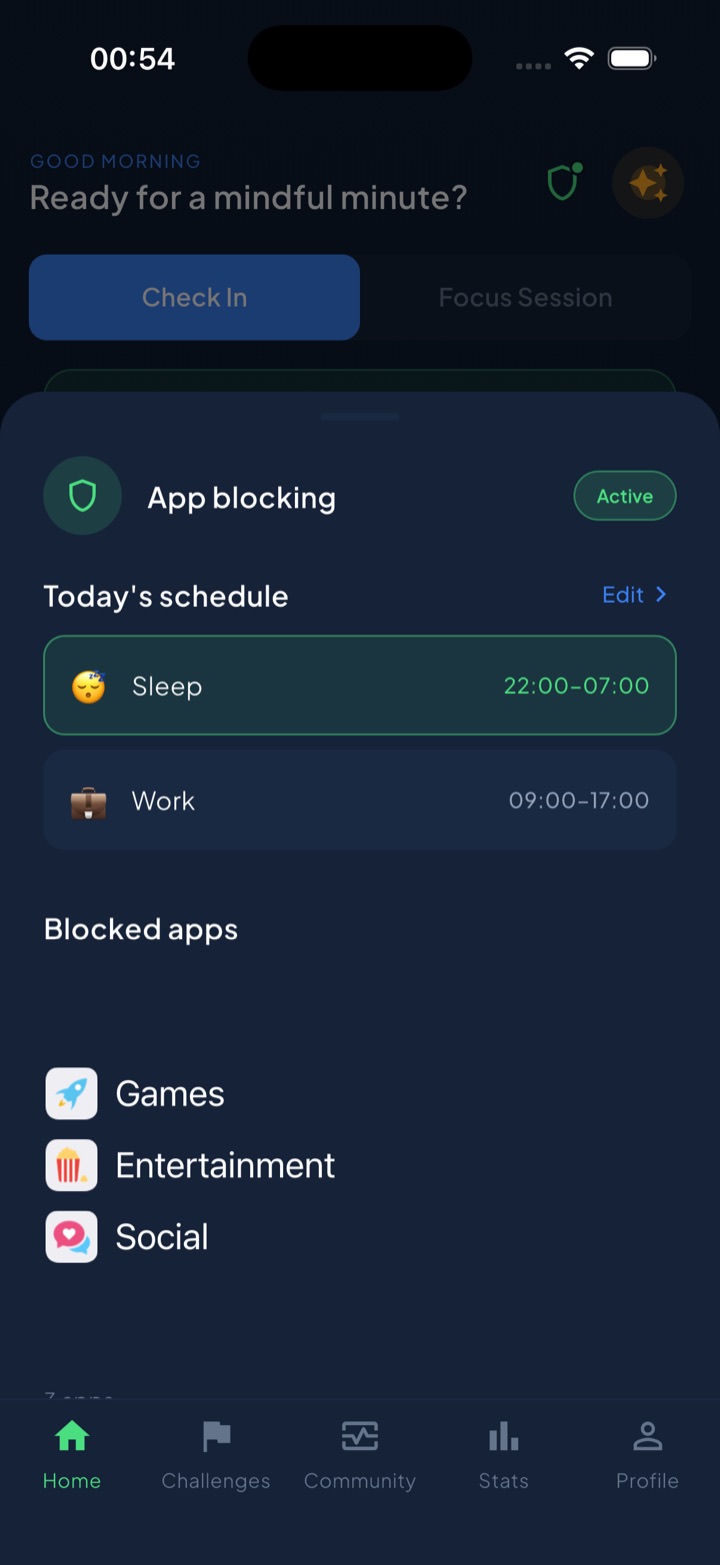
Here’s how it turns the menu from a nice idea into the path of least resistance:
- Block the default option. Schedule shields on your feeds during evening or study hours (a Sleep block at 22:00, a Work block 09:00-17:00), so scrolling stops being the easy answer and your menu becomes the obvious one. There’s even a short “take a break” bypass for the genuine exception — a deliberate middle ground, not a wall.
- Challenges as ready-made menu items. With 45+ built-in challenges, you have a stocked “mains” section to raid when you’re staring at a blank menu.
- Check-ins to notice what you actually needed. A quick mood or urge check-in helps you spot whether you’re craving rest or stimulation — so you order the right course instead of defaulting to dessert. Do a check-in or finish a challenge and your daily streak counts, which keeps the habit visible.
The honest version: you can do all of this with paper and Apple’s built-in tools. Unscrol just makes it stick — scheduling the blocks, stocking the menu, and turning “I should” into a streak you don’t want to break.
Frequently asked questions
What is a dopamine menu?
A dopamine menu is a pre-made list of healthy, feel-good activities you write while calm, organized like a restaurant menu. Items are sorted into courses — starters, mains, sides, desserts, and specials — by how long they take and how stimulating they are. The goal is to decide in advance what you'll do when you're bored or restless, so that in the craving moment you pick a rewarding activity from the list instead of defaulting to endless scrolling. It's a planning tool, not a diet.
How do you make a dopamine menu?
Brainstorm activities that genuinely make you feel good, then sort them by time and intensity. Put quick 2-5 minute pick-me-ups under starters, absorbing 30-minute-plus activities under mains, pairable add-ons like music under sides, fun-but-limited treats like one episode under desserts, and rare experiences under specials. Write it somewhere you'll actually see it — a note, a whiteboard, your fridge. The whole thing takes about 20 minutes and works best when you keep editing it over the first week.
Does a dopamine menu actually work for ADHD?
The dopamine menu was popularized by ADHD creators, and many people with ADHD find it a useful scaffold because it removes the hard part — deciding what to do — before the moment of restlessness hits. It is not a treatment for ADHD and does not replace professional care, medication, or therapy. Think of it as an accessibility tool for your future self: a low-effort way to make good options visible and immediate when your brain is craving stimulation and reaching for the phone.