Most app blockers fail people with ADHD within two or three weeks — not because you lack discipline, but because they’re designed for brains that only need a gentle reminder. A generic blocker relies on novelty that wears off, prompts you learn to tap through, and your memory to switch it on — three things ADHD specifically taxes. What actually holds is friction design: blocks that are hard to undo in the impulsive moment, scheduled windows that start themselves, visible streaks that make progress feel immediate, and body-double accountability so someone (or something) notices. This article is about tooling, not treatment — an app blocker is an executive-function support, and nothing here replaces a clinician’s care.

Why do generic app blockers fail ADHD brains?
Because they’re built around a polite pause, and ADHD eats polite pauses for breakfast. Three collision points come up again and again:
- Novelty-seeking works against the blocker itself. A new blocker is stimulating for about a week — new app, new settings, new graphs. Then it becomes furniture. The “take a deep breath” screen that felt meaningful on day one is wallpaper by day ten, and ADHD brains habituate to static prompts unusually fast. Worse, an under-stimulated brain treats the block screen as just one more obstacle between it and stimulation — and obstacles are interesting.
- Creative bypassing is an ADHD superpower pointed the wrong way. The same brain that can hyperfocus on a puzzle for three hours will absolutely hyperfocus on defeating its own blocker: delete and reinstall, extend the limit “just once,” toggle the setting off, open the site in a browser instead. If a bypass exists, an ADHD brain in a craving state will find it — we’ve written a whole piece on why you keep bypassing your app blocker, and every loophole in it applies double here.
- Out of sight, out of mind cuts both ways. This is the underrated one. When a block genuinely holds, it’s magic for ADHD: an app you can’t open quickly stops existing in your mind. But the same trait breaks tools that need activating — you forget to start the focus session, forget the blocker is installed, forget why you installed it. Any tool that relies on you remembering to turn it on will lose to ADHD working memory.
None of this is a character flaw. It’s a predictable mismatch between how most blockers are designed and how ADHD attention actually behaves.
Isn’t this just a willpower problem?
No — and framing it that way is why so many people with ADHD cycle through blockers feeling worse each time. ADHD involves real differences in impulse control (the gap between urge and tap is narrower), time blindness (an hour on a feed doesn’t register as an hour), and task initiation (starting the boring thing is disproportionately hard). We cover the underlying wiring in ADHD and phone addiction; the short version is that in-the-moment self-control is the weakest system you could possibly bet on.
Friction design bets on the environment instead. The principle: move every decision out of the craving moment — into a calm moment, a schedule, or a system — so the impulsive tap meets structure instead of a feed. You don’t need more willpower. You need fewer moments where willpower is the only thing on duty.
What friction design actually works for ADHD?
When you compare blockers (our best app blockers for iPhone roundup ranks the field), judge them against ADHD wiring specifically:
| Friction feature | Why it fits ADHD wiring | What to look for |
|---|---|---|
| Hard-to-undo blocks | The urge is intense but short; if quitting the block takes several deliberate steps, the urge usually dies before the block does | System-level enforcement, no one-tap “ignore,” survives delete-and-reinstall |
| Scheduled windows | Removes remembering and initiation — the block starts itself, every day, whether you think of it or not | Recurring routines (sleep, work, study) that activate automatically |
| Visible streaks | ADHD motivation responds to immediate, visible reward far better than to distant goals | A streak counter on a widget you see without opening the app |
| Body-double accountability | External presence regulates ADHD attention remarkably well — the “someone can see me” effect | Leaderboards, shared challenges, or a friend running the same blocks |
| A small, honest bypass | All-or-nothing walls trigger rage-quits; a real emergency shouldn’t require deleting the whole system | A short, deliberate “take a break” that’s inconvenient but available |
The last row matters more than it looks. A blocker with zero escape hatch feels safe until the day you genuinely need an app — and then the whole system gets torn out in frustration. A deliberate, slightly annoying bypass keeps the wall standing by giving the exception a door.
How do you set up ADHD phone blocking that survives week three?
- Block two apps, not ten. Ambition kills setups. Pick the one or two apps that eat the most hours — for most people that’s one short-video feed — and leave the rest alone for now.
- Choose schedules over daily limits. A limit asks you to track a running total (invisible bookkeeping your working memory will drop) and is negotiable when the craving hits. A window is binary: during work hours or after 22:00, the app simply isn’t there. Nothing to monitor, nothing to negotiate.
- Make undoing the block slow, not impossible. You want ten-plus seconds of deliberate steps between impulse and feed — enough for the urge to peak and pass — without a wall so absolute you’ll demolish it.
- Put the streak where your eyes already go. A widget on the home or lock screen turns progress into ambient feedback. If the reward lives inside an app you have to open, it doesn’t exist.
- Add a body double. Work alongside someone in person or virtually — body doubling is one of the best-fitting focus tools for ADHD — or use a leaderboard so your blocks have witnesses.
- Plan for the novelty dip. Somewhere in week two or three, the system will feel stale. That’s expected, not failure. Change one small thing — the schedule, the challenge, the widget — to re-novelty the setup instead of abandoning it.
“I’d tried four blockers and ‘won’ against all of them — I once changed my phone’s time zone to end a limit early, which is honestly impressive and pathetic at once. What finally held was boring: a schedule that blocks Reels from 9 to 6 without asking me, and a streak widget my brain treats like a game. I stopped fighting the blocker because there was nothing to fight — it just happens.” — Marcus, front-end developer, 29, diagnosed at 26
How does Unscrol help ADHD brains make blocks stick?
Start with the free route, honestly: Apple’s built-in Screen Time gives you Downtime and App Limits, grayscale mode lowers the feed’s pull, and charging your phone in another room is still the strongest blocker ever invented. If those hold for you, you’re done — and your wallet stays closed.
The catch is that everything above depends on the exact skills ADHD taxes: remembering to enable it, resisting the one-tap “Ignore Limit,” and re-arming the system after every bypass. Unscrol (iPhone, iOS 16+) is built as the layer that removes those failure points, using Apple’s own Screen Time frameworks for real, system-enforced blocks — processed entirely on-device, so your block lists and usage never touch our servers.
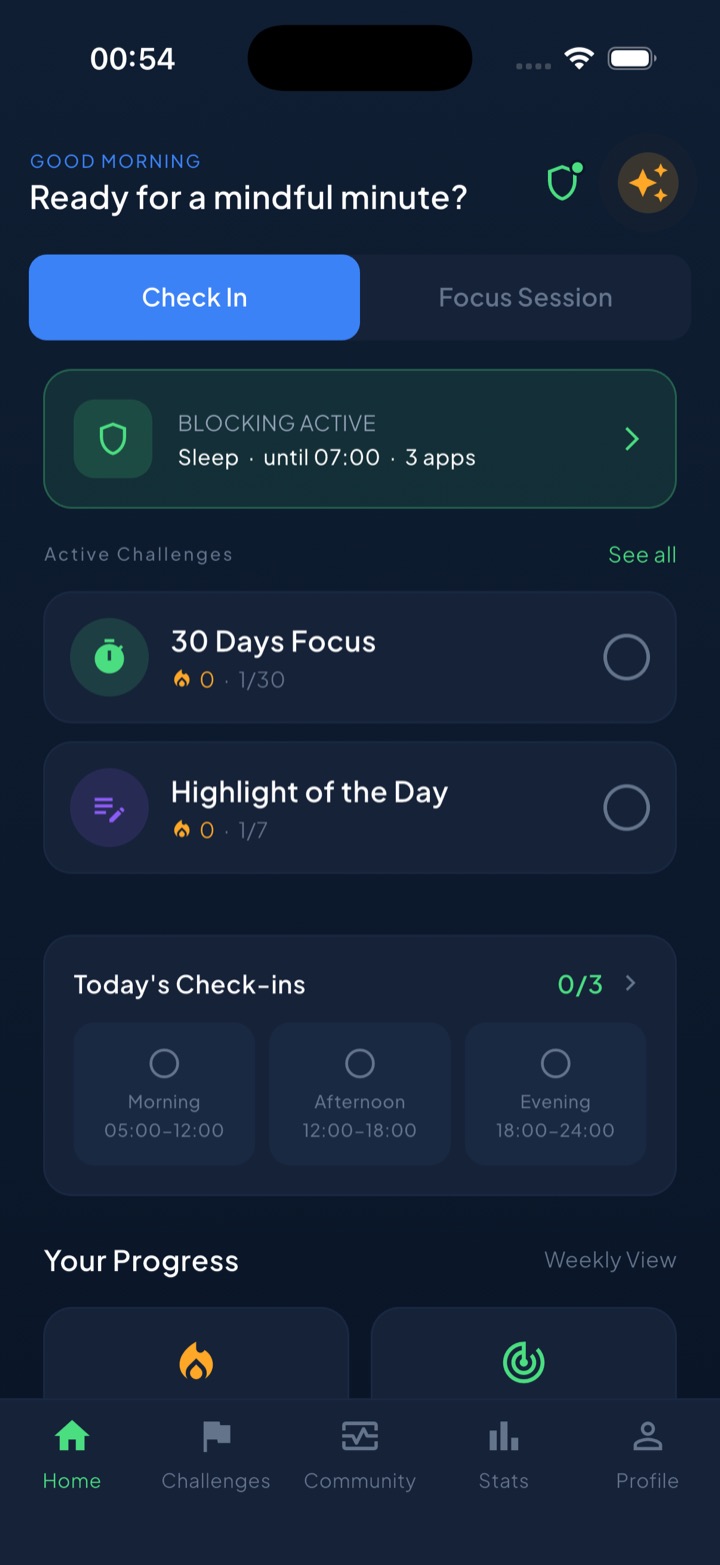
Mapped to the friction features above: scheduled block routines (Sleep, Work, School, or your own windows) start themselves daily, so nothing depends on your memory; the shields are hard to undo on impulse but include a short, deliberate “take a break” bypass for genuine exceptions — a door, not a loophole; a unified daily streak with home and lock-screen widgets keeps the reward visible without opening anything; and 45+ challenges plus a leaderboard add the body-double effect of being seen. Quick daily check-ins help you notice when the urges actually hit, which is data ADHD rarely collects about itself.
The honest close: no app treats ADHD, and if attention problems are disrupting your life, a clinician — not a blocker — is the right next step. But as external structure that runs itself, a well-designed friction system is one of the highest-leverage tools an ADHD brain can install. Build it once, make it automatic, and let the environment carry what willpower can’t.
Frequently asked questions
What is the best app blocker for ADHD?
The best app blocker for ADHD isn't a brand — it's a set of features. Look for blocks that are hard to undo in the moment (system-enforced, no one-tap ignore), scheduled windows that turn on by themselves so you don't have to remember, a visible streak or progress display for immediate reward, some form of accountability like a leaderboard or shared challenge, and a short, deliberate bypass so an emergency doesn't make you delete the whole app.
Why do app blockers stop working when you have ADHD?
Three reasons. Novelty wears off: the blocker is interesting for a week, then its nag screens fade into background noise, and ADHD brains habituate to static prompts quickly. Creative bypassing: the same problem-solving energy that hyperfocuses on puzzles gets pointed at the blocker — delete-and-reinstall, limit extensions, settings toggles. And out of sight, out of mind cuts both ways: blocked apps genuinely fade, but you also forget to start sessions, so any tool that relies on remembering loses.
Should I use daily app limits or scheduled blocks if I have ADHD?
Scheduled blocks, almost always. A daily limit asks you to self-monitor a running total — exactly the kind of invisible bookkeeping ADHD working memory drops — and it's negotiable in the craving moment, when one tap extends it. A scheduled window is binary and automatic: from 9 to 5, or from 22:00 to morning, the apps are simply unavailable, with nothing to track and no decision to make. Automation removes the remembering, which is usually the real point of failure.
Can an app blocker treat ADHD?
No. An app blocker is an executive-function support — an environmental tool that reduces how often impulsive taps land on an infinite feed. It can meaningfully cut wasted hours and protect focus time, and many people with ADHD find scheduled blocking one of the highest-leverage changes they make. But it doesn't treat the underlying condition and isn't a substitute for assessment, therapy, coaching, or medication. If attention problems disrupt your daily life, talk to a clinician.