You probably don’t need a $59 gadget to stop scrolling — most people get further with a well-configured app blocker first, and reach for hardware like Brick only if software genuinely fails them. A physical blocker such as Brick (a roughly $59 one-time NFC puck) or Unpluq (a ~$26 tag plus a subscription) works by adding distance friction: to open your blocked apps you have to physically walk to wherever the token lives and tap your phone against it. That extra 30 seconds is the whole point. But that same friction is also what makes hardware easy to lose, annoying to travel with, and expensive compared to software that does most of the same job for free. Here’s an honest breakdown of the brick vs app blocker matchup — when hardware actually wins, and when it doesn’t.
What does a Brick actually do?
A Brick is a small magnetic puck you stick to a wall or leave in another room. You pair it with a companion app, choose which apps and categories to block, then “brick” your phone by tapping it against the puck. To unlock, you walk back and tap again. Unpluq works the same way with an NFC tag, though it layers a subscription on top of the hardware cost.
The steelman for hardware is real and worth taking seriously:
- The lock and the key aren’t in the same drawer. With a software blocker, the “off switch” is always one panicky tap away on the same screen you’re trying to escape. A physical token moves the key across the room.
- Distance buys your brain time. The 30-second walk to the puck is enough for your prefrontal cortex — the deliberate, planning part of you — to catch up with the impulse. Often, by the time you’ve reached the token, the urge to check Instagram has already passed.
- It’s a real-world commitment device. You’re binding your future, weaker-willed self with a decision your present, motivated self made. That’s a legitimate and well-studied tactic.

Why does distance friction work?
The reason a walk across the room helps isn’t magic — it’s that most phone-checking is automatic, not chosen. Your hand reaches for the phone before “you” decide to. Any delay you insert between impulse and action gives the reflective part of your brain a chance to weigh in. This is the same principle behind the grayscale experiment and putting your phone in another room to charge: you’re not relying on willpower in the moment, you’re changing the environment so the easy path is the good one. Hardware blockers just make that environmental change physical and stubborn.
The catch: software can create friction too. A well-set-up app blocker forces a delay, a cooldown, or a deliberate “take a break” step before it lets you back in — no puck required.
Where do physical phone blockers fall apart?
Owners love their Bricks right up until they don’t. The failure modes are consistent and, frustratingly, they hit exactly when you’re most vulnerable:
- You lose the token. This is the big one. Brick caps emergency unlocks at 5 for the entire life of your account. Misplace the puck and you’re rationing your way out of your own apps.
- You forget it when traveling. The puck lives on your bedroom wall; you’re at a hotel. Now you either can’t focus at all or can’t block at all — the exact moment a new environment makes you scroll more.
- You’re carrying another thing. Keys, wallet, phone, AirPods… and now a magnetic puck. For a habit meant to simplify your relationship with tech, it’s one more object to manage.
- The price adds up. Brick is ~$59 one-time; Unpluq stacks a subscription on top of the tag. Compare that to Apple’s free built-in tools or a low-cost app.
“I bought a Brick, loved it for three weeks, then left it at my parents’ house over a holiday. I spent that whole week doomscrolling with zero blocks — the one week I most needed them. When I got home I switched to a scheduled app blocker so there’s nothing to forget or leave behind.” — Daniel, product designer, 31
Brick vs app blocker: which should you pick?
| Factor | Physical blocker (Brick / Unpluq) | App blocker (software) |
|---|---|---|
| Up-front cost | ~$59 (Brick) or ~$26 tag + sub (Unpluq) | Free built-in (Screen Time); many apps free or low-cost |
| Friction to override | High — walk to the token, tap | Medium — cooldown / “take a break” step |
| Auto-arms on a schedule | No — you must remember to brick | Yes — routines block at set times automatically |
| Something to lose | Yes — puck or tag | No — lives on your phone |
| Works while traveling | Only if you bring it | Always |
| Builds a lasting habit | Outsources willpower to an object | Streaks train the habit over time |
| Blocks apps & categories | Yes | Yes (via Apple’s Screen Time frameworks) |
Note the row most people skip: auto-arming. A brick only works if you remember to tap it every night. A scheduled software routine (Sleep 22:00–07:00, Work 09:00–17:00) arms itself whether or not you’re feeling disciplined — which is precisely when you need it. If your main problem is that iOS Screen Time is too easy to dismiss with the “Ignore Limit” button, that’s a reason to pick a firmer app blocker, not necessarily a $59 gadget. See our roundup of the best app blockers for iPhone for the software options.
When is a hardware blocker actually worth it?
Hardware isn’t a scam — it’s an escalation. It earns its place in specific situations:
- Severe, every-single-day failure. If you’ve honestly tried scheduled software blocks and still override them within seconds, daily, the physicality of a puck may be the wall you need.
- Exam season or a hard deadline. A student in the final stretch before a big test, or a writer finishing a manuscript, can benefit from a few weeks of maximum, inconvenient friction.
- You respond to objects, not settings. Some people genuinely find that a tactile ritual — walk, tap, done — sticks better than a screen tapping back at them. Going further, some try a dumbphone experiment for the same reason.
For everyone else, the honest verdict is: try a serious app-blocker setup first. Hardware is the thing you graduate to if software genuinely can’t hold you — not the starting line.
How does Unscrol help you stop scrolling without a gadget?
Before you spend a cent, know this: Apple’s built-in Screen Time already blocks apps and sets limits for free, and you should absolutely try it first. Its weakness is consistency — the “Ignore Limit” button is one tap away, nothing arms itself reliably, and there’s no reward for sticking with it. That’s the gap Unscrol is built to close.
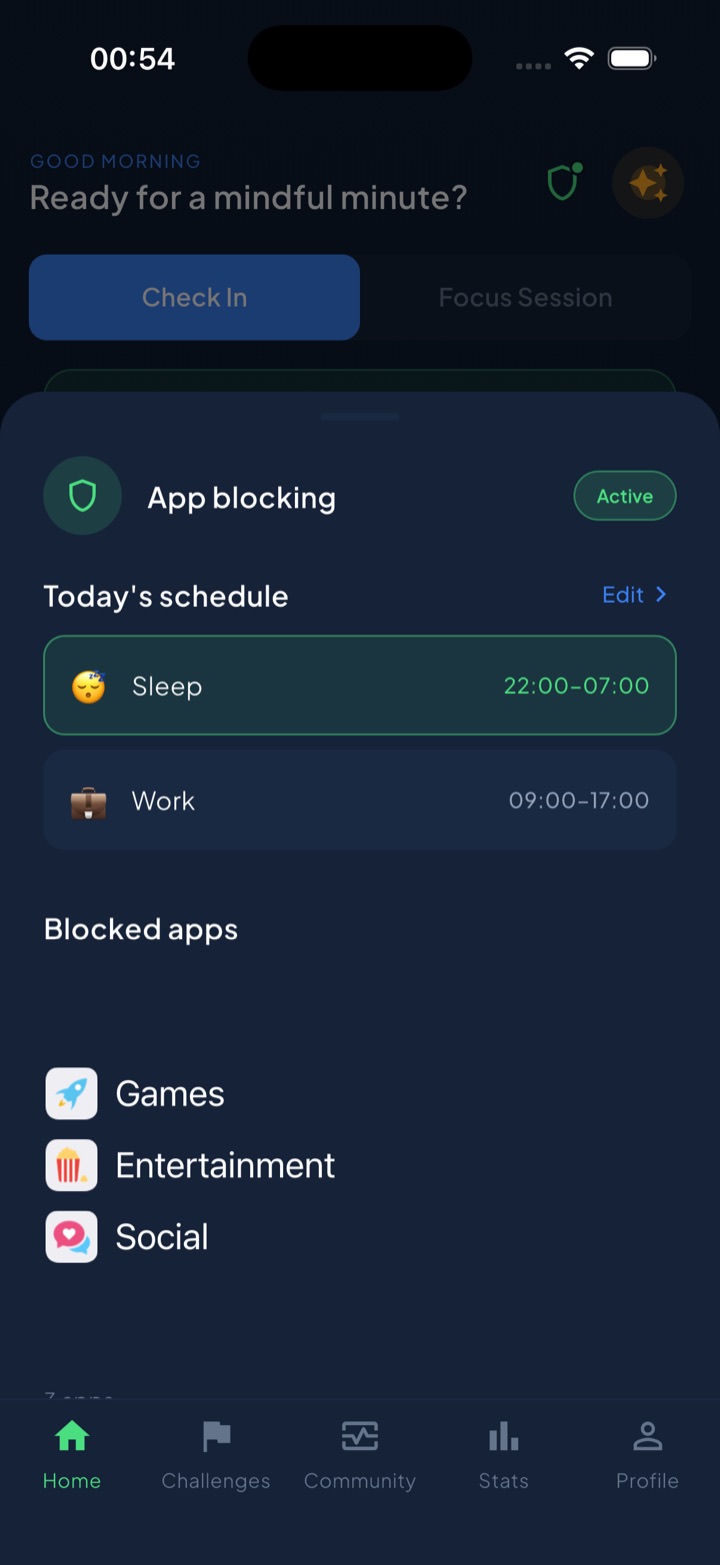
Unscrol uses the same official Screen Time frameworks to enforce real, system-level shields — not overlay reminders — and adds the parts hardware charges you for: scheduled routines that auto-arm (Work 09:00–17:00, Sleep 22:00–07:00), focus sessions with a live countdown, and a deliberate short “take a break” bypass so it’s a firm middle ground, not a prison. Instead of outsourcing your willpower to a puck you can lose, a unified daily streak and 45+ challenges train the habit so you eventually need less blocking, not more. Which apps you block and your usage stats stay on your iPhone — processed on-device by iOS, never sent to Unscrol’s servers. It’s free to download; Unscrol Pro adds Streak Saver and the full challenge library. If iOS Screen Time keeps losing to your thumb, that’s the real reason built-in limits don’t work — and a fix worth trying before you buy a gadget.
Frequently asked questions
Is the Brick worth it?
For most people, no — not as a first step. Brick is a ~$59 NFC puck you tap your phone against to lock and unlock chosen apps, and the distance friction genuinely helps if software has already failed you. But it only works if you carry it everywhere, and losing it is a real problem: Brick allows just 5 lifetime emergency unlocks before you're stuck. Try a free app blocker with scheduled routines first. If you still cave every single day, a physical blocker is a reasonable escalation — not the place to start.
What happens if you lose your Brick?
You can use one of Brick's emergency unlocks to regain access to your apps without the puck — but the company limits these to 5 for the entire lifetime of your account, so they're meant for genuine emergencies, not daily convenience. After that, a lost or forgotten Brick means your blocked apps stay locked until you find it. This is the core trade-off of hardware blockers: the friction that helps you focus is the same friction that punishes you when you travel, misplace the token, or leave it at home.
Do I need a physical device to block apps on my iPhone?
No. Apple's built-in Screen Time can block apps and set app limits for free, and dedicated app blockers use the same official Screen Time frameworks to enforce real system-level shields — no gadget required. A physical device like Brick or Unpluq only adds value if you routinely tap 'Ignore Limit' and override software with zero resistance. For most people, a scheduled app blocker that auto-arms at set times, plus a streak to build the habit, closes the gap without another object to carry or lose.