Screen time limits don’t work because they rely on willpower at the exact moment willpower is weakest: the second you’re bored and reaching for the app. Apple’s App Limit is really just a reminder with an “Ignore Limit” button, and one tap dissolves it. The fix isn’t more discipline. Self-control research consistently finds that people who resist temptation best don’t have more willpower, they arrange their environment so the temptation rarely reaches them. The answer is to move from soft reminders you can dismiss up to real friction or a hard block that removes the choice, and to make that choice when you’re calm rather than when you’re craving.
Why does the “Ignore Limit” button undo everything?
Apple’s Screen Time is a good awareness tool and a poor enforcement tool, and the gap is one button. You set a 30-minute daily limit on Instagram feeling motivated on Sunday night. On Wednesday afternoon you hit it, a dimmed screen appears, and it offers you “Ignore Limit → Ignore For Today.” The friction is a single tap, taken by the exact version of you least equipped to say no.
This is the design flaw in nearly every soft limit:
- The decision and the temptation collide. The limit was meant to enforce a decision you made earlier. But it asks you to re-confirm that decision at the worst possible time, when the craving is live.
- The escape is frictionless. No delay, no second device, no one to answer to. Behavioral research on commitment shows that a barrier you can remove yourself, instantly, is barely a barrier at all.
- It teaches you to dismiss. After you tap “Ignore” a few times, the prompt loses meaning entirely. It becomes wallpaper you swipe through on the way to the feed.
Anyone who has used Apple’s downtime knows this pattern. It’s the same reason how to reduce screen time is rarely solved by the phone’s own settings alone.
Is this a willpower problem or a design problem?
It feels like a willpower failure, which is why people respond by resolving to “just be more disciplined.” That resolution almost always fails, and understanding why is the key to fixing it.
Willpower is a state, not a trait: it fluctuates by the hour and collapses under stress, fatigue, and boredom, exactly the conditions under which you reach for your phone. The long-running debate over “ego depletion” (whether self-control is a limited resource that drains) is unsettled, but the practical lesson holds either way: you should never design a system that depends on you being strong at your weakest moment.
There’s a well-documented gap between our calm, planning self and our tempted, in-the-moment self, sometimes called the hot-cold empathy gap. When you set the limit on Sunday (cold state), you genuinely can’t feel how much you’ll want the app on Wednesday (hot state), so you under-protect against it. The old solution is centuries old: Ulysses tied himself to the mast before he could hear the sirens, because he knew his future self couldn’t be trusted to resist. A dismissible limit is Ulysses leaving a rope he can untie whenever he likes. This is the whole logic behind commitment devices, and it’s why the durable answer is structural, not motivational.
The three levels of a limit
Not all limits are equal. They sit on a ladder from “polite suggestion” to “genuinely can’t.” Match the level to how strong the habit is.
| Level | What it does | Effort to break it | Best for |
|---|---|---|---|
| Reminder (Apple App Limit, usage alerts) | Notifies you, then lets you continue | One tap (“Ignore Limit”) | Mild habits, awareness, people who mostly self-regulate |
| Friction (log out each time, delete app + use browser, grayscale, passcode held by someone else) | Adds steps and delay before the payoff | 20–60 seconds, or asking another person | Moderate habits where a pause is enough to break the reflex |
| Hard block (system-level shield via Screen Time frameworks, scheduled downtime with a passcode you don’t control) | The app won’t open during the window | Effectively can’t, until the schedule ends | Strong compulsive loops, protected hours (work, sleep, study) |
The insight the table makes obvious: most people fail because they only ever try the top row. They set a reminder, ignore it, and conclude “nothing works.” They never actually climbed the ladder. Adding even the friction rung, the “+20 seconds” principle where a small delay dramatically cuts impulsive use, is often enough. For entrenched habits, only the hard block reliably holds.
How do you design a limit you’ll actually respect?
A limit works when your calm self can bind your tempted self in a way that’s genuinely hard to reverse. Build it like this:
- Set limits in a cold state, for a hot state. Decide your rules when you’re not craving, and assume your future self will try to weasel out. Design against that person, not the current calm one.
- Put the “off switch” out of your own hands. Use a passcode you don’t know, a partner or friend who holds it, or a block that can’t be lifted until a scheduled window ends. If you can undo it in one tap, you will.
- Protect windows, not just totals. A daily minute-budget invites the “Ignore for today” bargain. A schedule (“no social 9am–5pm and after 10pm”) is cleaner: there’s nothing to negotiate because the answer in that window is simply no.
- Target the specific surface. Block the exact apps and features that pull you (short-video feeds, one social app), not your whole phone. Over-broad blocks get disabled out of frustration.
- Pair it with a streak or reward. Restriction alone breeds resentment. Tie your kept limits to something you’re building, like the momentum described in why streaks build habits, so the system feels like progress, not punishment.
You can assemble a lot of this for free. Apple’s Screen Time with a passcode a trusted person sets (and you don’t see) is a real hard block. Deleting an app and using only the mobile site is powerful friction. You don’t need to pay for any of it, the paid tools mostly buy you convenience, consistency, and scheduling you don’t have to babysit.
“I’d set an app limit, hit it, and tap ‘Ignore Limit’ without even thinking. It was a formality. What finally worked was a real block during my work hours that I couldn’t turn off on a whim. The first day I was annoyed. By Friday I’d stopped trying the app entirely.” — Marcus, project manager, 41
How Unscrol replaces reminders with real walls
The reason a plain reminder fails is that it hands the decision back to you at the worst moment. Unscrol is designed to not do that. It uses Apple’s official Screen Time frameworks (Family Controls and Managed Settings) to place real system-level shields on the apps you choose, the kind that actually prevent the app from opening rather than politely suggesting you stop.
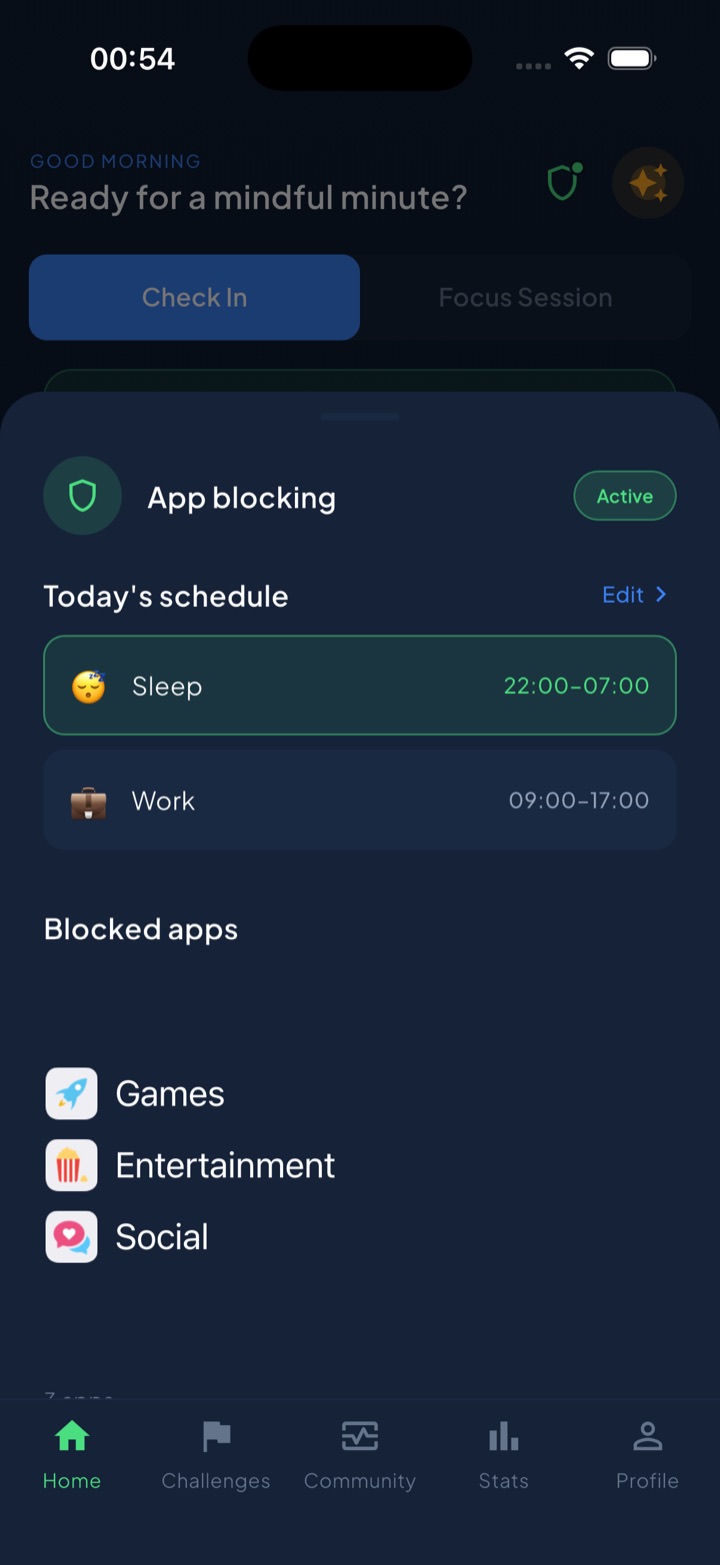
Its scheduled blocking routines let you set recurring windows, Work 09:00–17:00, Sleep 22:00–07:00, that auto-block your chosen apps and categories, so the limit protects a time, not a negotiable minute-count. That’s the difference between a reminder and a wall: during the window, there’s no “Ignore” bargain to make. Your block list and usage data stay on-device, processed by iOS, and never reach Unscrol’s servers.
You can build a version of this yourself with Apple’s Screen Time and a passcode you don’t control. Unscrol’s job is to make the wall consistent and the scheduling automatic, so the limit holds on the day you least want it to, which is the only day it ever mattered.
Frequently asked questions
Why don't iPhone screen time limits work?
Because Apple's App Limits are a reminder, not a barrier. When you hit the limit, a screen appears with an 'Ignore Limit' button, and one tap gives you 15 more minutes or the rest of the day. It relies on willpower at the exact moment willpower is weakest, when you are already bored and reaching for the app. A limit you can dismiss in one tap is a suggestion, not a limit.
Are app limits pointless then?
Not pointless, but weak on their own. Soft limits work as gentle awareness nudges for people who mostly self-regulate. They fail for genuine habits because the moment of temptation overrides the earlier good intention. To make them stick, add friction (extra steps, another device, a passcode you don't hold) or use a real system-level block that removes the option rather than reminding you about it.
How do I make screen time limits actually stick?
Move up the enforcement ladder. Replace dismissible reminders with real friction: log out after each use, delete the app and use the browser, or hand the settings passcode to someone else. Better still, use a scheduled hard block during your vulnerable hours so the app simply won't open. The principle is to design the limit when you're clear-headed so your tempted future self can't easily undo it.