A shutdown ritual is a fixed 10–15 minute routine at the end of your workday: you scan your inboxes, capture every unfinished task into a system you trust, sketch a rough plan for tomorrow, and mark the day closed with an explicit cue — Cal Newport famously ends his with the phrase “shutdown complete.” It works because your brain won’t stop rehearsing open loops until it believes there’s a plan for them. For remote workers it matters double: there’s no commute, no office door, no external signal that work is over — so without a ritual the workday doesn’t end, it just dilutes into an evening of half-work and doomscrolling.

Why does the workday never end when you work from home?
The office used to end the day for you. You stood up, left a building, and the commute — annoying as it was — worked as a decompression chamber between work-brain and home-brain. Working from home deleted all of that. The laptop sits three meters from the sofa, Slack lives on your phone, and “I’ll just check one thing” at 9:40 p.m. costs nothing to start.
The result is a day with no edge. Studies of remote work consistently point the same direction: without physical boundaries, work hours stretch and bleed into the evening. But the deeper cost isn’t the extra minutes — it’s the ambient partial attention. You’re never fully working after 6 p.m., and never fully off either. You half-watch a show while half-drafting a reply in your head. That’s the specific misery a shutdown ritual is built to fix: not working less, but being done harder.
What is open-loop anxiety, and why won’t your brain let go?
In the 1920s, psychologist Bluma Zeigarnik noticed that waiters remembered unpaid orders in detail — and forgot them the moment the bill was settled. Her research gave the effect its name: unfinished tasks stay mentally active, replaying and resurfacing until they’re resolved. That’s why “you never replied to Elena” ambushes you in the shower at 10 p.m.
Here’s the part that makes a shutdown ritual work: later research suggests you don’t have to finish the task to close the loop. Writing a specific plan — what, when — appears to release most of the mental nagging. Your brain isn’t demanding completion; it’s demanding assurance that the thing won’t be dropped. A trusted list and a concrete next step supply that assurance in minutes. It’s the same cold-state logic behind implementation intentions: decide once, in advance, so the thought has somewhere to land besides your evening.
What is Cal Newport’s “shutdown complete” ritual?
In Deep Work, Cal Newport describes the routine he runs at the end of every workday, and it maps almost perfectly onto the Zeigarnik fix:
- Final scan of email and messages for anything genuinely urgent.
- Transfer every open task and loose thought into his master task list.
- Review the task list and calendar for the coming days.
- Rough-plan tomorrow.
- Say, out loud: “shutdown complete.”
The phrase sounds ridiculous — Newport admits as much. But the verbal cue is the load-bearing part. It’s an unambiguous marker your brain learns to trust: after the phrase, any work thought that pops up gets the same reply — already handled, see you tomorrow. Without a marker, “done for the day” is a vague feeling that a single Slack ping can overturn. With one, it’s an event that happened. This is the evening counterpart of everything in our deep work guide: deep focus needs a hard start, and it needs a hard stop.
The 15-minute shutdown checklist for remote workers
Here’s Newport’s idea adapted for a WFH day full of Slack, tabs, and a laptop that never leaves the house:
| Minutes | Step | What it closes |
|---|---|---|
| 0–3 | Final scan of email + Slack. Reply only if it takes under a minute; otherwise capture it | Confirms nothing is on fire |
| 3–8 | Brain-dump every open loop into one trusted list — not five sticky notes and a mental note | Releases the Zeigarnik pressure |
| 8–11 | Plan tomorrow: the first task you’ll start with, plus your top three | Gives your morning a landing strip |
| 11–13 | Say your closing phrase, close every tab, quit Slack, shut the laptop | The unambiguous ending cue |
| 13–15 | Physical boundary: laptop in a drawer or bag, change out of work clothes | Tells your body, not just your calendar |
Two upgrades worth stealing. First, the fake commute: a 10–15 minute walk around the block right after the ritual rebuilds the decompression chamber the real commute used to be. Second, hide the hardware. A closed laptop on the kitchen table is still a work trigger; a laptop in a drawer is furniture. If you work in your bedroom, this step is non-negotiable.
How do you stop checking work email at night?
Start by being honest about what a 10 p.m. inbox check is: it’s rarely work, it’s self-soothing. You’re not processing email, you’re checking that nothing exploded. The shutdown ritual removes the reason (every loop already has a plan); your environment should remove the trigger:
- Silence work apps after your shutdown time. A scheduled iOS Focus mode or Screen Time Downtime that starts at 18:30 does this automatically, every day, without a decision.
- Move mail and Slack off your home screen — or shield them entirely until morning. Friction beats willpower at 10 p.m.
- Give work thoughts a landing spot. The rule: if a work thought pops up after shutdown, it goes on tomorrow’s list — never into Slack. Answering one message reopens the whole workday, for you and for whoever you just pinged.
- Kill the ambiguity with your team. “I’m offline after six; if something’s truly urgent, call me.” Most night-checking survives on the fear that silence looks like slacking. One clear sentence ends that.
“I’d close the laptop at six and then answer Slack from the couch until eleven, with Instagram filling the gaps. The checklist felt bureaucratic for about a week. Now ‘shutdown complete’ is the moment my flat stops being an office. My partner noticed the difference before I did.” — Marcus, backend developer, 34
What do you do with the evening you just got back?
A real shutdown hands you back three or four hours — and if you don’t decide what they’re for, the feed will decide for you. Swapping evening Slack-refreshing for evening doomscrolling is a lateral move: same posture, same drained feeling at midnight.
There’s also a sneakier trap. When the workday has no edge, “me time” gets pushed later and later until you’re claiming it at 1 a.m. — the pattern known as revenge bedtime procrastination. A hard shutdown at six is the actual cure: when the evening genuinely belongs to you, you don’t need to steal it back from sleep. Plan one deliberate thing per evening — cooking, the gym, a friend, a show you chose in advance — and if the phone still wins the last hour in bed, our guide on how to stop scrolling in bed closes that loop too.
How does Unscrol help you switch off after work?
Start free. Write the five checklist steps on a card and tape it to your monitor. Then use Apple’s built-in tools to enforce the boundary: a scheduled Focus mode at your shutdown time, Screen Time Downtime for the evening, and App Limits on mail and Slack. For plenty of people, paper plus Screen Time is enough.
Unscrol is the iPhone app for when it isn’t — when you keep approving your own “just 15 more minutes” at 9 p.m. It uses Apple’s Screen Time frameworks for real, system-enforced blocking, and everything is processed on-device: your block lists and usage never touch our servers.
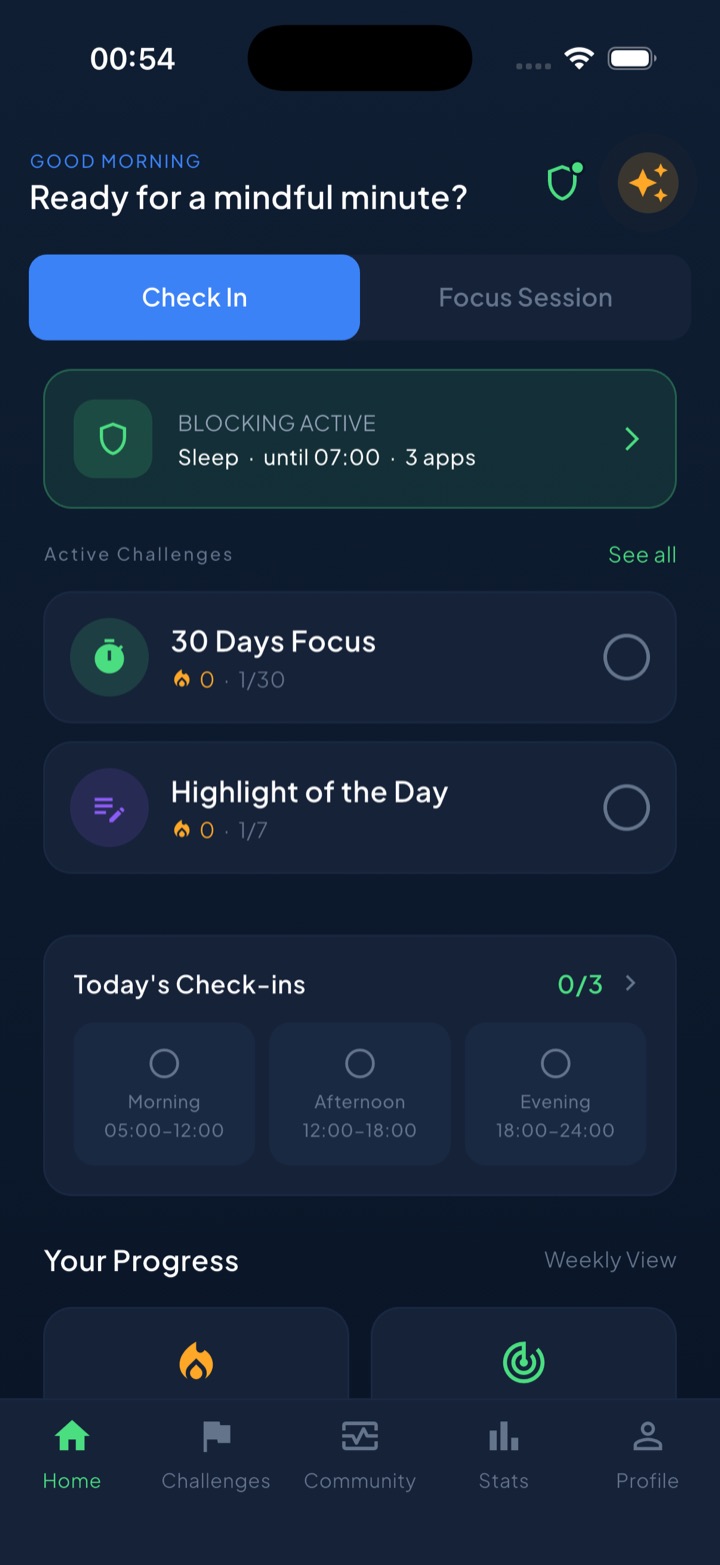
- Schedule the off switch. A block routine that starts at your shutdown time shields work apps — and the feeds you’d doomscroll instead — every evening, automatically. The boundary stops depending on how disciplined you feel at 6 p.m.
- A bypass that isn’t a loophole. For the genuinely urgent night, a short “take a break” window lets you handle it and re-locks — so one real emergency doesn’t end with you dismantling the whole system.
- Make the ritual the streak. End your checklist with Unscrol’s evening check-in; check-ins and challenges feed one daily streak, which turns “shutdown complete” from a nice intention into a chain you don’t want to break.
The honest version: the ritual is free, and Apple’s tools can enforce it. Unscrol is the layer that makes it stick — the scheduled off switch, the emergency valve, and a streak that rewards actually logging off.
Frequently asked questions
What is a shutdown ritual?
A shutdown ritual is a short, fixed routine at the end of the workday — usually 10 to 15 minutes — in which you scan your inboxes, capture every unfinished task into a trusted list, sketch a rough plan for tomorrow, and end with an explicit closing cue. Cal Newport, who popularized the idea in Deep Work, literally says the phrase 'shutdown complete.' The ritual gives your brain proof that everything is handled, so it stops rehearsing work all evening.
How do I stop thinking about work in the evening?
Your brain keeps replaying unfinished tasks — psychologists call this the Zeigarnik effect. The fix isn't finishing everything; research suggests it's making a concrete plan for each open item. Spend ten minutes writing down every loose end and deciding when you'll handle it, then close with a consistent cue like shutting the laptop and leaving the room. Done daily, this teaches your brain that the workday has a real edge, and the intrusive 'don't forget' thoughts quiet down.
How do I stop checking work email at night?
Make checking pointless and harder at the same time. Pointless: run a shutdown ritual so every open loop already has a plan — most night checks are anxiety checks, and the checklist removes the anxiety. Harder: after your shutdown time, silence work notifications, move mail and Slack off your home screen, and use Screen Time or an app blocker like Unscrol to shield work apps until morning. Then tell your team exactly when you're reachable, so silence isn't ambiguous.
How long should a shutdown ritual take?
Ten to fifteen minutes is enough for most remote workers: a few minutes scanning inboxes for anything urgent, five minutes capturing open tasks, three minutes planning tomorrow's first moves, and a minute for the closing cue. If it regularly takes longer than twenty, you're doing the work instead of closing it — capture and defer, don't reply and finish. Consistency matters far more than length; a short ritual you run every workday beats a thorough one you skip.