To stop scrolling in bed at night, make the decision once instead of renegotiating it every night when your willpower is at its lowest. The most reliable fix is a hard cutoff time paired with an automatic app block that shields your feeds from, say, 22:00 to 07:00 — plus moving your charger out of the bedroom and using a real alarm clock so your phone has no reason to be within arm’s reach. Bed scrolling isn’t sticky because you lack discipline. It’s sticky because your brain is depleted at the end of the day, your bed has quietly become a scrolling cue, and algorithmic feeds are tuned to keep you watching. Automating the boundary removes the nightly negotiation you keep losing.

Why is scrolling in bed so hard to stop?
You put the phone down at your desk all day, so why does it beat you at 11 p.m.? Because bed scrolling stacks several forces at once, and they all peak after dark:
- Willpower is a finite resource that runs low at night. Every decision you make during the day draws down the same tank of self-control. By bedtime it’s nearly empty — exactly when you’re asking it to fight the most engineered product on earth.
- Your bed has become a conditioned cue. If you’ve scrolled in bed a few hundred times, your brain now pairs “lying down” with “open the feed” automatically. The trigger fires before you’ve consciously decided anything.
- Feeds are strongest at night. Recommendation algorithms serve their most engaging content when you have nowhere to be and no reason to stop. There’s no natural endpoint — the feed is infinite by design — so “one more” never resolves into “done.”
- The phone is right there. Proximity is destiny. A device on your nightstand will be checked; a device charging in the kitchen mostly won’t.
None of this is a character flaw. It’s a predictable outcome of putting an infinite entertainment machine on your pillow.
What is revenge bedtime procrastination?
If you’ve ever thought “I’m exhausted, but this is my only time to myself,” you’ve felt it. Revenge bedtime procrastination is the habit of staying up late — usually on a phone — to reclaim personal time that got swallowed by work, study, or caregiving during the day. You’re not really choosing more Reels over sleep; you’re refusing to let the day end without a little freedom.
That reframe matters, because it tells you the fix isn’t just “block the app.” If your evenings feel stolen, your brain will find a way to steal them back at midnight. The durable solution pairs a boundary with a replacement — a short, genuinely enjoyable wind-down that isn’t your phone. We go deeper on the mechanism in revenge bedtime procrastination, and on the sleep cost specifically in how screen time wrecks your sleep.
How do you actually stop scrolling in bed?
Willpower is the tactic that fails most reliably, so build an environment that does the work for you. Stack these from easiest to strongest:
- Set one hard cutoff time. Decide when the feeds close for the night — 22:00 is a common choice — and treat it as non-negotiable as a work meeting. A single fixed time beats a vague “not too late.”
- Move the charger out of the bedroom. Charge your phone in the kitchen or hallway. This is the highest-leverage physical change most people can make, because it removes the cue entirely instead of relying on you to resist it.
- Buy a cheap alarm clock. The “but I use it as my alarm” objection dies for about the price of two coffees. Once the alarm lives on the nightstand, the phone has no job in the bedroom.
- Replace the scroll, don’t just delete it. A paperback, a few pages of a real book, a stretch, or a boring podcast gives your wind-down somewhere to go. An empty slot gets refilled by the feed.
- Automate the boundary with a scheduled block. This is the strongest move, and it deserves its own section.
This is the core idea behind designing your environment so it beats willpower at both ends of the day — the evening block and the phone-free first hour reinforce each other.
Why does a scheduled block beat willpower?
Here’s the key insight: the problem isn’t the 200th scroll, it’s the first decision. Every night you’re asked “phone or sleep?” at the exact moment you’re least equipped to answer well. A scheduled block moves that decision to daytime-you, who is rested and clear-headed, and takes it away from midnight-you, who is depleted and negotiating.
On iPhone you can do a version of this for free. Apple’s Screen Time Downtime lets you schedule a nightly window (say 22:00–07:00) that greys out chosen apps. It genuinely helps — but be honest about its ceiling: when a limit fires, iOS shows an “Ignore Limit” button that’s one tap away, and at midnight, one tap is all it takes. A dedicated blocker built on the same Apple frameworks adds real friction and, crucially, a streak you don’t want to break.
| Tactic | Setup effort | How well it holds at midnight |
|---|---|---|
| Willpower / “just put it down” | None | Fails when you’re depleted |
| Phone on silent, face down | Low | Easy to override in a second |
| iOS Screen Time Downtime | Medium | Solid, but “Ignore Limit” is one tap |
| Charger outside the bedroom | Medium | Strong — removes the cue entirely |
| Automatic sleep-schedule app block | One-time | Strongest — the decision is made once |
“I told myself every night I’d stop at eleven, and every night I was still going at one. The thing that finally worked wasn’t discipline — it was setting a Sleep block once and putting my charger in the hallway. Now the feed just isn’t there. I read a few pages and I’m out.”
— Deniz, product designer, 29
How Unscrol helps you stop scrolling in bed
You can get most of the way there for free with Apple’s built-in Screen Time, and you should start there — a nightly Downtime schedule and your charger in another room will move the needle tonight. Unscrol exists for the part that’s harder to hold on your own: consistency, scheduling, and not breaking the chain.
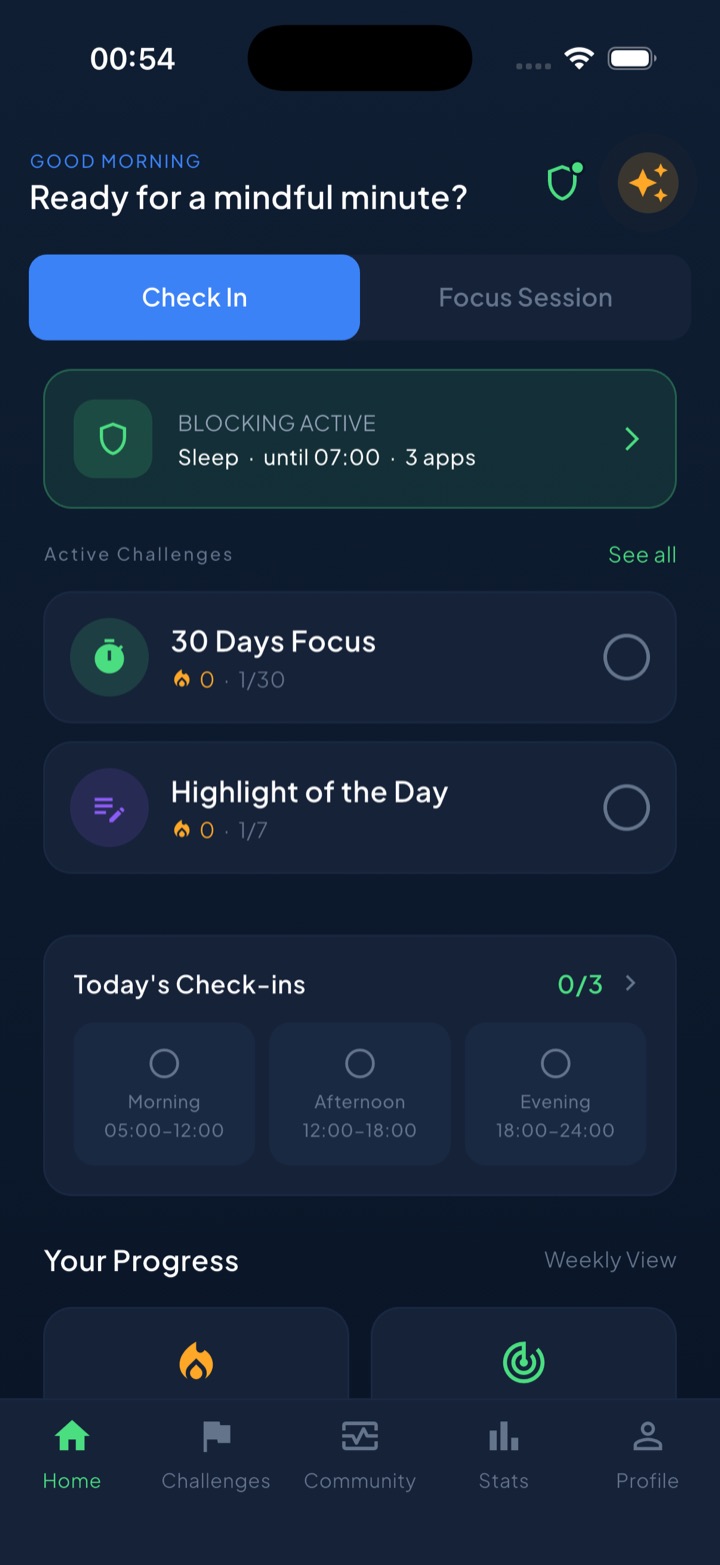
Unscrol runs on Apple’s official Screen Time frameworks — the same system-enforced shields, not overlay reminders — so you can set a Sleep routine (for example 22:00–07:00) that automatically blocks the apps and categories you name, every night, without you lifting a finger. The decision is made once. Because it’s built for this, it adds gentle friction instead of a frictionless “Ignore” button, and there’s a deliberate “take a break” bypass for the nights you genuinely need one — a middle ground between soft nudges and prison-style locks. An evening mood check-in helps you notice the urge before you act on it, and a daily streak gives you something to protect, which is often what finally makes the habit stick. Which apps you block stays on your device — iOS processes it locally and it never reaches Unscrol’s servers. It’s free to download; Pro adds the Streak Saver. Start with a cutoff time and a charger in the hallway tonight, and let the schedule carry the nights your willpower won’t.
Frequently asked questions
Why can't I stop scrolling on my phone in bed?
Bed scrolling is stickiest at night for three reasons: your self-control is depleted after a full day of decisions, your bed has become a conditioned cue that triggers the habit automatically, and social feeds are tuned to feel most engaging in the evening. It rarely comes down to weak willpower. The reliable fix is to remove the choice entirely — set a hard cutoff time, keep your charger in another room, and use an automatic app block so the feeds simply aren't available at the moment you're least able to resist them.
Does using your phone in bed affect sleep?
Yes. Late-night phone use pushes back your bedtime through 'revenge bedtime procrastination' — staying up to reclaim personal time you feel you lost during the day. The content itself is also activating: fast, unpredictable feeds keep your brain alert when it should be winding down. Blue light gets most of the blame, but for many people the timing and mental stimulation matter more than the wavelength. The practical takeaway is the same either way: stop scrolling well before you want to be asleep, and put the phone out of arm's reach.
What time should I stop looking at my phone before bed?
A common guideline is to stop 30 to 60 minutes before your target sleep time, but the exact number matters less than making it automatic. Pick a cutoff you can actually hold — say 10 p.m. if you aim to sleep by 11 — and enforce it with a schedule instead of willpower. An automatic block from, for example, 10 p.m. to 7 a.m. means you decide once instead of renegotiating every single night when you're too tired to say no.