Phone addiction at work rarely looks like addiction. It looks like a “quick check” — two minutes on the lock screen between tasks — that quietly becomes a twenty-minute drift through feeds you never planned to open. To stop scrolling at work, you need three moves, and none of them is “try harder”: put the phone physically out of reach, block your most tempting apps during work hours so a check can’t turn into a session, and take honest breaks that actually restore you instead of swapping one screen for another. Here’s why that combination works when resolutions don’t, and how to set it up before tomorrow morning.
Why do you keep reaching for your phone at work?
Not because you’re lazy, and not because the phone has anything urgent on it. Watch the moment before the reach and you’ll almost always find a small spike of discomfort: a task with no obvious next step, an email you’re dreading, a report that’s rendering, a meeting that ended awkwardly. The phone is the fastest exit from that feeling — one tap, instant novelty, occasional reward. Repeat that loop a few hundred times and the reach stops being a decision. It’s a reflex with a trigger you never see. We unpack the mechanics of that loop in why you can’t stop checking your phone.
The desk setup makes it worse. A phone lying next to your keyboard — even face down, even silent — is a standing invitation your brain keeps RSVPing to. The well-known 2017 “brain drain” study led by Adrian Ward found that the mere presence of a phone on the desk measurably taxed people’s available cognition, even when they never touched it. (More on that in phone in the room, brain drain.) At work, that means you pay for the phone even during the minutes you resist it.
The micro-break trap: how two minutes becomes twenty
“I’ll just check one thing” is the most sincere lie in the modern office. You unlock with a purpose — one message, one score, one notification — and the purpose is usually completed in seconds. What happens next is not your plan; it’s the app’s. Feeds are engineered to extend the visit: there’s always one more card, and there is no natural stopping point, no “end of the page” that hands you back to your day. So the two-minute check ends when something external interrupts it — a Slack ping, a colleague, the meeting reminder — often twenty minutes later.
And the visit isn’t even the expensive part. When you come back, your brain doesn’t snap back to the spreadsheet — it drags attention residue from whatever you just scrolled. Studies on task switching suggest that re-immersing fully after an interruption takes minutes, not seconds, which means a day of “harmless checks” can fragment nearly all of your potential deep work. We break down that math in the cost of context switching. Cal Newport’s core argument in Deep Work applies squarely here: the professionals who can still concentrate without flinching are becoming rarer — and more valuable — precisely because of this loop.
What does phone distraction at work actually cost you?
| What you notice | What it actually costs |
|---|---|
| A few “short checks” an hour | A re-focus tax on every return — the switch costs more than the scroll |
| The work still gets done | It gets done shallow: hard tasks get postponed, easy tasks expand to fill the day |
| ”At least I’m responsive” | A reputation for being around a lot but rarely fully finished |
| A busy-feeling day | Unfinished work follows you home, and the workday quietly stretches into the evening |
The career cost is the slowest and the largest. Raises, promotions, and interesting projects tend to flow toward people who finish hard things — and finishing hard things is exactly what a fragmented attention span can’t do. Nobody gets a warning for scrolling; you just slowly become the person whose work is fine, late, and thin. Meanwhile the hours you lose don’t disappear from your calendar — they get repaid at 6 p.m., from the part of the day that belonged to you.
Why do scrolling breaks leave you more tired, not less?
Because they’re not breaks. A real break changes your posture, your visual field, and your input load. A scrolling “break” keeps you in the same chair, on a screen, processing a firehose of new information — the exact ingredients of the work you’re supposedly resting from. Researchers who study workplace recovery consistently find that what restores people is psychological detachment and a bit of movement, not more stimulation.
Then comes the second hit: the guilt cycle. You surface from a twenty-minute drift, see the clock, and feel that low-grade shame of time you can’t account for. Shame is stressful, stress wants soothing, and the nearest soother is the object in your hand. So you scroll to feel better about scrolling. That loop — discomfort, escape, guilt, escape — is the engine of phone addiction at work, and it’s why the fix has to remove the escape hatch instead of asking you to feel worse about using it.
“I used to ‘reward’ myself after every finished email with a quick scroll. By 4 p.m. I’d have maybe two hours of real work done and this low-grade shame on the whole ride home. What finally broke it was embarrassingly physical: phone in my bag, bag on the hook by the door. My hand kept reaching for a week. There was just nothing there to grab.” — Tom, insurance underwriter, 41
A workday phone protocol that actually holds
You don’t need a productivity system — you need five environmental rules that make checking harder than working.
- Put the phone out of arm’s reach, out of sight. A drawer, your bag, the far side of the room. Face-down on the desk doesn’t count — the brain-drain effect comes from presence, not from the screen being lit. If you need it for 2FA, keep it just far enough that using it requires standing up.
- Block your worst apps during work hours. Use scheduled blocks (say, 09:00–17:00 on weekdays) on the three or four apps that eat your day. This kills the loop at step one: the reflexive unlock happens, hits a shield, and the drift never starts.
- Batch your checks. Pick two or three honest windows — late morning, after lunch, end of day — and do all your personal-phone business there, deliberately. Tell the people who matter that urgent means call; calls ring through everything.
- Take real breaks on purpose. Every 60–90 minutes: stand, water, stairs, window, two minutes outside. The goal isn’t fewer breaks — it’s breaks that don’t cost twenty minutes and a guilt trip. (For structuring the rest of the day around deep blocks, see how to stay focused at work.)
- Give the urge somewhere to go. Keep a sticky note or a text file for “check later” items. When the itch comes — a thing to look up, a message to send — write it down in five seconds instead of unlocking. The urge is real; it just doesn’t need to be obeyed immediately.
Run it for one week and compare your screen-time report — watch pickups, not just minutes. Pickups are the reflex; minutes are merely the damage.
How does Unscrol help with phone addiction at work?
Start with the free route, honestly: Apple’s built-in Screen Time can take you a long way. Set App Limits on your worst apps, schedule Downtime across your work hours, turn on a Work Focus to silence notifications, and pair it all with the physical rule — phone in the bag, not on the desk. The catch, as most people discover by Wednesday, is that “Ignore Limit” is one tap away, and you are both the guard and the prisoner.
Unscrol is an iPhone app built for exactly that failure point. It uses Apple’s own Screen Time frameworks to put real, system-enforced shields on the apps you choose — and lets you schedule them as recurring routines, so a Work block from 09:00 to 17:00 on weekdays simply exists, every day, without you re-deciding each morning.
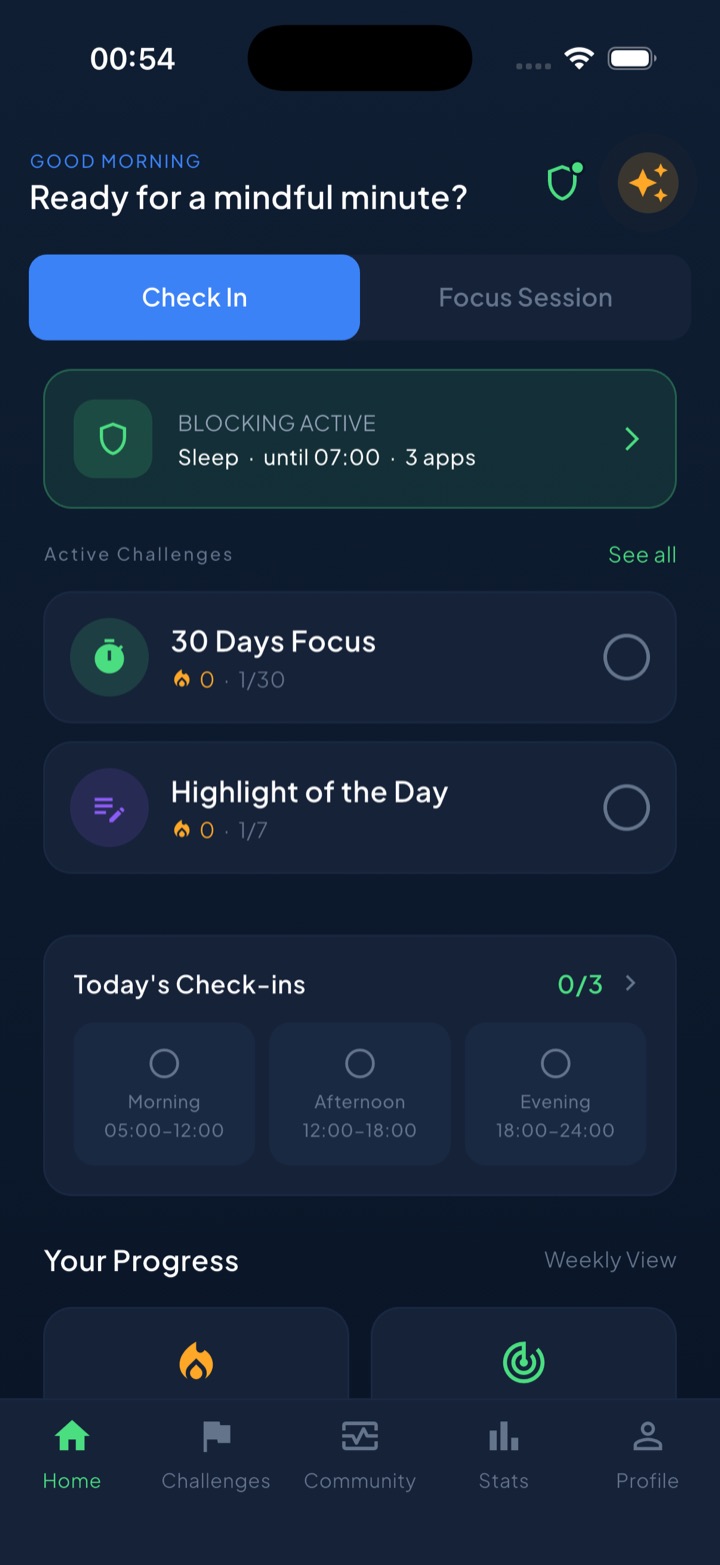
A few pieces map directly onto the protocol above:
- Scheduled block routines cover your work hours automatically — the micro-break trap can’t spring if the feed doesn’t open.
- A short “take a break” bypass handles the genuine exception without tearing the wall down — a deliberate pause, not an “Ignore Limit” reflex.
- Focus sessions with a Live Activity put a visible countdown on your lock screen during deep blocks, so even a glance at the phone reminds you what you’re in the middle of.
- Daily check-ins and a streak turn “I didn’t scroll through my workday” from an invisible non-event into a run you can see and won’t want to break.
- Privacy, on-device: your block lists and usage are processed on your iPhone and never touch our servers — worth knowing for a work phone.
The honest summary: the drawer is free, Screen Time is free, and together they might be enough. Unscrol is for the gap between knowing the protocol and still following it in week three — it makes the blocked hours automatic, the exceptions deliberate, and the progress visible.
Frequently asked questions
Why do I keep checking my phone at work?
Almost never because something on the phone matters. The check is an escape hatch from small moments of discomfort — a hard task, a boring email, an awkward pause between meetings. Your brain has learned that the phone delivers instant relief and an occasional reward, so the reach becomes automatic. That's why willpower alone rarely fixes it: as long as the phone sits within arm's reach and the apps are one tap away, checking stays cheaper than working.
How do I stop scrolling on my phone at work?
Change the environment, not just your intentions. Put the phone physically out of reach — a drawer or a bag, not face down next to the keyboard. Block your most tempting apps during work hours with Apple Screen Time or an app blocker like Unscrol, so a reflexive unlock hits a shield instead of a feed. Batch messages into two or three scheduled check windows, and replace scrolling breaks with real ones: stand up, walk, get water, look out a window.
Is scrolling on my work breaks actually bad?
Breaks are essential — feed breaks just make poor ones. Scrolling keeps you seated, keeps your eyes on a screen, and keeps your brain processing new information, so you return with little recovery, often plus guilt because two minutes became twenty. Researchers who study workplace recovery consistently point to detachment and movement as what makes a break restorative. Use breaks deliberately: move, stretch, step outside, talk to a human. Save the feed for after work.
How much time does phone use at work really cost?
More than your screen-time report shows. The visible minutes of scrolling are only part of the bill — every check also forces your brain to reload the task you left, and studies on task switching suggest that regaining full focus after an interruption takes minutes, not seconds. A handful of quick checks spread across the day can fragment hours of potential deep work, which is why a scrolled-through day feels busy but thin.