To stop checking email constantly, turn the inbox from a feed into a task: switch off email notifications, batch email into two or three scheduled windows a day, close the mail app completely between windows, and tell colleagues when you reply so nobody expects instant answers. Constant checking feels productive because every glance delivers a small hit of novelty and control — but it is interruption addiction dressed up as diligence. Each check costs you far more focus than the three seconds it takes, and the fix is not willpower. It is structure: fewer, predictable windows, an inbox that cannot ping you, and an escalation path for real emergencies.

Why does checking email feel productive when it isn’t?
Because email is work-shaped. Replying, filing, and clearing messages produces visible motion — little completions your brain happily counts as progress. It is the easiest possible way to feel busy: no hard thinking, instant feedback, and a socially bulletproof excuse (“I was answering emails”).
For remote workers there is a second engine: visibility anxiety. When nobody can see you at your desk, a fast reply becomes proof of work. So you keep the tab open, glance at every banner, and answer in minutes — not because the message needed it, but because responsiveness has quietly become your performance metric. That is productivity theater, and it crowds out the deep, uninterrupted work that actually moves your projects. Cal Newport has argued for years that knowledge workers drift toward this “hyperactive hive mind” mode by default — our deep work guide covers the antidote in depth.
The honest test: at the end of a day spent “on top of email,” what did you finish? If the answer is mostly “email,” the inbox is running you.
Is constant inbox checking really an addiction?
It is not a clinical diagnosis, but it runs on the same mechanics as one. The inbox is a variable-reward machine: most checks find nothing, but occasionally one delivers something important, flattering, or alarming. Unpredictable, intermittent rewards are precisely the schedule that trains compulsive behavior — the same one slot machines use, and the same one that makes notification overload so hard to escape.
Inbox anxiety closes the loop. The vague dread that something might be waiting builds between checks; checking relieves it for a moment; your brain files that relief as a win and schedules the next check sooner. Many heavy checkers describe the tell-tale signs: refreshing an inbox they looked at ninety seconds ago, feeling a phantom pull toward the mail tab mid-sentence, or checking email first thing in bed “just so nothing surprises me.”
None of that is a character flaw. It is a well-designed loop meeting a normal human brain — which is exactly why the exit is structural, not motivational.
What does compulsive checking actually cost you?
Far more than the seconds each glance takes. Every check is a context switch: your working memory drops the task at hand, loads the inbox, and then has to reload the task afterward. Attention researchers — Gloria Mark’s work is the best known — have found that returning to full focus after an interruption can take on the order of 20 minutes, and that a residue of the interrupting thought keeps running in the background even when you “get right back to it.” We break down the full price in the cost of context switching.
Now do the math on a typical remote workday:
| Checking style | Checks per day | Interruptions per hour | Realistic deep-focus blocks |
|---|---|---|---|
| Notifications on, tab always open | 30–50+ | 4–6 | Zero |
| ”I just glance quickly” | 15–25 | 2–3 | Maybe one, by accident |
| Batched: 3 scheduled windows | 3 | 0 between windows | Two to three, by design |
Studies suggest the stress cost is just as real: researchers have found that people limited to checking email a few times a day reported lower daily stress than those who checked freely — with no meaningful loss of responsiveness. Constant checking is a tax you pay in both focus and calm, and it refunds almost nothing.
How do you batch email into scheduled windows?
Email batching is the core fix: email becomes an activity with a beginning and an end, not a state you live in.
- Pick two or three windows anchored to natural transitions — for example 9:30 (after your first focused block, not before), 13:00, and 16:30. Guard your first work hour: starting the day in the inbox lets other people’s priorities write your to-do list.
- Time-box each window to 20–30 minutes with a visible timer. A window without an end is just “being on email” again.
- Process to a decision. For every message: reply now if it takes under two minutes, turn it into a scheduled task if it takes longer, or archive it. Touch each email once.
- Close the client completely between windows. Quit the app, close the tab, remove the icon from your dock or taskbar. An open inbox tab is a running invitation.
- Kill the phone inbox during work hours. The desktop discipline collapses if your phone still buzzes — move the mail app off your home screen and cut its notifications.
- Hold the line for two weeks. The urge to check spikes for a few days, then fades as your brain stops expecting the reward. What replaces it is the thing you actually wanted: long, quiet stretches to stay focused at work.
How do you fix email notifications without missing real emergencies?
The fear behind every failed batching attempt is “what if something urgent comes in?” Answer it with notification hygiene designed for email specifically:
- Badges and banners off for every mail app, on every device. A silent red badge is still a cue to check.
- Switch mobile mail from push to manual fetch. New mail then arrives when you open the app — inside a window — not whenever a sender hits send.
- Whitelist the true exceptions. iOS Mail’s VIP list (or Gmail’s priority settings) can let your manager or a critical client through while everything else stays silent. Keep this list brutally short — three names, not thirty.
- Route real emergencies around email entirely. Agree with your team that genuinely urgent means a phone call or a direct message, never an email. Email is, by design, the channel where nothing should be time-critical.
That last rule is the unlock: once urgency has its own channel, the inbox no longer carries the “might be an emergency” charge — and checking it three times a day becomes obviously enough.
How do you set expectations with colleagues so batching sticks?
Instant replies created the expectation of instant replies. You built that debt one fast response at a time, and you can unwind it the same way:
- Announce your rhythm once, casually. “I’m batching email at 9:30, 1:00 and 4:30 to protect focus time — if something’s truly urgent, call me.” One sentence in a team channel is enough.
- Put the reply window in your signature or status. “I check email a few times a day and reply within one business day” quietly resets every sender’s expectations.
- Keep the promise. Reliable replies at 16:30 beat sporadic replies within five minutes. Predictability, not speed, is what colleagues actually need.
- If you manage people, model it. Your 10 p.m. emails set the team’s real policy, whatever the handbook says. Use scheduled send.
“I counted one Tuesday: 47 inbox checks. I wasn’t answering email, I was monitoring it, like a lifeguard. Moving to three windows felt reckless for about four days. Then I noticed nobody had chased a single reply — and I’d shipped more in a week than in the previous month.” — Marcus, backend developer, 34
In practice, almost nobody notices your reply latency moving from five minutes to three hours. They notice missed deadlines — which batching prevents.
How does Unscrol help you check email less?
Start with the free, built-in route — it goes a long way. On your iPhone, use Apple’s Screen Time to set App Limits on Mail, Gmail, or Outlook during work hours, schedule Downtime from your log-off hour, move mail apps off your home screen, and trim notifications down to a VIP-only whitelist. On the desktop, quit the mail client between windows and use calendar blocks for your email windows.
The weak point of the DIY setup is the one tap on “Ignore Limit” at a weak moment. Unscrol is an iPhone app (iOS 16+) that closes that gap using the same Apple Screen Time frameworks — with real, system-enforced app blocking, and everything processed on-device: your block lists and usage never touch our servers.
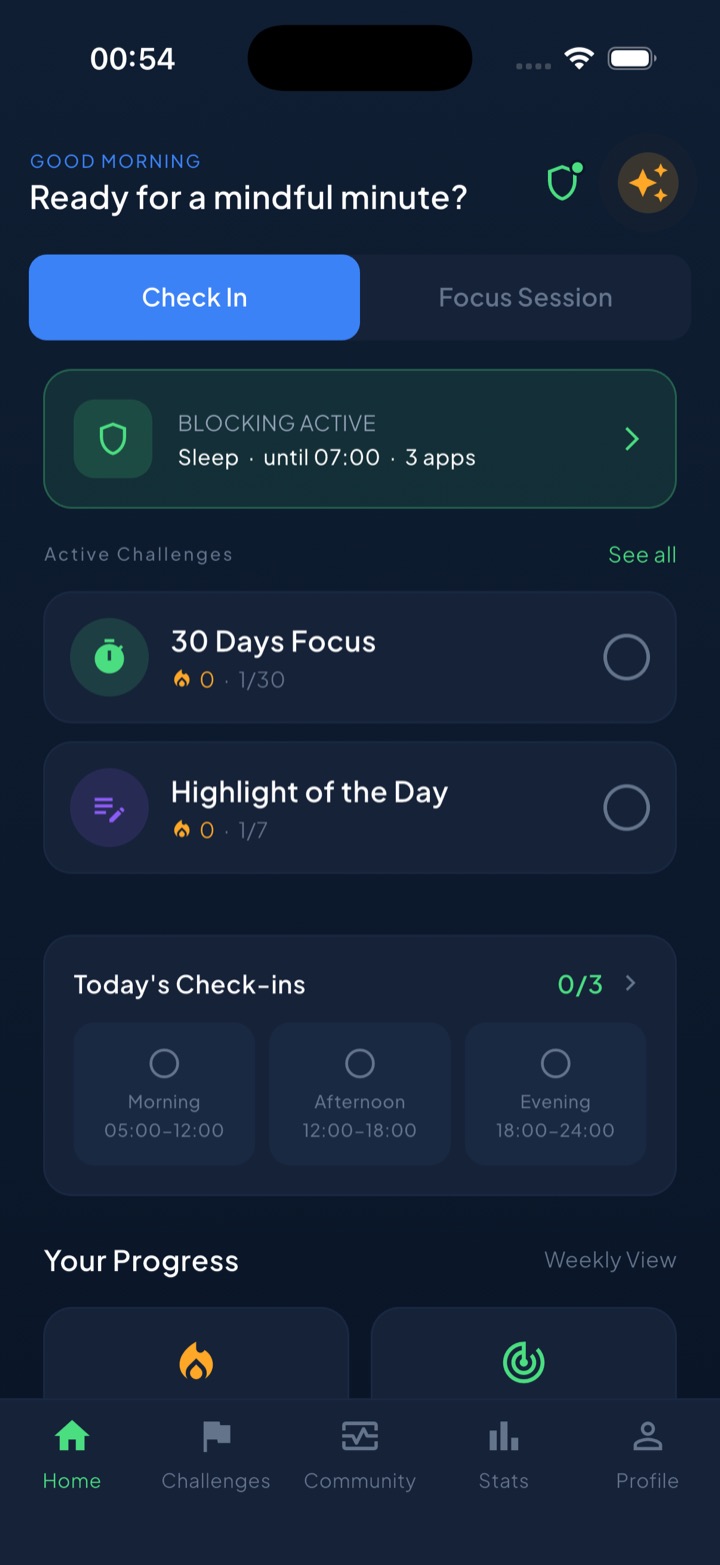
Here is how it maps onto the system in this article:
- Scheduled block routines mirror your batching windows: a Work routine that shields email and social apps from 9:00 to 17:00, opening only around your planned check times, plus a Sleep routine so the inbox cannot follow you to bed.
- A short “take a break” bypass handles the genuine exception — you can get in when you truly must, but it is a deliberate step, not a reflex tap.
- Focus sessions with a Live Activity put a visible countdown on your lock screen between windows, and daily check-ins and streaks turn “I didn’t check email compulsively today” into a chain you can see and keep.
The honest version: batching, notification hygiene, and one team announcement will get you most of the way with zero new tools. Unscrol is the enforcement layer that makes the system hold on the days your willpower doesn’t.
Frequently asked questions
How often should you check email at work?
For most roles, two to four scheduled windows a day are enough — for example a mid-morning triage, an early-afternoon pass, and an end-of-day sweep. Researchers have found that people asked to limit email checks to a few times a day reported measurably lower stress, without any meaningful drop in responsiveness. The key is that the windows are predictable: colleagues learn when replies arrive, and you stop paying an interruption tax during the other six hours.
Why do I compulsively check my email?
Because the inbox is a variable-reward machine. Most checks find nothing, but occasionally something important, flattering, or scary arrives — and unpredictable rewards are exactly the schedule that trains compulsive behavior. Checking also relieves inbox anxiety for a moment, which teaches your brain that checking equals relief. Add remote-work visibility pressure — wanting to look responsive because nobody can see you working — and you get a loop that feels like diligence but works like a slot machine.
What is email batching and does it work?
Email batching means processing email only in a few fixed, time-boxed windows — say 25 minutes at 9:30, 13:00, and 16:30 — instead of continuously all day. Between windows the mail client stays closed and notifications stay off. During a window you triage every message to a decision: reply now if it takes under two minutes, schedule it as a task, or archive it. Batching turns email from an interrupt-driven feed into a bounded task, and studies suggest it lowers stress while protecting focus.
How do I stop checking work email after hours?
Make evening checking physically harder and socially unnecessary. Remove the mail app from your phone's home screen, turn off its notifications, and set Downtime or an app blocker to start at your log-off hour. Then tell your team what the real escalation channel is — a phone call — so you can disconnect knowing a genuine emergency can still reach you. Most 'urgent' evening emails are only urgent because your instant replies taught people to expect them.