The biggest work from home distractions aren’t random — they’re structural: the phone within arm’s reach, visible chores, the fridge ten steps away, family or roommates who assume you’re available, and the missing commute that used to draw a line between work and everything else. Because these are built into your environment, willpower alone won’t beat them. What works is a system: a workspace your brain associates only with work, time anchors that replace the office’s built-in structure, a phone parked in another room, and app blocking during your focus hours. This guide maps the real distractions of remote work, then builds that system step by step.

What actually distracts you when you work from home?
Office-focus advice doesn’t map onto remote work. At the office, the enemies are chatty coworkers, meetings, and noise — we covered those in how to stay focused at work. At home, the map looks different, and it pays to name each distraction precisely, because each one needs a different counter.
| Distraction | Why it wins | The counter |
|---|---|---|
| Your phone | Always within reach, and nobody can see you scrolling | Another room during focus blocks + blocked feeds |
| Chores | ”Productive procrastination” — laundry feels legitimate | A parked chore list + one scheduled chore break |
| The fridge | A snack doubles as a micro-break with a reward attached | Fixed snack times + water bottle at the desk |
| Family & roommates | No office walls means no signal that you’re “at work” | A visible focus signal + agreed interruption rules |
| No commute | Work bleeds into life and life bleeds into work | A fake commute + hard start and stop anchors |
Notice the pattern: none of these feel like distractions in the moment. Folding laundry feels responsible. A snack feels like a break. Answering your partner’s question feels kind. That’s what makes remote work so sneaky — its distractions wear the costume of a good decision, and there’s no boss walking past to snap you out of it.
Why doesn’t willpower fix it?
Because your home is an environment designed for leisure, and in a fight between environment and willpower, the environment usually wins. Research on self-control suggests that the people who look the most disciplined aren’t grinding through more temptation — they’ve arranged their surroundings to face less of it. That’s the core argument of environment design beats willpower, and nowhere does it apply harder than a home office.
Think about what the office gave you for free: ambient accountability (someone might glance at your screen), a physical space with exactly one purpose, and a commute that told your brain when work started and stopped. Working from home, you lose all three at once — and then blame yourself for being “undisciplined.” You’re not. You’re running office expectations on leisure infrastructure. The fix is to rebuild those three supports deliberately: space, time, and friction.
How do you design a home workspace that protects focus?
You don’t need a dedicated room. You need a dedicated spot — even one end of the kitchen table — that means work and only work, so sitting there becomes its own start cue.
- Give work exactly one location. Don’t rotate between couch, bed, and table. One spot, every day, lets your brain build the association: here = focus.
- Point your desk away from temptation. If you can see the TV, the sink full of dishes, or your bed, they’re all open tabs in your head. Face a wall or a window instead.
- Keep only work within arm’s reach. A chore you can see is a chore that negotiates with you. Put the laundry basket behind a door, and keep a notepad to park any chore that pops into your head — write it down, do it later.
- Make focus visible to your household. Headphones on, door closed, a small desk light — pick one signal and agree on it: signal on means “emergencies only.” Most family interruptions are a signalling problem, not a respect problem.
- End the day by hiding work. Laptop closed and in a drawer, notes out of sight. A workspace that stares at you all evening means work never really ends — which also makes the next morning’s start harder.
What are time anchors, and why do remote workers need them?
The commute was never just transportation — it was a boundary ritual that told your brain when to boot up and when to shut down. Remove it and the workday goes soft at both ends: you “start” while half-reading the news at 8:40, and you’re still answering messages at 9 p.m. Time anchors put the edges back. A minimal set:
- Take a fake commute. Ten minutes walking around the block before work, and again after. It sounds silly and works absurdly well as a start/stop signal.
- Start at the same time with the same ritual. Coffee, write the day’s plan, open the first block. Same order every day — the ritual does the deciding so you don’t have to.
- Protect two or three deep-work blocks. Put your hardest work into 60–90 minute calendar blocks and defend them like meetings — time blocking is the simplest version of this.
- Schedule the distractions. One chore break, fixed snack times, a real lunch away from the desk. A distraction with an appointment stops negotiating with you all morning.
- Set a hard stop. A short shutdown ritual — review the list, note loose ends, close the laptop — tells your brain it’s allowed to stop tracking work. Without it, remote work becomes a fourteen-hour smear of half-work.
Where should your phone live during work hours?
In another room. Not face down next to you, not in your pocket — out of the room.
A well-known 2017 study led by Adrian Ward found that the mere presence of your phone — silent, face down, untouched — measurably drains available cognitive capacity: part of your brain spends the whole time not checking it. The effect was strongest in the people most attached to their phones; the full story is in phone in the room, brain drain. Working from home makes it worse, because nobody can see you scroll, so nothing pushes back.
A practical hierarchy, best to worst: another room → hallway or bag → drawer → face down on the desk. If your job genuinely needs the phone nearby — 2FA codes, on-call — keep it out of reach but audible for calls, and solve the real problem in software: block the apps that actually eat you.
“I kept a perfectly clean apartment and a perfectly unfinished backlog. The fix that finally held was boring: phone in the bedroom, my feeds blocked from 9 to 5, and a walk around the block at 5:30 as my ‘commute home.’ Turns out the laundry could always wait until evening.” — Marcus, backend developer, 34
How does Unscrol help you focus while working from home?
Start with the free route, honestly: everything above works with a notepad and Apple’s built-in Screen Time. Set App Limits on your worst apps, schedule Downtime over your deepest morning block, and switch on a Work Focus mode. For plenty of people, that plus a fake commute is enough.
The catch is the one tap on “Ignore Limit” — at home, with nobody watching, that button gets very easy by Thursday. Unscrol is an iPhone app (iOS 16+) built on the same Apple Screen Time frameworks, designed to make the plan hold:
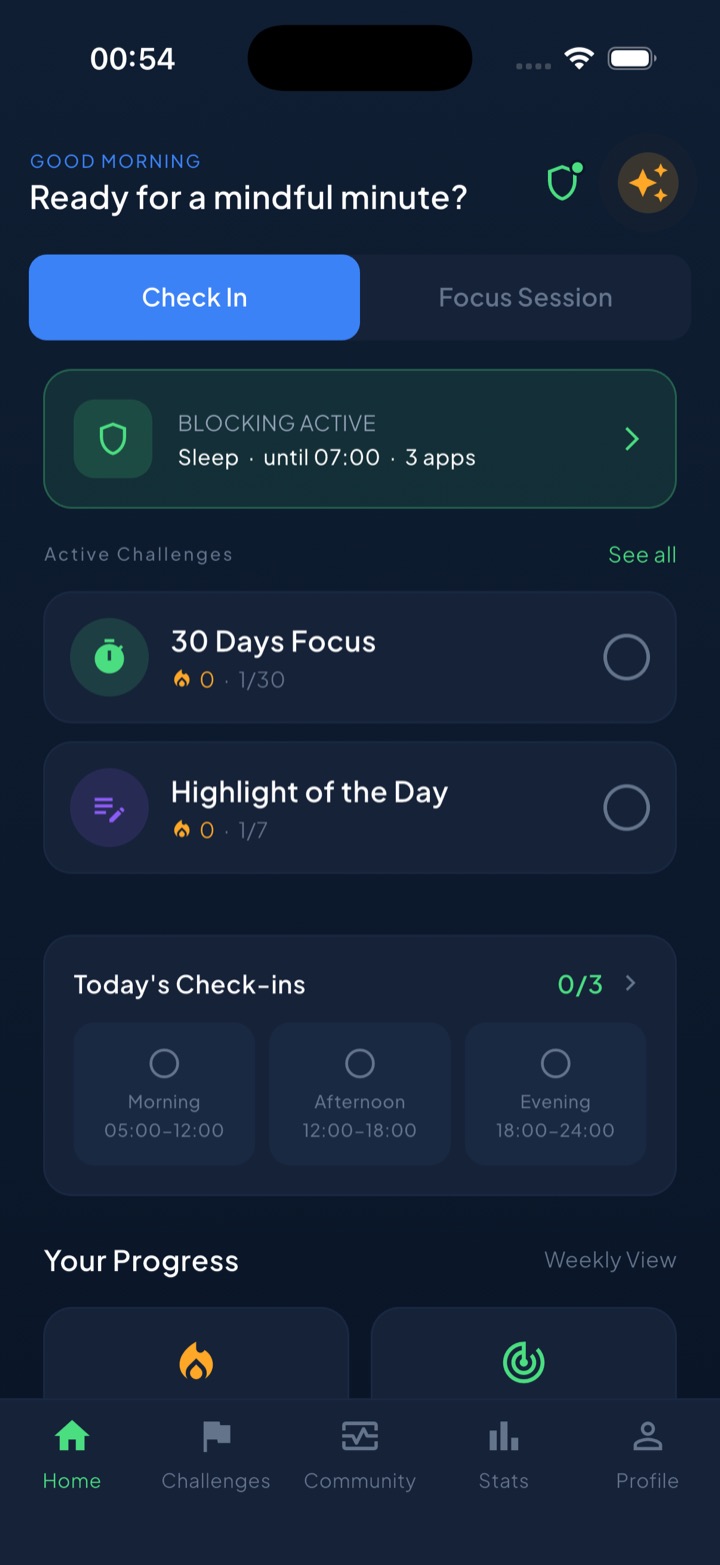
- Scheduled block routines. Set a recurring Work window — say 09:00–17:00 — and your chosen apps are system-shielded for those hours every workday, no re-deciding each morning.
- A “take a break” bypass instead of a wall. Genuinely need a blocked app mid-block? A short, deliberate bypass handles the exception without demolishing the routine — the middle ground that prevents the all-or-nothing spiral.
- Focus sessions with a Live Activity. Start a deep-work session and a countdown sits on your Lock Screen, so every glance at the phone shows you the commitment instead of a feed.
- Streaks and check-ins for the days nobody’s watching. Remote work removes external accountability; a daily streak, morning/afternoon/evening check-ins, and a leaderboard quietly put some back.
- Private by design. Your block lists and usage are processed on-device and never touch our servers.
The honest summary: the system — workspace, time anchors, phone out of the room — is free. Unscrol is the layer that keeps it running on the days your willpower doesn’t show up for the morning stand-up.
Frequently asked questions
What are the most common work from home distractions?
The big five are structural, not random: your phone sitting within arm's reach, visible chores like laundry and dishes, the fridge a few steps away, family or roommates who assume you're available because you're home, and the missing commute that used to separate work from everything else. Each one needs a different counter — phone placement and app blocking, a parked chore list, fixed snack times, an agreed interruption signal, and hard start and stop anchors for the day.
How do I avoid distractions while working from home?
Build a system instead of relying on willpower. Give work one dedicated spot your brain associates only with focus, and point your desk away from the TV, kitchen, and bed. Replace the commute with time anchors: a fixed start ritual, two or three protected deep-work blocks, scheduled breaks, and a hard stop. Park your phone in another room during focus blocks, and use Screen Time or an app blocker to shield distracting apps during work hours so the feeds aren't an option.
Why can't I focus when working from home?
Because your home is an environment designed for leisure, and environment usually beats willpower. The office quietly gave you three supports for free: ambient accountability, a space with exactly one purpose, and a commute that told your brain when work started and ended. Remote work removes all three at once, so ordinary tasks feel harder and every comfort competes for attention. The fix is rebuilding those supports deliberately — workspace design, time anchors, and friction on your phone.
Does putting your phone in another room actually help you focus?
Yes — more than most tips. A well-known 2017 study led by Adrian Ward found that the mere presence of a smartphone, even silent and face down, measurably reduces available cognitive capacity, because part of your brain works on not checking it. The effect was strongest in heavy users. At home nobody can see you scroll, so the pull is worse. Another room beats a bag, a bag beats a drawer, and a drawer beats face down on your desk.