To stop watching Reels and Shorts, you have to change your environment, not just your willpower — because short-form feeds are built to defeat willpower. The plan that actually works has four parts: remove the triggers (app off the home screen, notifications killed), block the short-video surface during your weak hours so the feed won’t open when you’re least able to resist, install a replacement behavior for the moments you’d normally scroll, and taper your dose over about a week instead of quitting cold. In-app limits and “take a break” reminders rarely hold, because they ask you to resist at the exact moment resistance is lowest. Below is the step-by-step version.
Why do in-app limits and willpower fail here?
Reels and Shorts are the hardest scrolling to quit, and it’s worth understanding why before you try. Unlike a normal feed, short-form video removes every natural stopping point: clips auto-play, so you never actively decide to continue, and the algorithm re-tunes itself to you on every swipe. That’s a variable-reward loop — occasional great clips buried in forgettable ones — which is the most persistent behavior pattern behavioral science has ever measured, the same engine behind dopamine and social media.
The built-in tools don’t match this force:
- Daily limits show a card you dismiss with one tap. When the pull is strong, you tap.
- “You’re all caught up” / “take a break” are polite suggestions with no teeth.
- Willpower is weakest exactly when you need it — tired, bored, or avoiding a hard task.
This is the core of why screen time limits don’t work for most people: they rely on you making the good decision in the worst possible moment. Real change moves the decision earlier, to a moment when you’re calm.
Step 1: Remove the triggers
Make the feed harder to reach so the automatic tap has nothing to land on.
- Move the app off your home screen into a folder on the last page, or into the App Library. Out of thumb’s reach is out of mind more than you’d expect.
- Kill the notifications. Every ping is an invitation back. Turn off all non-messaging notifications for Instagram, TikTok, and YouTube.
- Turn off autoplay where you can — YouTube lets you disable it, which restores a decision point.
- Log out of the ones you can bear to. Re-entering a password is a five-second delay that’s often enough to break the trance.
Step 2: Block the short-video surface during your weak hours
Removing triggers reduces accidental opens; blocking handles the deliberate reach when the craving is loud. The key is to target your vulnerable windows — for most people the last hour before bed and the first hour after waking, plus the mid-afternoon slump.
Reels is tricky because it’s inside Instagram, not separate, so blocking “just Reels” usually isn’t possible — you block the app during those windows and use it intentionally outside them. On iPhone you can do this with Apple’s Screen Time app blocking or a dedicated blocker that applies a real system-level shield.
“I told myself I’d ‘just check’ every night and lose an hour to Reels. Now Instagram and TikTok are blocked from 10pm, so at 10:01 it just won’t open. The urge is still there for a minute, then it’s gone. That one schedule did more than a year of trying to have self-control.” — Priya, graduate student
Step 3: Install a replacement behavior
You scroll to fill a specific need — usually boredom, a transition between tasks, or emotional avoidance. If you remove the scroll without replacing the function, the urge just finds another outlet. Pre-decide what you’ll do instead:
- For boredom: keep a book or a Kindle where your phone used to sit.
- For transitions: a 60-second physical reset — stand, stretch, water, look out a window.
- For avoidance: do the two-minute version of whatever you’re dodging.
Choosing the replacement in advance is what matters, so you’re not negotiating with yourself mid-urge.
Step 4: Run a 7-day taper
Quitting cold often triggers a rebound binge. Tapering lowers your dose gradually so the habit loosens without a backlash:
| Day | Reels/Shorts allowance | Add this |
|---|---|---|
| 1–2 | 30 min, in one sitting, on a timer | Notifications off, app off home screen |
| 3–4 | 20 min, after dinner only | Block during morning + bedtime windows |
| 5–6 | 10 min, on a timer | Add afternoon-slump block |
| 7 | 0–10 min, fully optional | Keep the schedule; notice how the urge has changed |
By day seven the goal isn’t zero forever — it’s that you decide when to watch, instead of the feed deciding for you. If you can open Reels, watch for ten minutes, and close it on purpose, you’ve won.
The honest note: plenty of people fix this with no app at all. Deleting Instagram and YouTube for two weeks, then reinstalling with notifications off and autoplay disabled, is a completely valid version of this plan. The tools below just make the blocking hold on the nights your willpower doesn’t.
Making the block hold with Unscrol
The plan lives or dies on Step 2 — whether the feed actually stays shut during your weak hours — and that’s the part willpower fails at. Unscrol is the iPhone and Apple Watch app we build to make that block automatic. You set scheduled blocking routines — for example, block Social and Entertainment from 10pm to 7am, and again during your afternoon dip — and Unscrol applies a real system-level shield using Apple’s official Screen Time frameworks, not a dismissible reminder.
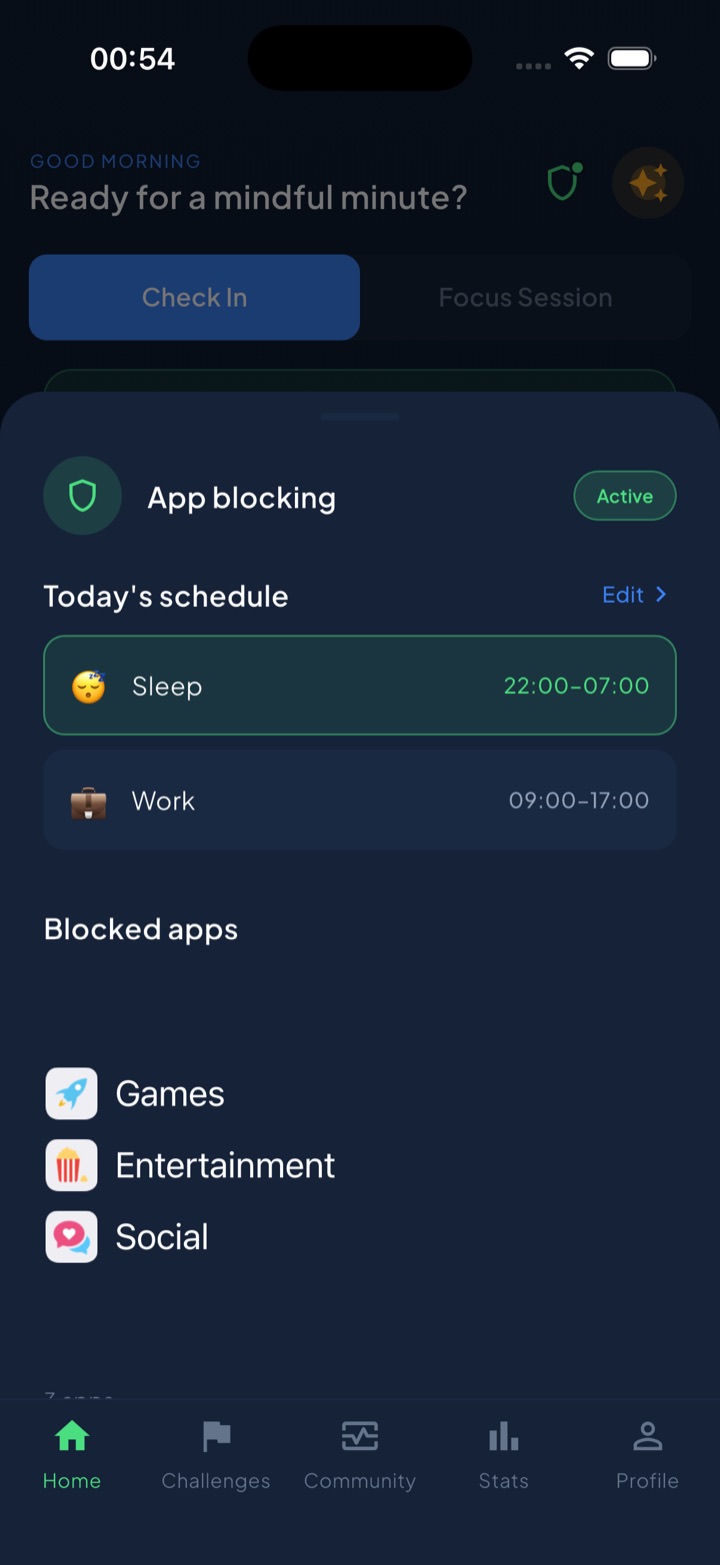
Because the block is scheduled, the decision to not open Reels is made once, calmly, in advance — not thirty times a night under pressure. A daily streak keeps you honest about staying on plan, and the mood journal helps you spot why you reach (bored, anxious, avoiding), which is the part that prevents the habit from simply relocating. You could build the same guardrails with Apple’s built-in Screen Time and a hard rule for yourself. Unscrol just removes the “Ignore Limit” escape hatch so the plan survives the nights you’d otherwise cave.
Pick your two weakest hours and block the feed there first. That single move does more than any amount of resolving to scroll less.
Frequently asked questions
Why can't I stop watching Reels even when I want to?
Because Reels is engineered to remove every decision point. Clips auto-play, so you never actively choose to continue, and the algorithm learns from each swipe to serve you something slightly more compelling. That's a variable-reward loop, the most persistent behavior pattern in psychology. You're not weak; you're up against a system designed by teams of engineers to keep you swiping. Winning means changing the environment, not just trying harder.
How do I block just Reels without deleting Instagram?
This is genuinely hard, because Reels is baked into the main app rather than being separate. Instagram offers a limited in-feed setting to reduce or take a break from Reels, but it's easy to bypass. For a real block you generally have to restrict the whole app during your vulnerable hours using Apple's Screen Time or a blocking app, then use Instagram deliberately for messaging or posting outside those windows.
Do Instagram and YouTube's built-in time limits actually work?
For most compulsive users, no. Built-in reminders like 'You're all caught up' or a daily limit are soft nudges you can dismiss with one tap, and you'll dismiss them exactly when the pull is strongest. They work fine for people who weren't struggling anyway. If you routinely tap 'Ignore Limit,' you need real friction — a block you can't dismiss in the moment — not another reminder.
How long does it take to break a Reels habit?
Most people feel the compulsion ease within one to two weeks of consistent friction, though the urge can spike whenever you're bored or stressed. A structured 7-day taper helps by lowering your dose gradually instead of quitting cold, which reduces the rebound binge. Expect the first three days to be the hardest, then a noticeable drop in how often you reach for the app without thinking.