If you feel addicted to TikTok, you’re not weak — the app is engineered to be almost impossible to put down. The reliable way to quit TikTok is to stop leaning on willpower and start removing the app from the moments you’re most likely to reach for it: delete it or block it during your weak hours (late at night, first thing in the morning, study or work breaks), line up a competing habit so your hand has somewhere else to go, and give yourself a 30-day reset so your brain recalibrates to slower rewards. In-app screen-time reminders barely help, because they’re one tap to dismiss. Real change comes from friction you can’t casually override.

Why is TikTok so addictive?
TikTok isn’t just another social app — it’s the most efficient attention machine ever shipped to a phone. A few design choices stack together to make it uniquely sticky:
- An algorithm that reads you in seconds: The For You Page (FYP) doesn’t wait for you to follow anyone. It watches how long you linger on each clip and rebuilds your feed in real time, so within minutes it’s serving a stream tuned to your exact weak spots.
- Variable rewards: Most videos are forgettable, but every so often one lands perfectly. That unpredictable payoff is the same slot-machine mechanic that drives compulsive behavior — you keep swiping because the next one might be the great one. It’s the same dopamine loop that powers every social feed.
- Autoplay with no seams: Videos loop and the next one starts automatically. There’s no “load more” button, no end of page, no moment where the app pauses and asks if you want to continue.
- No natural stopping point: A book has chapters, a show has episodes. TikTok has an infinite, edgeless feed. Without a built-in finish line, “just one more” can run for an hour — and the short-form format is quietly rewiring how long you can hold attention on anything.
Put together, these aren’t accidents. They’re the reason the same trap keeps people stuck watching Reels and Shorts too — TikTok just perfected it first.
How do I know if TikTok is a problem?
There’s no official score, but a few honest signs tend to show up together:
- You open it without deciding to. Your thumb finds the app before your brain does — in the elevator, at a red light, the second a conversation lulls.
- “Five minutes” becomes an hour. Time distortion is a hallmark of the feed; you genuinely can’t feel the minutes passing.
- You guess wrong about your usage. Most people underestimate their real TikTok time by a wide margin. Analytics firms often cite averages around 90 minutes a day for active users, though estimates vary — and your own number is usually higher than your gut says.
- It’s eating your sleep. If you’re scrolling past the point of tiredness, that’s revenge bedtime procrastination, and TikTok is one of its most common fuels.
- You feel restless without it. A flat, itchy boredom when you can’t scroll is a dependence signal, not a personality trait.
None of these mean you’re broken. They mean the app is doing its job, and it’s worth taking back the controls.
Should I delete TikTok or just block it?
This is where most quit attempts quietly fail, so let’s be honest about the trade-offs.
| Approach | How strong | The catch |
|---|---|---|
| In-app screen-time reminders | Very weak | A notification you dismiss without thinking; zero enforcement. |
| iOS Screen Time app limit | Moderate | Free and built in, but the shield has a one-tap Ignore Limit button. |
| Deleting the app | Strong at first | Reinstalling takes 20 seconds — the delete-and-reinstall cycle is the trap. |
| Scheduled system block | Strongest | Blocks TikTok automatically during set hours with friction that resists a casual tap. |
Deleting TikTok works — until it doesn’t. The problem isn’t the delete; it’s the 20-second reinstall at 11pm when a craving hits. Most people ride this delete-reinstall carousel for weeks, feeling like a failure each lap. Blocking is often more durable because it stays put: a system-level shield that reappears on schedule doesn’t depend on you being strong at your weakest moment. The most reliable setup combines both — remove the app from your home screen so it’s not a reflex, and put a scheduled block around the hours you’re most exposed.
A 30-day plan to quit TikTok
You don’t need to white-knuckle this. Work down the ladder:
- Audit your real usage first. Open Settings → Screen Time and look at your actual weekly TikTok minutes. Seeing the honest number — not your guess — is what makes the rest feel worth it.
- Kill the easy triggers. Turn off all TikTok notifications and move the app off your home screen and out of the dock. Every extra tap between you and the feed matters.
- Block it during your vulnerable hours. Identify your two or three danger windows — usually late night, the first hour awake, and study or work breaks — and block the app on iPhone during exactly those times. Scheduling beats willpower because the decision is already made.
- Line up a replacement. Cravings need somewhere to go. Keep a real book, a walk, or a quick workout as the default “bored hands” option. The goal isn’t a vacuum; it’s a slower, quieter reward.
- Commit to 30 days. Treat it as a reset, not a life sentence. A month is long enough for the FYP’s grip to loosen and for slower activities to start feeling interesting again.
- Plan for the dip. Days three and four feel flat and restless — that’s withdrawal from fast dopamine, and it passes. Knowing it’s coming is half the battle.
“I’d delete TikTok on Sunday feeling motivated and have it back by Tuesday night. What finally worked wasn’t discipline — it was scheduling a hard block from 10pm and during my morning commute so the app just wasn’t there when I’d normally cave. Three weeks in, I stopped reaching for it.” — Jordan, grad student, 24
How Unscrol helps you quit TikTok
Let’s be clear about what you can do for free: Apple’s built-in Screen Time can block TikTok with an App Limit or Downtime at no cost, and for some people that’s genuinely enough. The weakness is the one-tap Ignore Limit button and the fact that you have to set it up and defend it yourself, day after day. Unscrol exists to make that consistency automatic rather than a daily act of willpower.
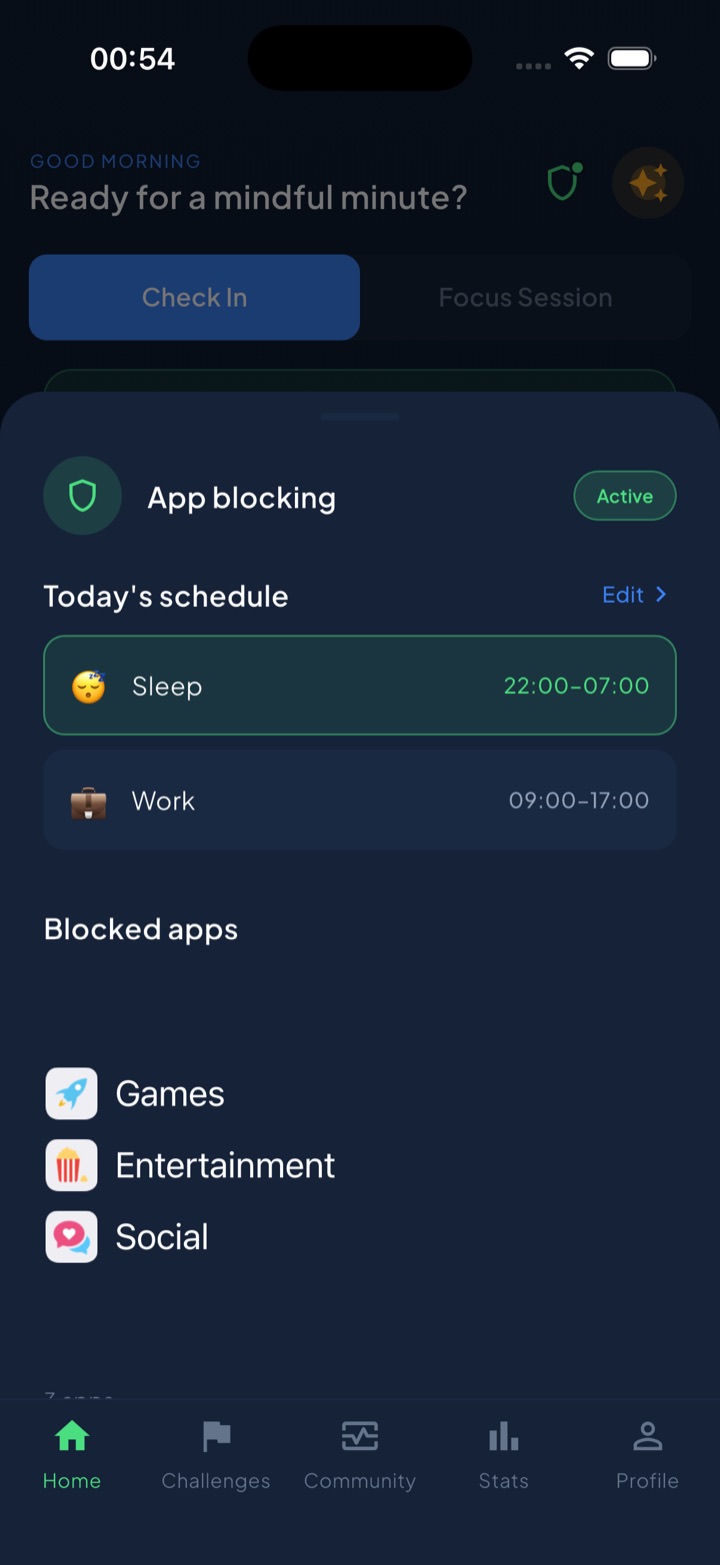
Unscrol runs on the same official Screen Time frameworks, so its blocks are real system-enforced shields — not overlay reminders you can swipe past. You can build scheduled blocking routines that shut TikTok off automatically during your danger hours (a Sleep routine from 22:00, a Work or Study routine during the day), so the app simply isn’t available when you’d normally cave. When a genuine urge hits, a short “take a break” bypass gives you a deliberate middle ground — not a soft nudge you ignore, not a prison-style lock, just enough friction to make the choice conscious. And because quitting is easier with momentum, urge check-ins let you log a craving instead of feeding it, while a unified daily streak and 45+ challenges turn each app-free day into visible progress. Which apps you block and your usage stats stay on-device — they never reach Unscrol’s servers. It won’t out-discipline you on day one — nothing does — but it removes the reinstall reflex and holds the schedule you set, which is exactly the part willpower fails at.
Frequently asked questions
Is TikTok addiction real?
TikTok isn't a clinical diagnosis, but the compulsive-use pattern behind it is very real. The For You Page uses a fast-learning recommendation algorithm, autoplay, and variable rewards — the same design levers that make slot machines and other social feeds hard to stop. If you open TikTok without deciding to, lose track of time, and feel restless when you can't scroll, you're experiencing genuine behavioral dependence. It doesn't mean you're broken; it means the app is working exactly as designed. The good news is the loop is trainable, and stepping away for a few weeks usually resets how strongly it pulls you.
How long does it take to quit TikTok?
Most people notice the strongest cravings fade within the first one to two weeks, and a 30-day break is enough for the habit loop to lose its grip. The first three to four days are the hardest — your brain expects the fast, novel rewards TikTok trained it on, so slower activities feel boring by comparison. That flat, restless feeling is temporary and a sign the reset is working. After a month, most people can either stay off entirely or return with far weaker urges. Blocking the app during your weak hours makes those early days dramatically easier.
Can I block TikTok on my iPhone during certain hours?
Yes. Apple's built-in Screen Time can set an App Limit or Downtime that blocks TikTok during chosen hours for free, though its shield has an 'Ignore Limit' button that's one tap away. Apps like Unscrol use the same official Screen Time frameworks to run scheduled blocking routines — for example, blocking TikTok every night from 22:00 and during study hours — with added friction so a single tap doesn't undo it. Everything about which apps you block stays on your device. Scheduling the block around your most vulnerable windows is far more effective than relying on willpower in the moment.