Digital minimalism is choosing your technology on purpose instead of by default. Coined by computer scientist Cal Newport, it flips the usual question: rather than asking whether an app gives you any benefit (almost anything does), you ask whether it’s the best way to support something you genuinely value — and if it isn’t, you cut it. The goal isn’t to reject technology; it’s to be ruthlessly selective, so a few carefully chosen tools serve your priorities and the rest of the noise disappears. The practical entry point is a 30-day declutter: step back from everything optional, then rebuild your digital life deliberately.
What is digital minimalism, and how is it different from a detox?
Newport’s core idea, laid out in his book Digital Minimalism, is that most of us adopted our apps by accident. We downloaded them because they were free and mildly useful, and never stepped back to ask whether they earn their place. A digital minimalist reverses that. They start from their values, decide what technology actually serves those values best, and treat everything else as clutter.
The distinction from a digital detox matters. A detox is a temporary break — useful, but you usually return to the same habits afterward. Digital minimalism is a permanent operating philosophy. The 30-day declutter looks like a detox, but its purpose is different: it’s a clean-slate reset whose whole point is the deliberate rebuild at the end. If a detox is a fast, digital minimalism is changing what’s in your kitchen.
There’s a subtler idea underneath it too. Newport argues that a cluttered digital life crowds out solitude — time alone with your own thoughts — and that the ability to be alone with yourself is where a lot of thinking, planning, and calm come from. Psychologist Timothy Wilson’s finding that many people would rather self-administer a mild shock than sit quietly with their thoughts shows how unpracticed we’ve become at exactly that. Minimalism buys the solitude back.
Why does declutter beat “just use less”?
Trying to moderate a dozen tempting apps at once is a willpower nightmare, because you face the same small decision hundreds of times a day and lose most of them. Newport’s insight is that a clean break followed by intentional reintroduction is easier than gradual moderation — for the same reason quitting is often simpler than cutting down.
Three things make the declutter approach work:
- It removes the constant decision. When an app is simply gone for 30 days, you’re not negotiating with yourself every hour. The choice was made once.
- It reveals what you actually miss. Most apps you won’t think about after day three. The two or three you genuinely miss are your signal for what to reintroduce. Absence is the cleanest test of value.
- It rebuilds the offline life first. The declutter isn’t just subtraction; you deliberately fill the freed time with things you value — reading, hobbies, people, movement. That matters, because an empty life will pull the apps right back.
This is why a structured reset outperforms vague “I’ll cut back” intentions, the same logic behind a committed monk mode sprint.
How do you run the 30-day digital declutter?
The process, adapted from Newport into a concrete plan:
- Define your rules (before Day 1). List your optional technologies — social media, games, streaming binges, non-essential browsing, news scrolling. Decide which are gone entirely for 30 days and write operating procedures for the handful you must keep for work (e.g. “email twice a day, at 11 and 4; no personal browsing on the laptop”).
- Take the 30 days. Step away from everything optional. The first week is the withdrawal — restlessness, phantom reaching, boredom. Hold steady; it passes.
- Aggressively rediscover offline life. This is the active ingredient, not an afterthought. Line up things you value in advance — a book stack, a sport, evenings with people, a project — so the freed hours have somewhere to go.
- Reintroduce with a test. At day 30, bring technologies back one at a time, and only those that pass two questions: Does this serve something I deeply value? and Is it the best way to serve it? If yes, define exactly how you’ll use it (which features, when, how long). If no, it stays out.
The reintroduction is where minimalism differs from every detox. You’re not returning to normal; you’re designing a new normal on your terms. For a lighter, whole-device version of the reset, the digital detox guide is a good companion, and how to reduce screen time covers the day-to-day tactics once the declutter is done.
What does a minimalist phone actually look like?
Philosophy is only as good as its setup. Here’s the concrete side — where friction and ease belong.
| App type | Minimalist setup |
|---|---|
| Feeds (social, short video) | Deleted, or logged out and buried on the last page; use the browser |
| Tools (maps, banking, notes) | Home screen — easy access, no friction |
| Communication | Kept, but notifications trimmed to people, not apps |
| Games / entertainment | Removed, or scheduled-blocked to set hours |
| Home screen | Tools and one page only; no dopamine apps |
| Notifications | Off by default; opt in to the few that matter |
| Color | Grayscale optional, to strip the visual pull |
Two principles run through the table. Put friction on the time-wasters — every extra tap, login, or missing icon reduces mindless opens. And keep the genuine tools frictionless — minimalism isn’t asceticism, and a maps app or your bank should be one tap away. The mere presence of a tempting app has a cost even when unused, as Adrian Ward’s “brain drain” research on phones suggests, so getting the feeds off the home screen does real work.
What are per-app operating procedures?
The most durable move Newport recommends is writing simple operating procedures for the apps you keep. Instead of a blanket “I use Instagram,” you decide exactly how: “Instagram on the laptop browser only, 20 minutes on weekends, to keep up with three friends.” A vague permission becomes a specific, bounded behavior.
Good operating procedures share a shape:
- When you’ll use it (specific times or triggers, not “whenever”).
- How long (a real limit).
- Where / how (browser vs app, which features).
- For what (the value it serves — if you can’t name one, it fails).
Write them down. An unwritten rule is a wish; a written one is a commitment you can check yourself against. And be honest that willpower alone rarely enforces these — which is exactly what tooling is for.
How Unscrol supports a minimalist phone
The weak point of any minimalist setup is the app you keep but don’t fully trust — the one you reintroduced with a strict operating procedure and then quietly overuse. Unscrol, the screen-time app we build, is built to enforce those procedures instead of leaving them to willpower. You can block whole categories — Games, Entertainment, Social — with Apple’s official Screen Time frameworks, and set scheduled routines so a kept app is only reachable in its allotted window and shielded the rest of the day. These are real system-level blocks, so “Instagram, weekends only” becomes a rule that actually holds.
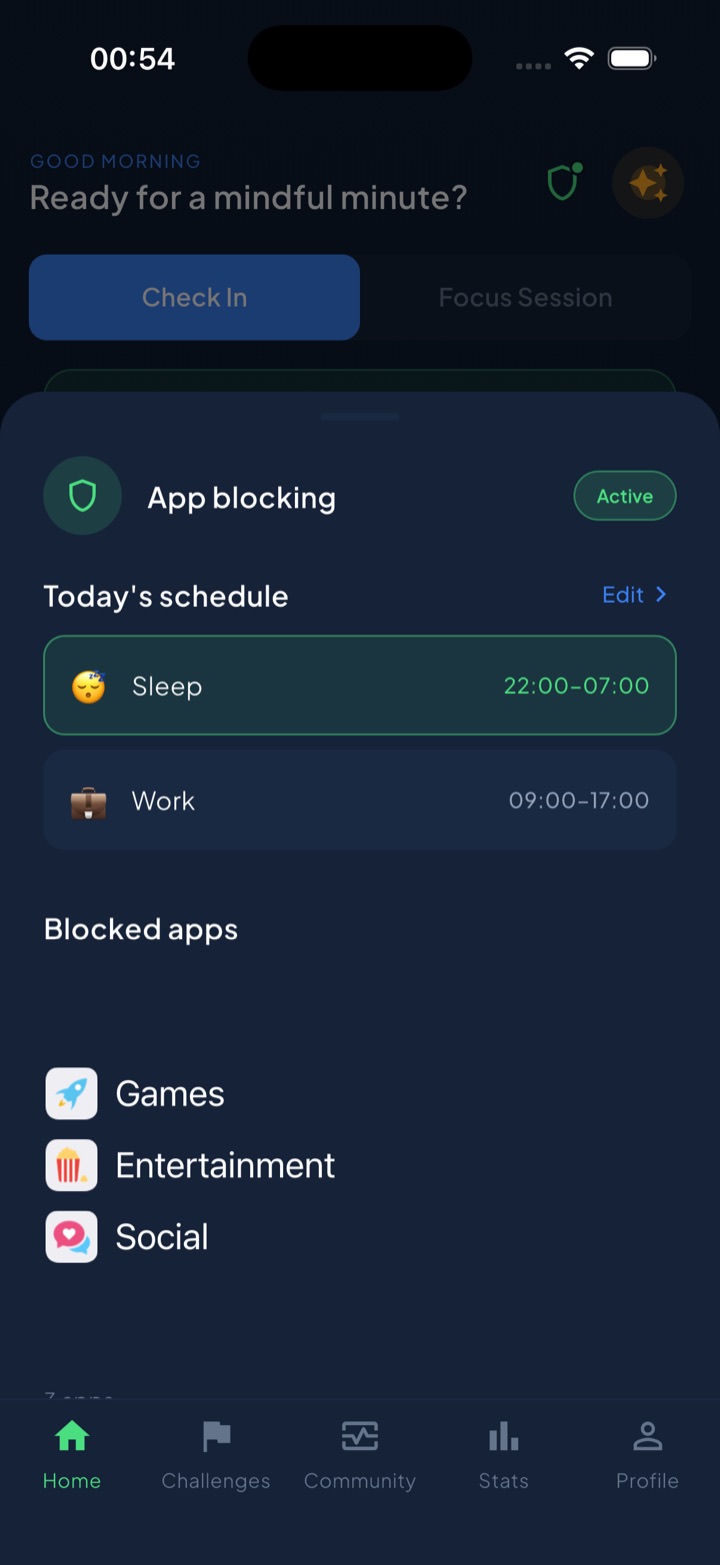
Because iOS processes which apps you block and your usage on-device, none of that data reaches Unscrol’s servers — a fitting match for a minimalist ethos. And to be clear, digital minimalism needs no app at all: deleting the time-wasters, burying the rest, and writing your operating procedures on paper is the whole method. A blocker just backs up the procedures you already decided on.
The takeaway: don’t ask whether an app is useful — almost everything is. Ask whether it’s the best way to serve something you value, clear out everything that fails, and let a small set of chosen tools have your attention.
Frequently asked questions
What is digital minimalism?
Digital minimalism is a philosophy, coined by Cal Newport, of using technology intentionally rather than by default. Instead of asking whether an app offers any benefit, you ask whether it's the best way to support something you deeply value — and if not, you cut it. The goal isn't to reject technology but to be selective, so a small number of carefully chosen tools serve your priorities and everything else falls away.
How do I do a 30-day digital declutter?
For 30 days, step away from all optional technologies — social media, most apps, non-essential browsing and video. Keep only what's genuinely required for work and life. Use the freed-up time to rediscover offline activities you value. At the end, reintroduce technologies one at a time, and only those that pass a test: this serves something I value, and it's the best way to serve it. Everything else stays gone or heavily restricted.
What's the difference between a digital detox and digital minimalism?
A digital detox is usually a short, temporary break, after which you return to your old habits. Digital minimalism is a lasting philosophy for how you use technology from then on. The 30-day declutter looks like a detox but has a different purpose: it's a reset that ends with rebuilding your digital life deliberately, keeping only high-value tools rather than sliding back to the default.
How do I set up a minimalist phone?
Delete apps you don't consciously choose, then organize what's left. Keep the home screen to tools only — no feeds or games. Bury social and video apps in a folder on the last page or remove them entirely and use the browser. Turn off nearly all notifications, switch to grayscale if you want less pull, and use scheduled blocking for the apps you keep but don't trust yourself with. The aim is friction on the time-wasters, ease on the tools.