The best Opal alternatives in 2026 are ScreenZen (free, friction-based), one sec (a gentle breathing pause), Jomo (deeply customizable), Forest (gamified), the Brick (a physical toggle around $59), and Unscrol (free to start, with system-level scheduled blocking, streaks and focus sessions). Opal is a genuinely well-made app — people go looking for alternatives mostly because of its ~$99.99/year price, a free trial that quietly rolls into an annual subscription, and the fact that even its strict mode can be bypassed. The right pick depends on whether you want something cheaper, stricter, or simply free.

Why do people look for an Opal alternative?
Opal earns its fans. The design is polished, the onboarding is friendly, and the Deep Focus sessions feel like a product someone loved building. But the same handful of frustrations show up again and again:
- Price. At roughly $99.99 a year (or about $19.99/month, or a ~$399 lifetime tier), Opal sits at the premium end of a crowded category. Prices change, so check the App Store — but that annual figure is what most people quote.
- Trial-to-annual surprise. A common complaint is that the free trial auto-converts to the yearly plan if you forget to cancel. That is standard App Store subscription behaviour, but it stings on a $100 charge.
- The free tier feels like a demo. Enough is locked that free use nudges you toward paying rather than solving the problem.
- Strict mode is still bypassable. On iOS, no third-party app can truly lock you out — more on that below.
If any of those describe you, you’re not alone, and there are good options at every price point. For a deeper head-to-head, see our Opal vs Freedom vs Unscrol comparison.
Opal vs the alternatives: a quick comparison
Here’s an honest, at-a-glance table. Prices are approximate and change often — treat them as ballpark, not gospel.
| App | Price (approx.) | Blocking strength | Gamification | Best for |
|---|---|---|---|---|
| Opal | ~$99.99/yr | Medium (bypassable) | Low | Polish and Deep Focus sessions |
| Jomo | ~$5/mo | Medium–High | Medium | Tinkerers who want fine control |
| one sec | ~$4/mo | Low (a pause, not a block) | Low | Gentle interruption of autopilot |
| ScreenZen | Free (donations) | Medium (friction) | Low | Anyone wanting a free option |
| Forest | Varies* | Low–Medium | High | People motivated by rewards |
| Brick | ~$59 hardware | High (physical step) | Low | A real-world friction layer |
| Unscrol | Free to start | High (scheduled, system-level) | High (streaks, challenges) | Consistency and routines |
*Forest was long a one-time paid app; its pricing has changed over the years, so confirm the current model and price before you buy.
Which Opal alternative is cheapest — or free?
If price is the issue, you have solid free and near-free choices:
- ScreenZen (free). Donation-supported and refreshingly simple. Instead of hard blocks, it adds friction — a breath, a delay and a “do you really want to open this?” screen — before an app launches. Friction won’t stop a determined relapse, but it kills mindless opening.
- one sec (~$4/month). Triggers a short breathing pause before you enter a chosen app. It’s the gentlest tool here and lovely for anxiety-free nudging. Fair warning: pauses can habituate — your thumb learns to wait out the animation — so it works best combined with a real block.
- Unscrol (free to download). Free to start, with scheduled blocking, a daily streak and focus sessions built in; the paid Unscrol Pro only unlocks extras like Streak Saver.
“I cancelled Opal after the annual charge caught me off guard. I honestly expected to miss it, but a free friction app plus one strict evening block covers ninety percent of what I actually needed.”
— Daniel, freelance developer, 29
Which Opal alternative is the strictest?
First, the honest caveat almost no listicle mentions: on iPhone, no third-party app can make itself truly impossible to bypass. Apple’s Screen Time gives you an “Ignore Limit” button, and you can always delete an app. Any tool claiming an unbreakable lock on iOS is overselling. What good apps do is make quitting annoying enough that you don’t.
Within that reality, the stricter options are:
- Brick (~$59). A small physical tag you tap with your phone to switch in and out of a blocking mode. Adding a real-world step — getting up to find the Brick — is meaningfully harder to cheat than tapping “end session.”
- Scheduled, system-level blocks. Routines that block whole app categories on a timer (say, all Social and Games from 22:00–07:00) tend to hold better than a focus session you can end early, because there’s no “end now” button staring at you. Unscrol and Apple’s own Screen Time both do this using the official Screen Time frameworks to block apps on iPhone.
If raw willpower were enough, none of us would need any of this — which is exactly why screen-time limits so often don’t work unless the friction is real.
How do I switch from Opal without losing momentum?
Cancelling one app and installing another is where good intentions quietly die. Keep it simple:
- Cancel Opal properly. Settings → your name → Subscriptions → Opal → Cancel. Do this before the trial or renewal date, not after.
- Pick one job to protect first. Your mornings, your study block, your bedtime — one, not all five.
- Set one scheduled block covering that window and choose the app categories (not just single apps) that derail you.
- Add a streak or a small reward so the habit compounds instead of resetting. Streaks matter more than they sound — here’s why streaks build habits.
- Give yourself one honest escape hatch for genuine emergencies, so the system feels humane rather than a prison you’ll rage-quit.
For the full landscape beyond Opal’s competitors, our roundup of the best app blocker apps for iPhone covers the category in depth.
How does Unscrol work as an Opal alternative?
Let’s be straight: you don’t strictly need any paid app to block apps. Apple’s built-in Screen Time is free, it uses the same underlying frameworks, and for a disciplined person it’s genuinely enough. What people pay for — with Opal, Unscrol or anything else — is consistency: making the good setup effortless so you actually keep it.
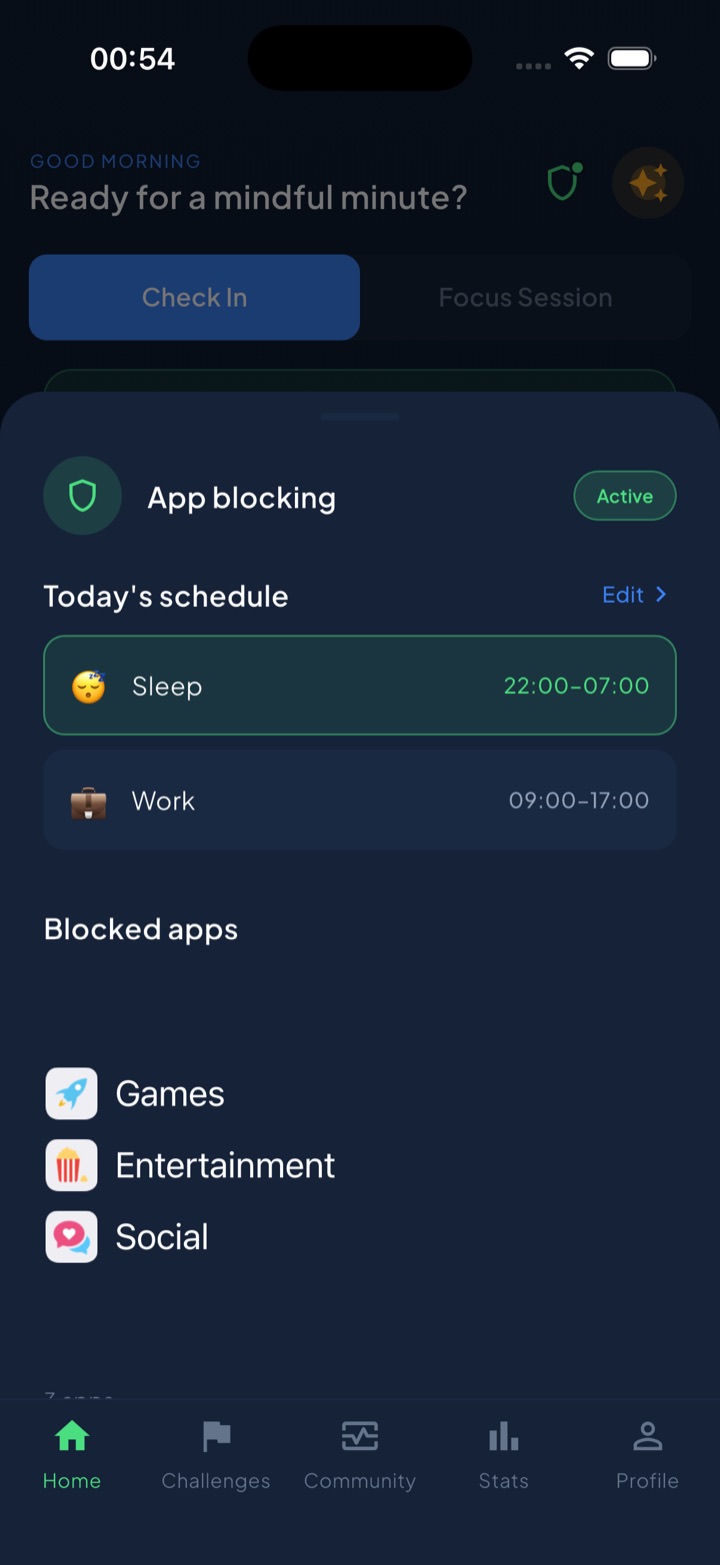
Unscrol is free to download and leans into three things Opal’s price point doesn’t emphasise: scheduled routines (Work 09:00–17:00, Sleep 22:00–07:00 that auto-block chosen apps and categories), a unified daily streak that counts whether you check in or finish a challenge, and focus sessions with a wall-clock countdown that also shows in your Dynamic Island. Blocking runs through Apple’s official Screen Time frameworks — so it’s system-enforced, and the apps you block stay processed on-device by iOS, never reaching Unscrol’s servers.
There’s also a deliberate “take a break” bypass — a middle ground between a soft nudge that does nothing and a prison lock you’ll uninstall. If you want strictness plus routines plus a streak to keep you honest, and you’d rather start free, it’s a fair Opal alternative. If you just want the gentlest possible nudge, one sec might suit you better — and that’s fine too.
Frequently asked questions
Is Opal worth it?
Opal is worth it if you value polish and don't mind roughly $99.99 a year. It has one of the cleanest interfaces of any screen-time app, and its Deep Focus mode genuinely helps some people. The two common complaints are the price and a free trial that auto-converts to an annual plan, so set a cancellation reminder. If you mainly want scheduled blocking or something free, a cheaper alternative like ScreenZen, one sec or Unscrol will cover most of the same ground.
What is the best free alternative to Opal?
ScreenZen is the best fully free alternative to Opal. It's donation-supported and uses friction — a pause and a tap-through screen — before an app opens, which is enough to break autopilot for many people. Unscrol is also free to download and adds system-level scheduled blocking, a daily streak and focus sessions, with a paid tier only for extras like Streak Saver. Both run on Apple's Screen Time frameworks, so blocking is enforced by iOS itself rather than a flimsy overlay.
Is there an app blocker stricter than Opal?
Yes, but with a caveat: on iOS no software block is truly unbypassable, because Apple lets you tap 'Ignore Limit' or delete the app. Opal's strict mode can be worked around, and so can most competitors. For genuinely harder friction, the Brick is a $59 physical tag you tap to switch modes, which adds a real-world step. Among apps, scheduled routines that block whole app categories on a timer — like Unscrol's Work and Sleep blocks — tend to hold better than a session you can end early.