Time blindness is the difficulty perceiving the passage of time — sensing how much has gone by, estimating how long things take, and feeling a future deadline as real. For many adults with ADHD, time doesn’t stretch out as a timeline; it collapses into just “now” and “not now.” A task due next week lives in “not now,” carries no urgency, then crashes into “now” as a full-blown emergency. This isn’t laziness — researchers have consistently found that ADHD affects time perception and duration estimation. And the fix is not “try harder to watch the clock.” It’s to stop trusting your internal clock and make time external: visible timers, alarms as guardrails, routines anchored to fixed points of the day — and taming the one device engineered to erase time cues altogether: your phone. (One honest note up front: this article shares strategies, not medical advice — if time struggles are seriously disrupting your life, that conversation belongs with a clinician.)

What does time blindness actually feel like?
If you’ve never experienced it, time blindness sounds like an excuse. If you have, the examples are painfully specific:
- “Five more minutes” becomes ninety. Not occasionally — reliably, and you’re genuinely shocked every time.
- Chronic lateness while caring deeply. You weren’t ignoring the meeting; the twenty minutes you had somehow became four.
- Estimates that are fiction. “That email will take ten minutes” — it takes an hour. “The project needs a weekend” — it needs three.
- Deadlines that don’t exist until they’re on fire. You know the date. Knowing and feeling are different systems, and only the second one creates action.
- Waiting mode. A 3 p.m. appointment quietly cancels your whole morning, because nothing can start with an event floating somewhere in “not now.”
Dr. Russell Barkley, one of the most cited ADHD researchers, describes ADHD as being “nearsighted to time”: the further away an event is, the blurrier and less motivating it becomes — far more steeply than for non-ADHD brains. That framing moves the problem from character (“you don’t care”) to perception (“you can’t see it from here”).
Why does ADHD split time into “now” and “not now”?
The short, hedged version: ADHD involves differences in executive functions — the brain’s self-management system — whose core job includes holding the future in mind so it can guide the present. Studies suggest ADHD brains underestimate elapsed time, struggle to reproduce durations accurately, and discount future rewards more steeply. The consequence: motivation doesn’t switch on until a deadline crosses the border into “now.”
That’s why the all-nighter is such a universal ADHD story. Panic finally making you productive isn’t a discipline failure — panic is simply the moment the deadline became perceptible. The urgency was always going to arrive; it just arrived too late to be useful.
Two practical conclusions follow, and the rest of this article is built on them:
- You cannot willpower your way into sensing time. Perception isn’t a choice.
- You can move time outside your head, where perception isn’t required — you just need to look.
Why does your phone make time blindness worse?
Here’s the part most time-management advice skips: the modern feed is close to a purpose-built time-blindness amplifier.
Almost every older format has built-in endings. A book has chapters. An episode has credits. A newspaper runs out. Those endings are “surfacing points” — moments your brain lifts its head, checks the clock, and renegotiates (“one more chapter, then bed”). Feeds are deliberately designed to have none. Infinite scroll removes the bottom of the page; autoplay removes the gap between videos. No chapters, no credits, no “you’re all caught up.” The product goal is a state with no natural exits — and time cues are exactly what got engineered away.
Now combine that with an ADHD brain. Your internal clock is already unreliable, so you depend more than most people on external signals to notice time passing — and the feed removes those too. That’s the whole trap: a sensory-deprivation tank for time, wrapped around the exact reward system ADHD brains find hardest to resist (we cover that mechanism in ADHD and phone addiction — that piece is the hub; this one is the time-perception spoke). Studies suggest people broadly underestimate how long they spend scrolling; with ADHD in the mix, the gap widens further.
The conclusion isn’t “never scroll.” It’s that scrolling must never be open-ended for a time-blind brain. If a session’s ending isn’t built in before it starts, the feed decides when it ends — and the feed’s answer is never.
How do you make time visible? The external-clock toolkit
Every strategy that reliably helps with time blindness is a version of the same move: take time out of your head and put it where your eyes are.
| Strategy | What it does | How to do it |
|---|---|---|
| Analog clocks, everywhere | Shows time as space — moving hands make elapsed time visible in a way digits don’t | One in every room you work or relax in, in your natural line of sight |
| Visible countdown timers | Turns duration into a shrinking shape you perceive without checking | A visual timer or a face-up phone timer, running during the task |
| Alarms as guardrails | Marks the start of things, not just the due time | A labeled “leave the house” alarm, a “start dinner” alarm, a “wrap up” alarm 15 minutes before you must stop |
| Time-anchored routines | Attaches tasks to fixed daily events instead of a feeling of “when it’s time" | "After morning coffee, meds and calendar.” “At 22:00, screens off.” Anchors don’t require sensing time |
| The ×1.5 rule | Corrects chronically optimistic estimation | Estimate, write it down, multiply by 1.5, schedule that. Adjust after a week of data |
| Phone-side time cues | Reinstalls the “chapter breaks” feeds removed | App limits, scheduled blocks, and a lock-screen timer so the phone itself announces endings |
If you already plan in a calendar, this pairs naturally with the time blocking technique — blocks turn abstract hours into concrete appointments. And a classic Pomodoro timer is really just a visible external clock with a built-in ending, which is exactly why it tends to work well for ADHD brains.
“The alarm that changed my life is labeled ‘SHOES ON.’ Not ‘meeting at 10’ — I’d had that alarm for years and still arrived late, because ‘meeting at 10’ told me a fact, not an action. ‘Shoes on, 9:35’ tells my body what to do right now. I still can’t feel twenty-five minutes. I don’t have to anymore.” — Marcus, software developer, 34
How do you build a time-anchored day?
You don’t need to overhaul your life — just a skeleton of fixed points that doesn’t depend on your sense of time:
- Choose three anchors that already exist. Waking up, lunch, bedtime. They happen daily whether or not you plan them — that’s what makes them load-bearing.
- Attach one routine to each anchor. Not “I’ll do it in the afternoon” (a “not now” that never becomes “now”), but “right after lunch, 20 minutes of messages — with a timer running.”
- Set start alarms, labeled with actions. “Leave,” “Start report,” “Kitchen.” Naming the action removes the transition decision — the step ADHD brains stall on.
- Run one visible timer during focused work. The task gets a duration, the duration gets a face. When it ends, you renegotiate consciously instead of drifting.
- Give your evening a hard ending. The feed will not end your night — that’s its business model. A “screens off” alarm, backed by an actual app block (below), is the chapter break the feed refuses to provide.
- Log reality for one week. Guess how long tasks will take, then note the truth. You’re not judging yourself; you’re calibrating your multiplier. Most people find their ×1.5 is really a ×2.
Expect imperfection. External clocks don’t cure time blindness — they compensate for it, the way glasses compensate for nearsightedness. The system’s job is to make sure one slipped anchor doesn’t unmoor the whole day.
How does Unscrol help with time blindness?
Start with the free route, honestly: buy a cheap analog clock, set labeled alarms, and use Apple’s built-in Screen Time to put App Limits on your feed apps and a Downtime window at night. For a lot of people, that alone reinstalls enough endings to matter.
The catch — as most ADHD adults who’ve tried it will tell you — is that Screen Time’s “Ignore Limit” button is a one-tap suggestion, and a time-blind brain at 1 a.m. taps it without even registering the decision. Unscrol is an iPhone app (iOS 16+) built on the same Apple Screen Time frameworks, designed to be the sturdier external clock:
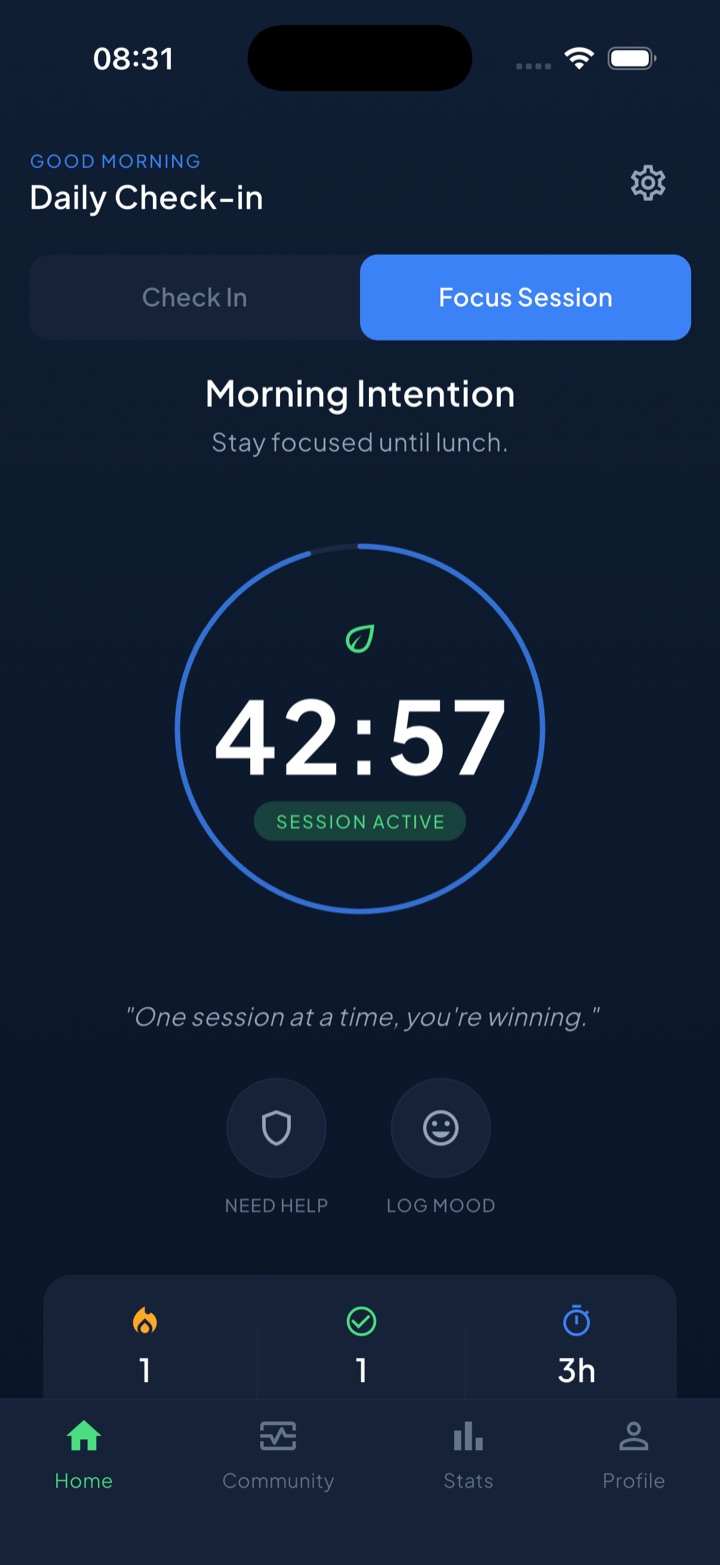
- Scheduled block routines are time anchors the system enforces. A Sleep routine that shields your feeds at 22:00, a Work routine for 9:00–17:00 — fixed walls that exist whether or not you feel time passing.
- Focus sessions put a visible countdown where your eyes already are. A Live Activity shows the timer draining on your lock screen — an external clock on the exact device that usually erases time.
- The “take a break” bypass is a chapter break, not a wall. When you genuinely need an app mid-block, you take a short, deliberate break with an ending built in — the one thing feeds never give you.
- Daily check-ins (morning / afternoon / evening) are three ready-made anchors, and finishing one keeps your streak alive — a small, visible “now” reward for behavior whose payoff usually hides in “not now.”
- Private by design. Your block lists and usage are processed on-device and never touch our servers.
The honest summary: clocks, alarms, and Apple’s free tools are the foundation, and no app replaces professional support if ADHD is seriously disrupting your life. What Unscrol adds is enforcement and visibility — endings that actually arrive, on a phone that was designed to have none.
Frequently asked questions
What is time blindness?
Time blindness is a persistent difficulty sensing the passage of time and estimating how long things take. People who experience it — very commonly adults with ADHD — tend to feel time in just two categories, 'now' and 'not now,' so a deadline next week has almost no emotional weight until it suddenly becomes urgent. It shows up as chronic lateness, wildly optimistic estimates, and losing hours to absorbing activities without noticing. It's a difference in time perception, not laziness.
Is time blindness a real ADHD symptom?
Time blindness isn't a formal diagnosis on its own, but researchers have consistently found that ADHD affects time perception and time estimation, and clinicians widely recognize it as part of the executive-function picture. Dr. Russell Barkley, one of the best-known ADHD researchers, has described ADHD as being 'nearsighted to time.' If time struggles are disrupting your life, that's worth discussing with a clinician — an article like this can offer strategies, but it isn't medical advice.
Why does my phone make time blindness worse?
Feeds are deliberately built without endings. A book has chapters and an episode has credits — natural pauses where your brain surfaces and checks the clock. Infinite scroll and autoplay remove those pauses, so there is no cue to resurface. For a brain that already struggles to sense time internally, a feed removes the last external signals too, which is why 'five minutes' on a feed so often turns into an hour that felt like nothing.
How do you deal with time blindness?
Stop relying on your internal clock and move time outside your head. The core toolkit: analog clocks you can see from anywhere you sit, visible countdown timers that show duration shrinking, alarms that mark when to start things (not just when they're due), routines anchored to fixed daily events, and multiplying your time estimates by 1.5. On the phone side, app limits and scheduled blocks act as artificial 'chapter breaks' that feeds refuse to provide.