The best apps to stop doomscrolling in 2026 depend on the job: Unscrol for a daily budget plus a habit you keep on iPhone, Apple Watch and Android, one sec, ScreenZen and ClearSpace for friction before you open an app, SocialLite for Reels and Shorts specifically, Opal and BePresent for scheduled limits and rewards, and Headway for replacing the scroll with something else. Apple’s built-in Screen Time is the free baseline worth trying before any of them.
Disclosure: we make Unscrol. To keep this comparison fair, every rating, price and feature below comes from each app’s own App Store listing (US store), checked on 2 October 2026, and every app is described by what its developer says it does.

How did we pick these apps?
We started from the apps that keep showing up in App Store search results and existing doomscrolling roundups — Headway, one sec, ScreenZen, Opal, BePresent, ClearSpace, SocialLite, Brick and Forest all appear again and again — plus Unscrol, which we build. We kept the ones that run on iPhone without extra hardware, do something about the scroll itself rather than only track time, and were updated in the last two months — all eight shipped an update between 19 Aug and 1 Oct 2026.
Then we read each app’s own App Store listing for what it says it does, what it costs, and who built it. If you want the mechanics of why a feed is so hard to put down in the first place, our guide to what doomscrolling actually is covers that in more depth. We didn’t run tests or invent scores, and no developer paid for a mention.
Where does each kind of app step in?
Most doomscrolling roundups sort apps into “blockers,” “nudgers” and “replacements.” That’s a reasonable start, but it skips the question that matters more: at what point in your scroll does the app actually intervene?
- Before the open. one sec, ScreenZen and ClearSpace add a pause, a check-in or a delay the moment you tap a chosen app, before you’re inside the feed at all. Right for a reflex problem — you don’t decide to open Instagram, your thumb does.
- Inside the feed. SocialLite works once you’re already in the app, stripping out Reels, Shorts and the algorithmic recommendations while leaving messages and profiles intact. Right if you don’t want to lose the app, just the feature that eats the hour.
- A daily budget. Opal, BePresent and Unscrol work on a schedule or a limit, a window of time before Apple’s Screen Time framework shields the apps outright. Right for a duration problem — you open the app on purpose and lose ninety minutes.
- Replacing the habit. Headway doesn’t touch the feed at all; it gives the craving for novelty somewhere else to go. Right once the other three have stopped the automatic behavior and you’re left with an empty few minutes a day.
Most people need more than one layer: a pause stops the reflex open, a budget caps the session if the pause fails, a replacement fills what’s left over. For more on building that routine day to day, see how to stop doomscrolling.
Which app is best for your kind of doomscrolling? The quick comparison
| App | Where it steps in | Best for |
|---|---|---|
| Unscrol | A daily budget plus a per-session cap, enforced by a Screen Time shield | Blocking plus a habit you keep, on iPhone, Apple Watch and Android |
| one sec | Before the open — a breathing pause and a question | Breaking the reflex tap before it happens |
| ScreenZen | Before the open — a growing delay, check-ins and optional strict blocks | The strongest fully free option |
| ClearSpace | Before the open — a pause plus challenges and accountability partners | Pairing friction with a support system |
| SocialLite | Inside the feed — removes Reels, Shorts and recommendations, keeps the rest | Reels and Shorts specifically |
| Opal | A daily budget — scheduled blocks, app limits, Deep Focus sessions | Strict, scheduled focus sessions |
| BePresent | A daily budget — goals backed by a cash stake and real-life rewards | Staying under a limit with a reward attached |
| Headway | Replacing the habit — microlearning instead of the feed | Swapping the scroll for something else entirely |
What do the App Store listings say?
The numbers straight from each listing, so you can see how many people have actually rated an app before you install it. All eight are free to download.
App Store data (US store) as of 2 Oct 2026. Ratings and prices change, so check the listing before you install.
| App | Developer | Rating (count) | Languages | Last updated |
|---|---|---|---|---|
| Unscrol | Ridvan Uyan | No US ratings yet | English | 1 Oct 2026 |
| one sec | riedel.wtf apps S.L. | 4.8 (23,637) | 30 languages | 29 Sep 2026 |
| ScreenZen | ScreenZen LLC | 4.9 (50,778) | 6 languages | 6 Sep 2026 |
| ClearSpace | Clearspace Technologies, Inc. | 4.7 (8,887) | English | 19 Aug 2026 |
| SocialLite | Sociallite LLC | 4.8 (8,072) | 9 languages | 23 Sep 2026 |
| Opal | Opal OS Corporation | 4.7 (88,978) | 10 languages | 26 Sep 2026 |
| BePresent | Screen Detox Inc | 4.8 (65,526) | English, Spanish | 27 Sep 2026 |
| Headway | GTHW App Limited | 4.6 (117,136) | 11 languages | 1 Oct 2026 |
1. Unscrol: best for a daily budget plus a habit you keep
Unscrol is the app blocker for iPhone we build. You set two numbers — a daily budget for distracting apps (45 minutes by default) and a per-session cap (5 minutes by default) — and a Screen Time shield enforces both: burn through a session-sized block and those apps lock for 15 minutes, spend the whole budget and they stay locked until the next day. A Shield can also run on a schedule by time of day, and turning it off early takes a breathing exercise and a wait, not one tap.
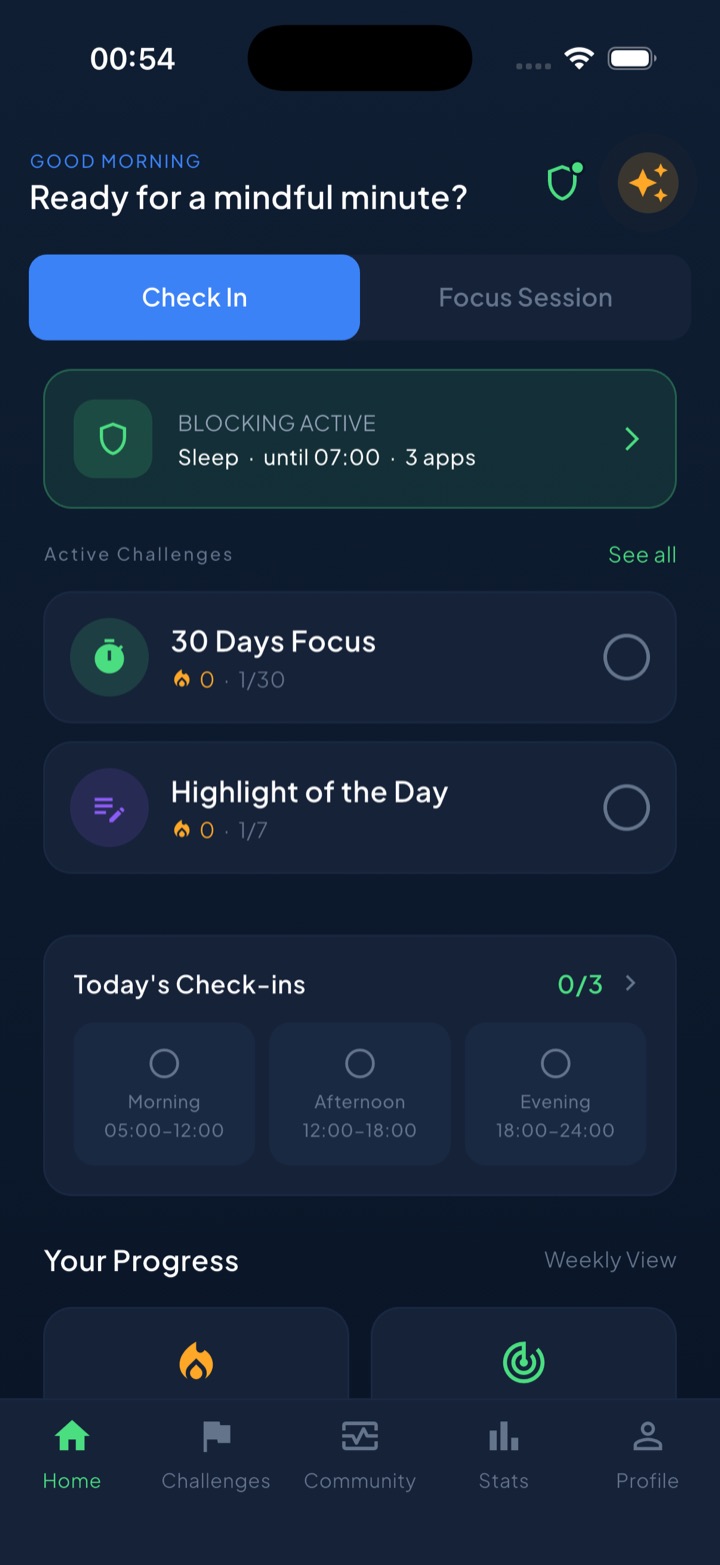
The habit layer is the rest of the pitch: a one-minute reflection for the moment the urge hits, a streak for every day under budget, around 117 challenges across 8 categories, mood check-ins, and focus sessions with a Live Activity countdown. Block lists and usage stay on the device — iOS hands Unscrol opaque tokens, not app names. It’s free to download; the subscription only adds Streak Saver and more challenge slots. Honest caveat: it’s iOS and watchOS only, and new enough that it has no US ratings yet.
2. one sec: best for a breathing pause before you open
one sec does one thing: when you tap a chosen app, it plays a deep-breath animation and makes you wait, then asks whether you still want in. Its listing says the approach delays access instead of blocking it outright, that app usage drops by 57% on average, and that the work is backed by research collaborations it names with the Max Planck Institute and the German and Danish governments. If you get pulled in anyway, its “Doom Scroll Emergency Brake” kicks you out of the app after a set time and makes you go through the intervention again. Using it with one app is free; more apps need one sec Pro, and it also offers a free Safari extension for websites. It’s an interrupter, not a hard blocker — if the pause has stopped working for you, look further down this list.
3. ScreenZen: best fully free option for before-the-open friction
ScreenZen stacks several small frictions rather than one. Its listing describes a delay before a distracting app opens that can grow each time you open it, short check-ins that interrupt scrolling once you’re already in, an “Is this important?” prompt, an app goal with an optional block once you hit it, and a strict block by time range or number of opens, plus a lock on its own settings. The only in-app purchases its listing mentions are optional tips, which makes it the strongest fully free pick here, and its 4.9 average is the highest of the eight.
4. ClearSpace: best for pairing friction with challenges and accountability
ClearSpace’s listing leads with the same pause-before-opening idea as one sec and ScreenZen — decide whether to proceed after a deep breath, or opt out — but wraps it in more structure: session management so a distracting app opens only for a bounded stretch, screen time challenges its listing says train your attention, and accountability partners who help you stick to your limits. Its listing also reports that users say phone addiction subsides and dopamine cravings get less powerful, though that’s ClearSpace’s own framing, not an independent result. With 8,887 ratings, it has one of the smaller samples on this list, just ahead of SocialLite’s 8,072.
5. SocialLite: best for Reels and Shorts specifically
SocialLite is built around a narrower problem than the rest of this list: not all of social media, just the short-form feed inside it. Its listing says it blocks short-form video feeds, algorithmic recommendations, explore and discovery pages, live streams, shopping tabs and ads from Instagram, YouTube and other platforms, while leaving direct messages, profiles you visit on purpose, and the ability to post untouched. Tap a video someone sent you directly and it plays — you just can’t swipe to the next one. If your doomscrolling is specifically the Reels or Shorts tab, this is the one tool here aimed at exactly that gap.
6. Opal: best for scheduled blocks and a daily app limit
Opal’s listing leads with blocking apps and websites at set times through the week, daily app limits, focus sessions it can sync with iPhone’s own Focus modes, and a Deep Focus level it says you cannot cancel or bypass. It also claims members save an average of about 1 hour 23 minutes a day — a figure from Opal’s own marketing, not an independent study. With 88,978 ratings averaging 4.7, it’s the most-reviewed of the blockers here, second only to Headway’s microlearning library. The trade-off: it requires iOS 18, a higher bar than every other app on this list.
7. BePresent: best for a budget backed by real rewards
BePresent’s listing combines app blocking with gamification and a financial incentive: set a daily screen-time goal and back it with a monetary stake that’s forfeited if you go over. On top of that sit Present Sessions you can run solo, with a group, or in a stricter “Beast Mode,” weekly leaderboards, and points redeemable for things like a meditation subscription or discounted therapy sessions through named partners, plus hourly scrolling-awareness reminders. With 65,526 ratings averaging 4.8, it has one of the largest samples here, behind only Opal and Headway.
8. Headway: best for replacing the scroll with something else entirely
Headway doesn’t block or interrupt anything — its listing positions it as a book-summary app, with more than 1,700 titles condensed into sessions under 15 minutes, a daily microlearning habit, self-growth challenges and spaced-repetition flashcards. The pitch is the swap itself: instead of leaving an empty gap where the scroll used to be, you fill it with something that at least compounds. Its listing claims more than 50 million users and carries the highest rating count here at 117,136, averaging 4.6. The caveat: it does nothing about the reflexive tap that opens Instagram in the first place — pair it with an interrupter or a blocker if that’s still unsolved.
Also considered
Brick, a physical device you tap your phone against to lock and unlock chosen apps (its listing caps you at a handful of Emergency Unbricks for when you’re without it), is effective but needs a device you can lose; see our Brick vs app blocker comparison. Forest, a gamified focus timer that can also block apps during a session on iOS 16 and later, sits alongside other blockers in our best app blocker apps for iPhone roundup. And Apple’s own Screen Time, the free baseline already on your iPhone, sets App Limits and Downtime at no cost, with the well-known weakness that “Ignore Limit” is one tap away — our guide to how to block apps on iPhone covers setup.
Which app should you choose?
- Blocking plus a habit loop that lasts, on iPhone, Apple Watch and Android: Unscrol.
- Your problem is the reflex tap, not the time once you’re in: one sec.
- Real friction, free: ScreenZen, or Apple’s built-in Screen Time.
- Friction plus accountability partners and challenges: ClearSpace.
- Your scrolling is specifically Reels, Shorts or another short-form feed: SocialLite.
- Strict, scheduled sessions with a polished interface: Opal.
- A cash stake and real rewards work better on you than willpower: BePresent.
- You’d rather swap the scroll for something else than fight it: Headway.
What should you do instead of scrolling?
Blocking or delaying an app creates a gap; it doesn’t fill one. If you don’t decide in advance what goes into that gap, the easiest thing to do is open a different feed, which is why people who “quit” Instagram often end up doomscrolling on YouTube instead.
Pick a short, pre-decided replacement for the moment the urge hits, and keep it boring enough that you’ll actually do it:
- A physical reset. Stand up, stretch, drink water, or step outside for sixty seconds. Unscrol builds this in as a one-minute reflection you can do the moment you notice the pull.
- A task you’ve already queued. A couple of pages of a book, a specific chore, or the smallest next step on something you’ve been avoiding.
- A log, not a lecture. Note what you were feeling right before you reached for the phone — bored, anxious, avoiding something — without judging it. The pattern usually becomes obvious within a week or two.
“A budget alone didn’t do much — I just moved my scrolling to a different app. What helped was having to breathe for a few seconds before it would open again. By the third week I mostly didn’t bother.” — Renata, dental hygienist, 38
The point isn’t a replacement as exciting as the feed. It’s having something ready so the decision is made before the urge shows up.
Do apps to stop doomscrolling actually work?
They work when they match the mechanism, not just the symptom. Interrupters like one sec and ScreenZen are built for the reflex tap; budget tools like Opal, BePresent and Unscrol are built for session length; a feed-specific tool like SocialLite targets one kind of scroll; a replacement like Headway is built for the empty space after you stop. Using the wrong shape of tool for the problem is the most common reason people say “nothing works” — a pause won’t fix a three-hour session, and a strict block won’t fix a reflex if you just switch to a different app.
None of the eight fixes the underlying reason you reach for your phone. If scrolling is how you cope with a bad day, boredom, or a hard task you’re avoiding, an app buys you the pause; what you do with it is still up to you. Read our deeper guides on how to stop doomscrolling and how to break a social media addiction if the habit runs wider than any single app can reach, or start with a full digital detox if you’d rather reset first. For a wider reset that goes beyond doomscrolling specifically, our roundup of the best digital detox apps covers eight picks split by detox style, from a full break to a daily habit.
Frequently asked questions
What is the best free app to stop doomscrolling?
ScreenZen is the strongest fully free option on this list: the only in-app purchases on its App Store listing are optional tips, and it already combines a growing delay before an app opens, short scroll interruptions, and strict blocks by time or number of opens. Apple's own Screen Time costs nothing and is already on every iPhone, though it is easy to override with a single tap. Unscrol is free to download and use, with a subscription that only adds a streak-saving feature and more challenge slots. One sec is free if you only need it on a single app. If money is the deciding factor, start with Screen Time or ScreenZen before paying for anything stricter.
Do apps to stop doomscrolling actually work?
They work best when the tool matches the actual problem. An interruption before an app opens helps people who tap into a feed without deciding to, but it does nothing about the time spent once inside. A scheduled daily limit helps people who open an app on purpose and then lose track of time, but a determined person can usually find a way around it. A feed-specific blocker helps only with the exact feature it targets, and a replacement app does nothing to stop the reflex that starts the whole cycle. Picking one tool and expecting it to solve every version of the habit is the most common reason people give up on all of them. Combining a pause with a limit, and giving yourself something to do instead, works far more reliably than any single app alone.
Can I stop doomscrolling without deleting Instagram or TikTok?
Yes, and for most people that is the more realistic goal. You can keep the apps installed and still change what they do to you: add a delay or a breathing pause before they open, set a scheduled daily budget so a session ends on its own, or use a feed-specific tool that removes only the short-form recommendations while leaving direct messages, posts and profiles you intentionally visit untouched. Deleting an app entirely works for some people, but many simply reinstall it within days, which is why friction, limits and narrower feed-blocking tools exist as a middle path between doing nothing and quitting a platform outright.
Which app works best for Reels and Shorts specifically?
SocialLite is built specifically for that problem rather than for app use in general. Its approach is to remove short-form video feeds, algorithmic recommendations and discovery pages from apps like Instagram and YouTube while leaving direct messages, profiles you visit on purpose and the ability to post untouched, so you can still use the app for what you actually need it for. Most other tools on this list work at the level of the whole app: they block it, delay it, or limit it as a single unit, which is a blunter match if Reels or Shorts is the only part that actually traps you. If the habit spreads beyond one feed, pairing a feed-specific tool with a broader daily budget covers both problems at once.