If one sec has stopped working for you, the honest replacements are ScreenZen (free, friction-based), Jomo or Opal (paid, stricter scheduling), Apple’s own Screen Time (free and built in), the Brick (a physical tap, around $59), and Unscrol (a daily budget plus a cooldown lock). Which of those is right depends on a question worth answering before you install anything: do you want the pause to be harder to skip, do you want it cheaper, or do you want something that is not a pause at all? one sec is a well-made product doing one specific job. People leave it when the job changes, not because it is bad.
Prices below were checked in September 2026, vary by storefront, and change often. Treat them as directional and confirm on the App Store before you pay for anything.

What does one sec actually do, and what is it good at?
one sec inserts a short interruption between your tap and the app opening. Depending on how you configure it, that is a deep-breath animation, a small task, a mirror view, or a quick emotion check, followed by a question: do you still want to open this? It is a self-nudge by design, deliberately not a wall.
It is also the most seriously researched tool in this category, which is worth saying plainly. A 2023 paper in PNAS by David Grüning, Frederik Riedel and Philipp Lorenz-Spreen reported that participants abandoned the app they were reaching for roughly 36% of the times one sec interrupted them, and attempted to open their target apps about 57% less after six weeks. Read that with one caveat the marketing does not print: two of the three authors are part of the one sec team. Peer-reviewed and plausible is not the same as independent.
Practically, one sec runs on iPhone, Android and as a browser extension, which already puts it ahead of the iOS-only tools further down this page. The free tier gives you one breathing interruption on one app. Pro is a subscription with a lifetime option; one sec’s own store lists 3.99 EUR monthly, 14.99 EUR yearly and 99.99 EUR lifetime, with regional variation. Pro also adds scheduled sessions and real blocks, so the common line that one sec “only pauses” is not quite fair — but the pause is what it is built around and what it does best.
What it is genuinely good at: killing the reflex open. The unlock-and-thumb-to-Instagram move that happens before you have decided anything. If that is your problem, you may not need an alternative at all.
Why do people look for a one sec alternative?
Four reasons come up again and again, and only one of them is about money.
- The pause habituates. A surprise stops working once it stops being a surprise. After a few hundred repetitions your thumb waits out the animation while your attention is somewhere else entirely. This is the single most common complaint, and it is a property of pauses in general, not a flaw in this one.
- It governs the door, not the room. An interruption asks whether you meant to open TikTok. It has nothing to say about the fifty minutes after you answer yes. If your problem is session length rather than session count, an interruption is the wrong shape of tool.
- The free tier is one app on one interruption type. Reasonable for the developer, frustrating if you were hoping to test it properly first.
- You wanted a lock and bought a doorbell. Some people arrive at one sec after Screen Time failed them, expecting something stricter, and a mindful breath is not that.
If reason one or two is yours, the deeper issue is worth reading about on its own — we wrote about why you keep bypassing your app blocker and about why short cooldown locks tend to outlast day-long limits.
one sec alternatives compared: which one fits which problem?
Everything in this table is a real, currently shipping product. “Bypass difficulty” is a judgement, not a measurement, and it assumes you are the one who set the thing up — every one of these is easier to defeat if you also hold the passcode.
| App | Core mechanic | Platforms | How hard to bypass | Pricing model | Best for |
|---|---|---|---|---|---|
| one sec | Interruption before an app opens | iOS, Android, browser | Low — sit through it | Free tier; subscription or lifetime Pro | Breaking the reflex open |
| ScreenZen | Delay screen plus confirmation | iOS, Android | Low to medium | Free; optional in-app tips | Anyone who wants friction at no cost |
| Apple Screen Time | App Limits and Downtime at OS level | iPhone, iPad, Mac, Watch | Low alone, high with a passcode you don’t hold | Free, built in | People who will actually configure it |
| Jomo | Scheduled blocking routines and limits | iPhone, iPad, Mac | Medium | Subscription, with a lifetime option | Tinkerers who want fine control |
| Opal | Scheduled focus sessions plus analytics | iOS mainly, Mac and Android weaker | Medium | Free tier; premium subscription, roughly $100/year | Detailed dashboards and polish |
| Freedom | Cross-device filtering sessions | iOS, Android, Mac, Windows | Medium | Subscription, plus a one-time Forever plan | One block across a laptop and a phone |
| Brick | Physical NFC puck you tap to lock and unlock | iOS, Android | High — you have to walk to it | One-time hardware, about $59, free app | Adding a real-world step |
| Unscrol | Daily budget, per-session cap, 15-minute cooldown | iPhone, Apple Watch | Medium | Free to use; optional subscription | Limiting how long you stay, not just how often you enter |
Which alternative is stricter than a pause?
Start with the caveat that almost no comparison page prints: on iPhone, no third-party app can make itself impossible to bypass. You own the device. You can disable a limit, and in the last resort you can delete the app. Anything advertised as an unbreakable lock on iOS is overselling. What good tools sell is friction expensive enough that the impulse dies before you pay it.
Within that reality, three things are meaningfully harder to skip than an animation:
- A physical step. The Brick is a small NFC puck, around $59 one-time with a free companion app. Tap your phone to it and the apps you chose are blocked until you tap it again — so if the Brick is in a drawer in another room, unlocking costs you a walk rather than a swipe. We compared that trade-off in detail in app blocker versus the Brick device.
- A schedule you set in advance. A routine that blocks whole categories from 22:00 to 07:00 holds better than a session you can end early, because there is no visible “end now” button to argue with. Jomo, Opal, Unscrol and Apple’s own Downtime all do this.
- A passcode you do not hold. The strictest setup available on iOS costs nothing: have a partner or a friend set the Screen Time passcode and not tell you. It is socially awkward and it works.
What is the best free alternative to one sec?
ScreenZen. It is free to download with no subscription; the only in-app purchases on its App Store listing are optional tips, and it runs on both iPhone and Android. Instead of a breath, it shows a configurable delay screen and a confirmation before a flagged app opens, with per-app delay lengths, daily limits, scheduled free periods and a lock on its own settings. In shape it is the closest free equivalent to one sec Pro that exists.
Its honest weakness is the same as one sec’s: once the delay screen stops being a surprise, your thumb learns to wait it out without your attention ever engaging. Unlike one sec, though, you can’t loosen it in a weak moment — ScreenZen locks its own settings, so turning down the delay takes deliberately switching that lock off first, not a quick tap.
The other free answer is the one already on your phone.
Is Apple’s built-in Screen Time enough?
For a meaningful minority of people, yes — and any comparison that skips this is selling you something. Screen Time is free, it runs at the OS level, and it is the same underlying framework that Opal, Jomo and Unscrol build on. Set an App Limit at Settings > Screen Time > App Limits, add Downtime for your evenings, and you have covered the core of what most paid blockers do.
Two things changed recently that make it a stronger recommendation than it was. In iOS 26 an App Limit can be set to zero minutes, which blocks the app outright instead of merely capping it, and revoking Screen Time permissions now requires the Screen Time passcode.
The honest weakness is unchanged, though: without a passcode, the limit screen offers to ignore it, and one tap later you are back where you started. There is no streak, no reward for a clean week, and nothing that notices when you quietly turn the whole thing off in March. That gap — enforcement without encouragement — is the entire reason this category of apps exists.
What if you don’t want a pause at all?
Then you are looking for a different mechanic, and there are three:
- A budget. A fixed number of minutes per day for a set of apps, after which they are gone until tomorrow. This treats attention like money rather than like a temptation to resist.
- A schedule. Blocks tied to the clock rather than to your usage: work hours, study block, after 22:00. Freedom does this across a laptop and a phone at once, which is its real advantage over everything else here; Jomo and Opal do it deeply on Apple hardware.
- A physical object. The Brick, or the older and cheaper version: a drawer, a timer-locked box, or leaving the phone in the other room.
“I ran one sec for about eight months and I still think it is a good app. What killed it for me was that I could breathe, tap through, and lose an hour anyway — the pause was never the part I was failing. I needed something that ended the session, not something that greeted me at the start of it.”
— Marta, hospital pharmacist, 41
How does Unscrol compare to one sec?
Differently enough that “alternative” is only half right. one sec asks a question at the door. Unscrol sets a spending limit for the room: a daily budget for your distracting apps (45 minutes by default) plus a cap on any single sitting (5 minutes by default). Burn a session-sized block and those apps lock for 15 minutes. Spend the whole daily budget and they are gone until tomorrow. There are also blocking schedules by time of day, and turning one off deliberately costs you a breathing exercise and a wait rather than a single tap.
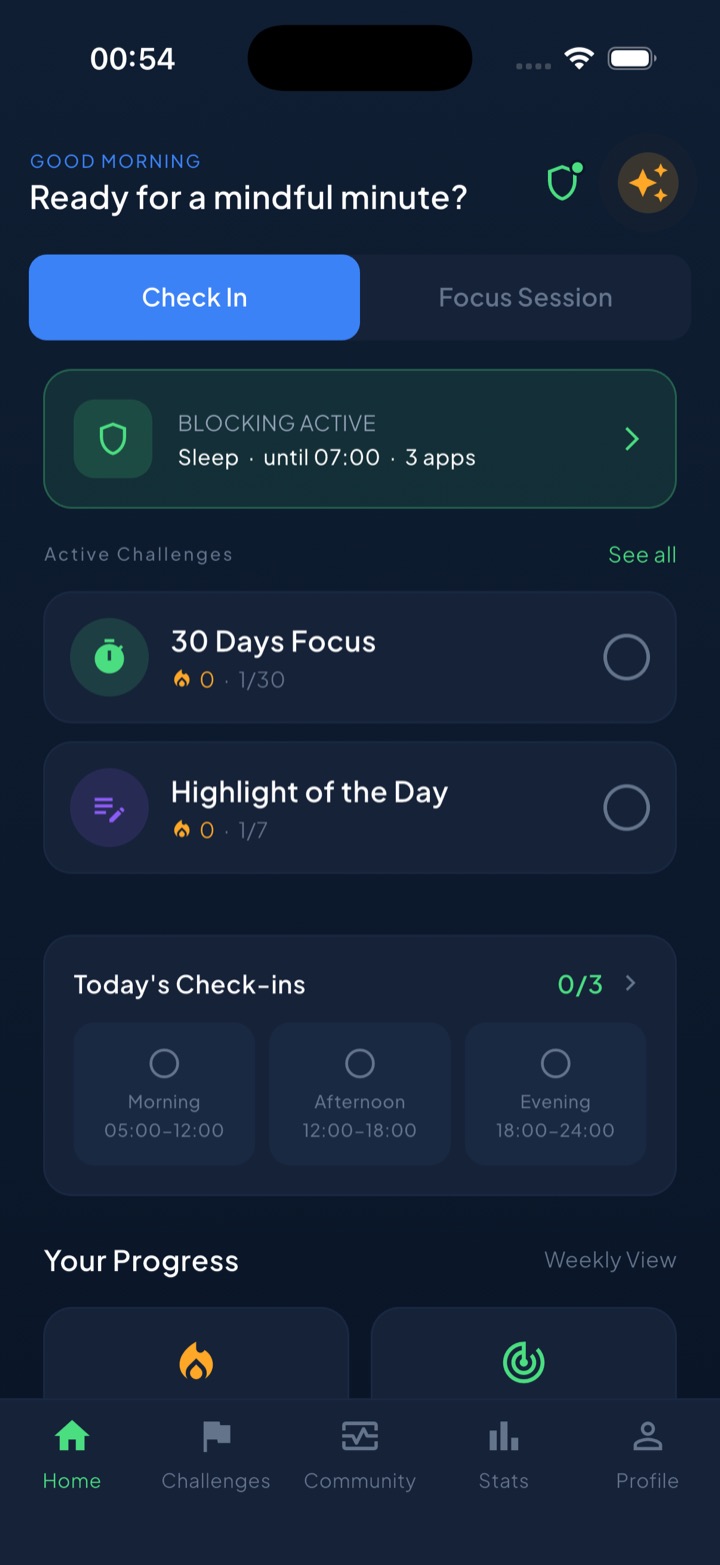
Blocking runs on Apple’s official Screen Time frameworks, so the block is a system-enforced shield rather than an overlay. A side effect worth knowing: iOS hands the app opaque tokens rather than app identities, so Unscrol cannot see which apps you picked or how long you spent in any one of them. The figures it reports are estimates from crossed thresholds, not exact minutes. It is free to download and use; the subscription adds Streak Saver, which rescues a missed day, and raises concurrent challenge slots from one to five.
The honest weaknesses: it is iPhone and Apple Watch only, so if you need Windows or Android coverage, Freedom is the answer in this list, not this one. The 15-minute cooldown is deliberately survivable, which means a determined person can wait it out. And it will not tell you that you spent 47 minutes in a particular app, because it structurally cannot know that.
Choose it over one sec only if a pause has genuinely stopped working on you. If you have never tried an interruption, try one sec first — it is cheaper and it might be enough. For the wider landscape, our comparison of Opal, Freedom and Unscrol and the roundup of Opal alternatives cover the paid end of the category in more depth. The full field, free apps included, is in our guide to the best app blocker for iPhone.
What none of these apps fix
All of them, one sec included, are working on the last three seconds of a much longer chain. None of them touch why you reached for the phone: the meeting you are dreading, the message you do not want to answer, the evening with nothing planned in it. A blocker converts an unconscious hour into a conscious decision. It does not make the decision easier, and on a genuinely bad day it will simply lose.
They also all share the same ceiling. On iOS every one of them is bypassable by the person who installed it, which means the real variable is not the app’s strictness but whether the version of you at 23:40 is willing to honour a decision made at noon. Tools can widen the gap between impulse and action. They cannot want things on your behalf.
If you have already cycled through three of these apps, the useful next step is probably not a fourth. It is picking the one whose mechanic matches the failure you actually keep having — reflex opens, long sessions, or a schedule you never keep — and then leaving it alone for six weeks.
Frequently asked questions
What is the best alternative to one sec?
It depends on what stopped working. If the pause was too easy to sit through, the stricter options are scheduled system-level blocking (Jomo, Opal, Unscrol or Apple's own Screen Time with a passcode someone else holds) or the Brick, a physical NFC puck you have to tap to unlock your apps. If price was the problem, ScreenZen is free and does something close to what one sec does, and Apple Screen Time is already on your phone. If you wanted a limit on how long you stay rather than a prompt at the door, look for a tool with a daily budget and a per-session cap instead of an interruption screen.
Is there a free alternative to one sec?
Yes, two good ones. ScreenZen is free to download with no subscription — the only in-app purchases on its App Store listing are optional tips — and it puts a configurable delay, a confirmation screen and a lock on its own settings in front of the apps you flag, on both iPhone and Android. Apple's Screen Time is built into every iPhone at no cost and, since iOS 26, an App Limit can be set to zero minutes so the app is blocked outright rather than merely capped. Unscrol is also free to download and use, with a subscription only for extras. None of these are trial-limited, and all of them cover the core job that most people bought one sec Pro for.
Is one sec or Opal better?
They solve different problems. one sec interrupts the moment you reach for an app and asks whether you meant it, and it is cheap, cross-platform and unusually well researched. Opal is a heavier, more expensive tool built around scheduled blocking sessions and detailed usage dashboards, at roughly one hundred dollars a year at the time of writing. If your problem is the reflex open, one sec is the better and far cheaper fit. If your problem is that you open an app on purpose and then lose ninety minutes, Opal's sessions do more, and so do several cheaper tools.
Why did one sec stop working for me?
Almost always habituation. A pause works because it is a surprise, and after a few hundred repetitions your thumb learns to wait out the animation without your attention ever engaging. The interruption still fires, you still breathe, you still go in. The second common reason is scope: an interruption governs the door, not the room, so it does nothing about the fifty minutes after you decide to enter. If either of those describes you, the fix is not a different pause. It is a limit that constrains how long you stay, or a block that is genuinely annoying to lift.