The best digital detox apps for 2026 split by the kind of detox you actually want: Unscrol for a daily budget plus a habit you keep, Brick for a full, physical break from your phone, Opal, Freedom and Detox: Digital Detox for scheduled offline windows, Dumb Phone for a simpler home screen instead of a blocked one, Forest for a reward that keeps you off your phone, and Jomo for a plain daily detox routine. Apple’s built-in Screen Time is the free baseline worth trying before any of them.
Disclosure: we make Unscrol. To keep this comparison fair, every rating, price and feature below comes from each app’s own App Store listing (US store), checked on 5 October 2026, and every app is described by what its developer says it does. Unscrol has no US ratings yet, so there’s nothing here to inflate.

What is a digital detox?
A digital detox is a deliberate stretch of time where you step back from the apps and feeds that pull at your attention, so you can see your habits clearly and reset them on your own terms. It doesn’t require throwing your phone in a drawer forever — most people do better with a scheduled break or a blocked set of apps than with a permanent ban they can’t sustain. For the full week-by-week plan rather than just the tools, see our digital detox guide.
How do digital detox apps work?
Most roundups sort these apps into vague buckets like “blockers” and “nudgers.” Looking at what the apps on this page actually say they do, there are five real mechanisms:
- Tracking. Show you pickups, usage by app, and patterns you hadn’t noticed, on the theory that awareness alone changes behavior.
- Blocking and limits. Remove access to chosen apps for a scheduled window or once you hit a time budget, so the decision gets made in advance.
- Rewards. Turn staying off your phone into something visible and motivating, like a growing tree or a streak, instead of just an absence.
- A simplified phone. Keep every app installed but strip the home screen of the colors, badges and icons that pull your attention toward it.
- A full break. Remove the option to use distracting apps entirely, usually by adding a physical step between you and reopening them.
Most apps lean on one or two of these, not all five, which is exactly why a detox style matters more than a feature checklist.
How did we pick these apps?
We started from US App Store search results for “digital detox” and “dopamine detox” and the apps named in the top-ranking digital detox roundups, plus Unscrol, which we build. We kept the ones that run on iPhone (Brick also needs its own physical accessory), that do something to the apps themselves rather than only log your screen time, and that had shipped an update within the five weeks before 5 October 2026.
Then we read each app’s own App Store listing for what it says it does, what it costs, and who built it. We didn’t run tests or invent scores, and no developer paid for a mention.
Which detox style actually fits you?
Picking by feature list misses the real question: what kind of detox do you actually want? The eight apps here split into five distinct styles.
- A full break from the phone. Brick adds a physical object between you and your distracting apps — tap it to lock them, tap again to get them back.
- Scheduled offline windows. Opal, Freedom and Detox: Digital Detox all work by blocking chosen apps during set hours or sessions, so the boundary holds without a decision every time.
- A simpler phone. Dumb Phone (dp) doesn’t block anything — it strips your home screen down to plain buttons so there’s less to be pulled toward.
- A reward for keeping it down. Forest turns every distraction-free stretch into a growing tree, with milestones and friends to plant alongside.
- A daily detox habit. Unscrol and Jomo are built around a routine you keep up day after day — a budget, a streak, a check-in — rather than a single block or session.
None of these is objectively “best.” They’re different bets on what will actually stop you from reopening the app.
Which app fits your kind of detox? The quick comparison
| App | Detox style | Best for |
|---|---|---|
| Unscrol | A daily detox habit | A daily budget plus a habit you keep, on iPhone, Apple Watch and Android |
| Brick | A full break from the phone | A complete break enforced by a physical device |
| Opal | Scheduled offline windows | Strict, scheduled focus sessions you can’t cancel |
| Freedom | Scheduled offline windows | Blocking across phone, tablet and computer |
| Detox: Digital Detox | Scheduled offline windows | A gentler block that allows quick checks, with an Apple Watch app |
| Dumb Phone (dp) | A simpler phone | A minimalist home screen instead of a blocked one |
| Forest | A reward for keeping it down | Turning restraint into a growing, shareable reward |
| Jomo | A daily detox habit | A plain daily routine for cutting screen time |
What do the App Store listings say?
The numbers straight from each listing, so you can see how many people have actually used an app before you install it. All eight are free to download.
App Store data (US store) as of 5 October 2026. Ratings and prices change, so check the listing before you install.
| App | Developer | Rating (count) | Languages | Last updated |
|---|---|---|---|---|
| Unscrol | Ridvan Uyan | No US ratings yet | English | 1 Oct 2026 |
| Brick | Brick LLC | 4.9 (56,165) | English | 2 Oct 2026 |
| Opal | Opal OS | 4.7 (89,167) | 10 languages | 26 Sep 2026 |
| Freedom | Eighty Percent Solutions | 4.4 (5,945) | 4 languages | 22 Sep 2026 |
| Detox: Digital Detox | Detox | 4.6 (452) | 4 languages | 2 Sep 2026 |
| Dumb Phone (dp) | Tigas Industries | 4.6 (3,811) | 21 languages | 30 Sep 2026 |
| Forest | SEEKRTECH | 4.8 (49,512) | 14 languages | 2 Oct 2026 |
| Jomo | Jomo | 4.8 (2,458) | 11 languages | 25 Sep 2026 |
Brick also requires the physical device to unblock apps, and its listing doesn’t state a price for it. Freedom, Jomo and Detox: Digital Detox list paid subscriptions for their full feature set, with prices stated below.
1. Unscrol: best for a daily detox habit you actually keep
Unscrol is the app blocker for iPhone we build (it also runs on Apple Watch and Android), and on this list it’s the one built around a routine rather than a single block or session. You set two numbers — a daily budget for distracting apps (45 minutes by default) and a per-session cap (5 minutes by default) — and, on iPhone, a Screen Time shield enforces both: burn through a session-sized block and those apps lock for 15 minutes, spend the whole budget and they stay locked until the next day. The Shield can also run on a schedule by time of day, and turning it off early takes a breathing exercise and a wait, not one tap.
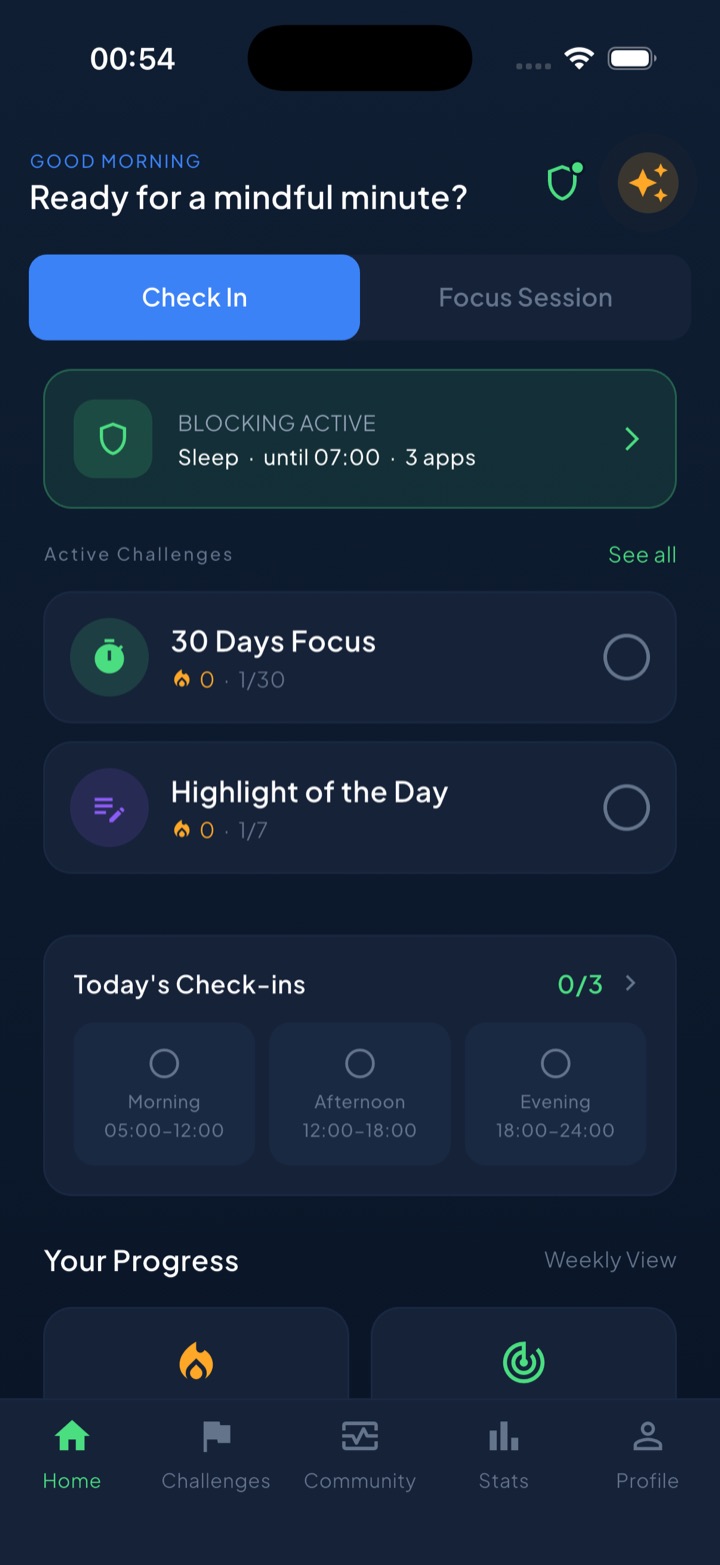
The habit layer is the rest of it: a one-minute reflection for the moment the urge hits, a streak for every day under budget, around 117 challenges across 8 categories, mood check-ins, and focus sessions with a Live Activity countdown on iPhone. Block lists and usage stay on the device — on iPhone, iOS hands Unscrol opaque tokens, not app names. It’s free to download; the subscription only adds Streak Saver and more challenge slots. Honest caveat: it runs on iPhone, Apple Watch and Android but not on a computer, and it’s new enough that it has no US ratings yet.
2. Brick: best for a full break from the phone
Brick pairs its app with a small physical accessory: tap your iPhone against it to lock your chosen apps, tap again to get them back. Its listing frames the mechanic as deliberate friction, a physical step between impulse and action, with custom modes for different parts of your day (Work, Family, Sleep, Study, Gym), a built-in focus timer, and a Strict Mode that closes loopholes during an active session. Not near your Brick? You can activate a block remotely, but unblocking still needs the physical tap, which is the point. Its listing includes 5 Emergency Unbricks for when you’re genuinely stuck without it, and says there are no subscriptions or monthly fees — buy once, use forever — without stating what that purchase costs. With 56,165 US ratings averaging 4.9, it’s the highest-rated app on this list. The honest trade-off: you need the device with you, or at least nearby, for it to work as designed.
3. Opal: best for scheduled offline windows
Opal’s listing leads with blocking apps and websites at set times through the week, daily app limits, and focus sessions it can sync with iPhone’s own Focus modes. Its strictest tier, Deep Focus, is described as a level you cannot cancel or bypass once it starts. The listing also states members save an average of 1 hour 23 minutes a day and offers milestones, a leaderboard and rewards — figures from Opal’s own marketing, not an independent study. With 89,167 US ratings averaging 4.7, it’s the most-reviewed app in this roundup. The trade-off: it requires iOS 18 or later, the highest minimum here (Brick’s is the same), and its listing doesn’t mention an Apple Watch app.
4. Freedom: best for blocking across every device
Freedom’s approach is scheduling: its listing describes blocking apps and websites during sessions you can start now, later, or on a recurring basis, plus a Locked Mode for when you want the commitment to stick. Its listing says there’s no limit to the number of devices you can connect, phones, tablets and computers included, so a browser tab on a laptop can be covered too. Its listing states users report gaining an average of 2.5 hours of productive time a day, and that after a 7-day free trial, the Premium plan runs $39.99 a year. With 5,945 US ratings averaging 4.4, it has the lowest average rating of the eight.
5. Detox: Digital Detox: best for a gentler, scheduled block
Detox: Digital Detox takes a different angle on scheduling: rather than blocking the moment you open a chosen app, its listing says it tracks consecutive usage and only steps in once you’ve been scrolling continuously for too long, so a quick check stays available. On top of that sit Scheduled Blocks for recurring windows like mornings or sleep, and Block Now sessions you can start on demand for deep work. It’s also one of only two apps on this list whose supported-devices list includes an Apple Watch, alongside Unscrol. Its listing describes it outright as a subscription app with a free trial, without stating a specific price. With 452 US ratings averaging 4.6, it has the fewest ratings of the seven rated apps and the oldest last update of the eight, 2 September 2026.
6. Dumb Phone (dp): best for a simpler phone instead of a blocked one
Dumb Phone doesn’t block anything by default — it replaces your home screen. Its listing describes a minimalist launcher that swaps colorful icons and notification badges for plain text buttons to the apps you actually need, with dark or light styling and multiple launchers you can switch between for work, leisure or night. A separate Detox Mode layers in actual blocking or hiding of non-essential apps using Screen Time, for anyone who wants both. With 21 listed languages, it’s the most multilingual app on this page; its 3,811 US ratings average 4.6.
7. Forest: best for a reward for keeping it down
Forest’s mechanic is simple: start a session, a tree grows while you leave your phone alone, and it withers if you quit early. Its listing says the community has planted over 2 million real trees through a partnership with Trees for the Future, and that an Allow List feature can block distracting apps during a session on iOS 16 and above. Co-planting with friends, unlockable tree species and a visual history of your focus time round out the reward side. With 49,512 US ratings averaging 4.8, it’s the third most-reviewed app on this list, after Opal and Brick. Forest Plus, an upsell with extra rewards, offers a free trial per its listing, though no price is stated.
8. Jomo: best for a daily detox routine
Jomo’s pitch is squarely about a daily habit: its listing frames the app around becoming productive instead of distracted, with app and website blocking by chosen categories — social media, games, shopping and more — for the times you set, plus optional mindful breaks. Its listing states the approach can cut screen time by 50% in the first week, a figure from Jomo’s own marketing. Pricing is stated plainly: $5.99 a month, $2.49 a month billed annually at $29.99, or a $99.99 one-time purchase, with a 3-day trial on the annual plan. With 2,458 US ratings averaging 4.8, it sits in the middle of this list by sample size.
Also considered
Flora, a gamified focus timer built on the same core idea as Forest — plant a seed, grow a tree, lose it if you quit early — adds planting trees together with friends, per its listing; it carries 82,780 US ratings averaging 4.8, more than every main pick here except Opal. OffScreen tracks pickups, average usage and sleep time, and adds a scheduled “OFF Time” for social apps plus Pomodoro-style focus modes, per its listing; it has 2,549 US ratings averaging 4.4. DetoxLock calls itself an “extreme app blocker” with scheduled locks and a free-to-start tier, per its listing, and carries 493 US ratings averaging 4.7. one sec and ScreenZen add a pause before a chosen app opens rather than a scheduled block — both are covered in our best apps to stop doomscrolling roundup if that’s closer to your actual problem. And Digital Detox: Focus & Live is the top Google result for “best digital detox app” searches, but we could not find it on the US App Store on 5 October 2026.
Which app should you choose?
- Blocking plus a daily habit that sticks, on iPhone, Apple Watch and Android: Unscrol.
- You want your distracting apps gone completely, not just scheduled away: Brick.
- Strict, scheduled focus sessions, including a mode you can’t cancel: Opal.
- Your distractions follow you to a laptop too: Freedom.
- You want scheduling without losing access for a quick, necessary check: Detox: Digital Detox.
- You’d rather simplify your home screen than block anything: Dumb Phone.
- Gamification and a visible reward motivate you more than restriction: Forest.
- You want a plain daily routine for cutting screen time, no gimmick: Jomo.
If none of these detox styles fit and you just want apps blocked, period, see our broader best app blocker apps for iPhone roundup.
What should you do instead of scrolling?
A detox app creates a gap. If you don’t decide in advance what fills it, the easiest thing to do is open a different app: block Instagram and it’s easy to end up on YouTube instead.
Pick something boring and pre-decided for the moment the urge hits:
- Move for sixty seconds. Stand up, stretch, step outside, drink water. Unscrol builds this in as a one-minute reflection for the moment you notice the pull.
- Queue a small task in advance. A couple of pages of a book, a chore, or the next small step on something you’ve been avoiding.
- Write down what you’re feeling, not a lecture. Bored, anxious, avoiding something specific — noting it without judgment usually makes the pattern obvious within a week or two.
“I tried blocking everything cold and lasted four days. What actually worked was scheduling it instead — mornings and after 9pm, every day, no exceptions — and having my running shoes by the door for the exact hour I used to spend scrolling.” — Priya, operations manager, 34
If you want a structured plan instead of just picking a tool, our 30-day social media detox walks through what to expect week by week.
Do digital detox apps actually work?
They work when the style matches the actual problem. A full break like Brick’s works if a software toggle is too easy to override, but it does nothing if you leave the device at home. A scheduled window like Opal’s, Freedom’s or Detox’s works if you lose track of time once you’re inside an app, but it won’t stop you from opening a different one during the gap. A simplified phone like Dumb Phone’s works if the pull is really about visual bait on your home screen rather than the apps themselves. A reward like Forest’s only works as long as growing a tree keeps mattering to you. And a daily habit tool like Unscrol’s or Jomo’s only works if you keep showing up — none of this works without you.
None of the eight fixes the reason you reach for your phone in the first place. If it’s boredom, stress or avoidance, an app buys you the pause; what you do with it is still up to you. If the phrase that brought you here was “dopamine detox app,” our breakdown of what the science actually says about dopamine detox is worth reading before you build a whole routine around the idea.
Frequently asked questions
What is the best free digital detox app?
All eight apps on this list are free to download on the US App Store. Opal's and Dumb Phone's descriptions don't mention any paid tier, Forest's names an optional Forest Plus upgrade, and Brick's says there are no subscriptions or monthly fees, but it works with a physical Brick you buy once (its listing doesn't state that price). Jomo, Freedom and Detox: Digital Detox are more explicit about paid tiers: Freedom's listing states a $39.99-a-year plan after a 7-day trial, Jomo lists plans from $2.49 to $5.99 a month or a $99.99 one-time purchase, and Detox's listing describes itself outright as a subscription app with a free trial. Unscrol is free to download and use; its subscription only adds Streak Saver and extra challenge slots. Apple's own Screen Time, already on every iPhone, costs nothing at all.
Do digital detox apps actually work?
They help most when their mechanism matches your actual problem. A full break like Brick's works if a software toggle is too easy to override, but does nothing once you leave the device at home. A scheduled window like Opal's or Freedom's works if you lose track of time once you're inside an app, but won't stop you opening a different one during the gap. A reward like Forest's only works as long as growing a tree keeps mattering to you, and a daily habit tool like Unscrol's or Jomo's only works if you keep showing up. Pick the mechanism that matches your problem, and expect to adjust it after the first week.
What is a dopamine detox app?
It's the popular name for an app that helps you take a scheduled break from your most stimulating apps, usually short video, social feeds and games. In practice, a dopamine detox app is a blocking, scheduling or habit tool pointed at those apps specifically; the apps compared here describe what they block and when, not what happens in your brain. Whether the 'dopamine' framing holds up is a separate question, covered in our article on what the science says about dopamine detox.
Can I do a digital detox without deleting my apps or buying Brick?
Yes. Scheduled blocking covers most of what deleting an app does, without the all-or-nothing step of removing it and the temptation to reinstall it ten seconds later. Opal, Freedom, Detox: Digital Detox, Jomo and Unscrol all work by scheduling or budgeting access to apps you keep installed, enforced on iPhone through Apple's Screen Time frameworks rather than deletion. Brick is the one pick here that adds a physical device: tapping your phone against it locks and unlocks chosen apps, which is real friction but means carrying an extra object. It's a legitimate option, not a requirement; every other app on this list gets most of the way there with just the phone you already have.